Forum Discussion

DanielNiccoli
Mar 17, 2021Steel Contributor
Cannot change my avatar
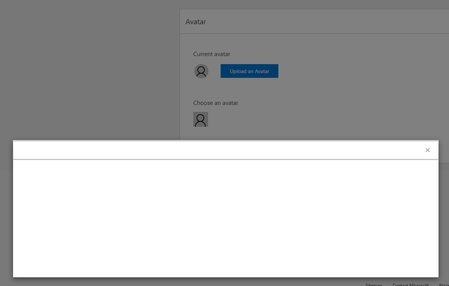
I cannot change my avatar. I am using Google Chrome with no add-ons / extensions. When I click the "Upload an Avatar" the dialogue is just blank.

Marc_Albrecht
Apr 01, 2021Tin Contributor
I was having similar problems, for me, the preview didn't update/render correctly in Chrome. Data transfer as such seemed to work fine, at least my avatar appears. Looks like the MS developers didn't bother testing in "standard" browsers, only in Edge - in the 1990s that was common procedure to try and force people into one "ecosystem" 🙂
Tongue out of cheek: Have you tried the usual workarounds like clearing your cache, allowing all cookies (at least temporarily), using incognito for a test, switching off (or on) hardware acceleration for rendering in Chrome? If you can get the "save" button to appear (it might just be an "Ajax" issue, check your network activity in dev tab) you should be fine if your avatar is square and laid out the way you want it.
Marc Albrecht
Tongue out of cheek: Have you tried the usual workarounds like clearing your cache, allowing all cookies (at least temporarily), using incognito for a test, switching off (or on) hardware acceleration for rendering in Chrome? If you can get the "save" button to appear (it might just be an "Ajax" issue, check your network activity in dev tab) you should be fine if your avatar is square and laid out the way you want it.
Marc Albrecht