Forum Discussion

Azure Files Manage Access is missing
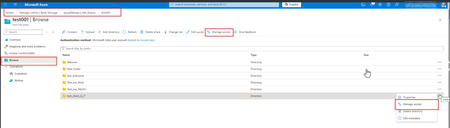

You have working permissions, but the portal intermittently removes Azure Files Manage access for the same share and identity. That control depends on the current authentication method and identity source; RBAC alone does not guarantee it appears. Open the share through the dedicated file-permissions portal, select Browse, and confirm Authentication method is Microsoft Entra user account, not an access-key session. For Entra Kerberos, verify the administrator has Storage File Data SMB Share Elevated Contributor or a custom role with read/write file-backup-semantics actions, plus a permitting ACL. Sign out and back in, then test an InPrivate session to eliminate cached portal state. Do not make account-key administration the permanent workaround. If the command still disappears under unchanged conditions, capture the timestamp, subscription, storage account, browser trace, and portal correlation ID and open Azure support. Microsoft’s documentation does not describe intermittent hiding as expected behavior.