Forum Discussion

Andreas-WPH
Mar 10, 2026Copper Contributor
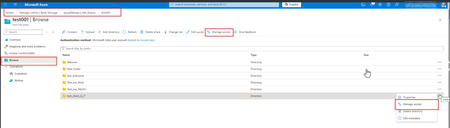
Azure Files Manage Access is missing
Good day, We have fully and correctly configured an Azure File Share and the associated permissions. All required Azure RBAC roles as well as the necessary data plane permissions are assigned. H...

Kidd_Ip
Mar 11, 2026MVP
The intermittent absence of the “Manage access” button in the Azure Portal for Azure Files reflects a portal interface limitation rather than a permissions misconfiguration. According to Microsoft’s official documentation, access management for Azure Files requires both Azure RBAC role assignments and data‑plane permissions. While these permissions remain valid and effective, the Azure Portal does not consistently render the “Manage access” option even when all roles and permissions are correctly in place.
https://learn.microsoft.com/en-us/troubleshoot/azure/azure-storage/files/connectivity/files-troubleshoot?tabs=powershell
https://learn.microsoft.com/en-us/azure/storage/files/storage-files-faq