Forum Discussion

Welcome to the new Azure Log Analytics community!
- Jan 30, 2018
Hi
Specifically for Http Queue Length seems that metric is not available in Application Insights itself. That metric is part of the metrics that Azure App service offers for web apps. Such metrics can be send to Azure Storage, Log Analytics workspace or Event Hub. If you configure your web app to send these metrics to Log Analytics workspace in the workspace itself these metrics will appear in 'AzureMetrics' table. Once there you can execute query like the one below to calculate the average Http Queue length for each web app:
AzureMetrics | where MetricName == "HttpQueueLength" | summarize avg(Average) by Resource
More info about the Azure Metrics for Web apps you can find here:
My source for that metric not available in Application insights is this:
For Availability: Application Insights tracks availability with web tests. The results of these web tests are stored in Applications Insights in table 'availabilityResults'. The below query can be used to track availability per web test:
availabilityResults
    | where timestamp >= ago(30d)
    | summarize AvailabilityPercentage=(sum(todouble(success)) / count(success)) * 100, Failures=count(success)-sum(todouble(success)), TotalTests=count(success) by TestName=name
| order by Failures asc
The source of the query: https://gist.github.com/brlinton/2b54cdaa77d1247b8b9c1d7b99eb14e9
For slow response it is not quite clear what you mean by slow response exactly but Application Insights tracks http request duration. That information is stored in "requests" table. You can track the request duration in percentile 50, 90 and 95 in 1 hour interval:
requests
| where  timestamp > ago(24h)
| summarize percentiles(duration, 50, 90, 95) by bin(timestamp, 1h)
| render timechart
I will mark this reply as best response but let me know if something is not what you are looking for. In such case please give us a little more details what metrics you have in mind and what you are trying to achieve otherwise I am just making guesses.
Hi,
Yes, It is about monitoring Azure web app with Application Insights.
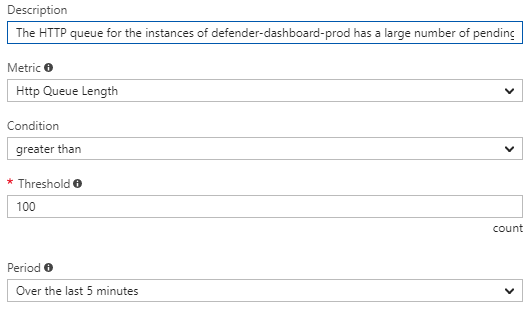
Well here is a screenshot of the alert that is configured in app services -> alerts.

Hi
Specifically for Http Queue Length seems that metric is not available in Application Insights itself. That metric is part of the metrics that Azure App service offers for web apps. Such metrics can be send to Azure Storage, Log Analytics workspace or Event Hub. If you configure your web app to send these metrics to Log Analytics workspace in the workspace itself these metrics will appear in 'AzureMetrics' table. Once there you can execute query like the one below to calculate the average Http Queue length for each web app:
AzureMetrics | where MetricName == "HttpQueueLength" | summarize avg(Average) by Resource
More info about the Azure Metrics for Web apps you can find here:
My source for that metric not available in Application insights is this:
For Availability: Application Insights tracks availability with web tests. The results of these web tests are stored in Applications Insights in table 'availabilityResults'. The below query can be used to track availability per web test:
availabilityResults
    | where timestamp >= ago(30d)
    | summarize AvailabilityPercentage=(sum(todouble(success)) / count(success)) * 100, Failures=count(success)-sum(todouble(success)), TotalTests=count(success) by TestName=name
| order by Failures asc
The source of the query: https://gist.github.com/brlinton/2b54cdaa77d1247b8b9c1d7b99eb14e9
For slow response it is not quite clear what you mean by slow response exactly but Application Insights tracks http request duration. That information is stored in "requests" table. You can track the request duration in percentile 50, 90 and 95 in 1 hour interval:
requests
| where  timestamp > ago(24h)
| summarize percentiles(duration, 50, 90, 95) by bin(timestamp, 1h)
| render timechart
I will mark this reply as best response but let me know if something is not what you are looking for. In such case please give us a little more details what metrics you have in mind and what you are trying to achieve otherwise I am just making guesses.
- AnonymousJan 30, 2018Thanks!! I can customize these queries according to my needs now!!
- Jan 30, 2018Great! Glad that will help you.