Forum Discussion

Need Heartbeat Query
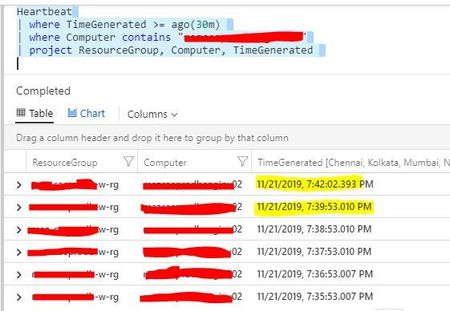
- Nov 22, 2019
personally I prefer the example query of// Availability rate // Calculate the availability rate of each connected computer Heartbeat // bin_at is used to set the time grain to 1 hour, starting exactly 24 hours ago | summarize heartbeatPerHour = count() by bin_at(TimeGenerated, 1h, ago(24h)), Computer | extend availablePerHour = iff(heartbeatPerHour > 0, true, false) | summarize totalAvailableHours = countif(availablePerHour == true) by Computer | extend availabilityRate = totalAvailableHours*100.0/24Heartbeats are expected to be missed (pauses, glitches, load etc...) and the data will catch-up - so you may get false positives.
You can use a date_diff to compare
Go to Log Analytics and Run QueryHeartbeat | where TimeGenerated >= ago(1h) | where Computer == "hardening-demo" | project Computer, TimeGenerated | order by TimeGenerated desc | project n = TimeGenerated, nminus = prev(TimeGenerated), TimeGenerated, Computer | where isnotempty(nminus) // show time NOW vs time n -1 row | extend second = datetime_diff('second',nminus, n) | where second >= 60Results for seconds below 60 (mainly 9 and 51 for the demo data) - just remove the last line of the above query to see this
n nminus TimeGenerated Computer second 2019-11-22T17:42:37.88Z 2019-11-22T17:42:46.523Z 2019-11-22T17:42:37.88Z hardening-demo 9 2019-11-22T17:41:46.52Z 2019-11-22T17:42:37.88Z 2019-11-22T17:41:46.52Z hardening-demo 51 2019-11-22T17:41:37.877Z 2019-11-22T17:41:46.52Z 2019-11-22T17:41:37.877Z hardening-demo 9 2019-11-22T17:40:46.52Z 2019-11-22T17:41:37.877Z 2019-11-22T17:40:46.52Z hardening-demo 51 2019-11-22T17:40:37.873Z 2019-11-22T17:40:46.52Z 2019-11-22T17:40:37.873Z hardening-demo 9

personally I prefer the example query of
// Availability rate
// Calculate the availability rate of each connected computer
Heartbeat
// bin_at is used to set the time grain to 1 hour, starting exactly 24 hours ago
| summarize heartbeatPerHour = count() by bin_at(TimeGenerated, 1h, ago(24h)), Computer
| extend availablePerHour = iff(heartbeatPerHour > 0, true, false)
| summarize totalAvailableHours = countif(availablePerHour == true) by Computer
| extend availabilityRate = totalAvailableHours*100.0/24
Heartbeats are expected to be missed (pauses, glitches, load etc...) and the data will catch-up - so you may get false positives.
You can use a date_diff to compare
Go to Log Analytics and Run Query
Heartbeat
| where TimeGenerated >= ago(1h)
| where Computer == "hardening-demo"
| project Computer, TimeGenerated
| order by TimeGenerated desc
| project n = TimeGenerated, nminus = prev(TimeGenerated), TimeGenerated, Computer
| where isnotempty(nminus)
// show time NOW vs time  n -1 row
| extend second = datetime_diff('second',nminus, n)
| where second >= 60
Results for seconds below 60 (mainly 9 and 51 for the demo data) - just remove the last line of the above query to see this
| n | nminus | TimeGenerated | Computer | second |
|---|---|---|---|---|
| 2019-11-22T17:42:37.88Z | 2019-11-22T17:42:46.523Z | 2019-11-22T17:42:37.88Z | hardening-demo | 9 |
| 2019-11-22T17:41:46.52Z | 2019-11-22T17:42:37.88Z | 2019-11-22T17:41:46.52Z | hardening-demo | 51 |
| 2019-11-22T17:41:37.877Z | 2019-11-22T17:41:46.52Z | 2019-11-22T17:41:37.877Z | hardening-demo | 9 |
| 2019-11-22T17:40:46.52Z | 2019-11-22T17:41:37.877Z | 2019-11-22T17:40:46.52Z | hardening-demo | 51 |
| 2019-11-22T17:40:37.873Z | 2019-11-22T17:40:46.52Z | 2019-11-22T17:40:37.873Z | hardening-demo | 9 |

Data source: Azure
Below query is based on Events which are registered and cleared after a while.
Heartbeat
// list records for last 30 days:
| where TimeGenerated > ago(30d)
| summarize LastCall = arg_max(TimeGenerated,*) by Computer
// retrieve machines that have not sent a heartbeat in the last 4 hours:
| where LastCall < ago(4h)
| project Computer, LastCall, timestamp = format_datetime(LastCall, 'MM-dd-yyyy hh:mm'),
startofday = format_datetime(startofday(now()), 'MM-dd-yyyy')
,VMUUID, SourceComputerId, ComputerIP, ResourceId
| sort by LastCall
The above KustoQL query runs every day, so today it may return 10 Computers (10 events), tomorrow 7 computers (7 events), etc.
Want to keep records of all events (today, tomorrow, etc.) for 31 days.
How to use Power BI or Power BI Dataflow to achieve above ,
otherwise how do I get data from (Log Analytics workspaces) into Azure SQL Database and apply incremental refresh (so todays records don't overwrite yesterdays records) ?
- Clive_WatsonMay 19, 2022Bronze Contributor
You can store the data for longer (at a cost) by increasing retention. You can also see the others days from within the query
Heartbeat
| where TimeGenerated > startofday(ago(30d))
| summarize count(), LastCall = max(TimeGenerated) by Computer, bin(TimeGenerated,1d)
| where LastCall < ago(1m)
| render columnchart
- KevinNikoMay 20, 2022Copper Contributor
If I run your query, I get 4 rows returned for today. So it's like a snapshot for today, when query was run. How can I get a snapshot for everyday over the last 30 days where VM downtime is 4 hours or longer, time for getting snapshot is 9am daily ?
