Forum Discussion

Need Heartbeat Query
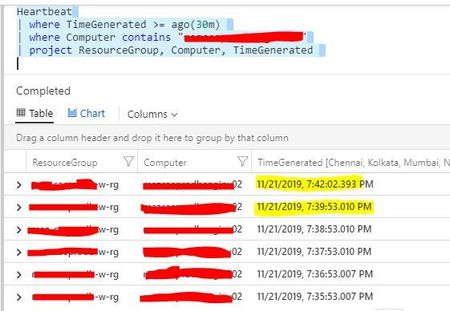
- Nov 22, 2019
personally I prefer the example query of// Availability rate // Calculate the availability rate of each connected computer Heartbeat // bin_at is used to set the time grain to 1 hour, starting exactly 24 hours ago | summarize heartbeatPerHour = count() by bin_at(TimeGenerated, 1h, ago(24h)), Computer | extend availablePerHour = iff(heartbeatPerHour > 0, true, false) | summarize totalAvailableHours = countif(availablePerHour == true) by Computer | extend availabilityRate = totalAvailableHours*100.0/24Heartbeats are expected to be missed (pauses, glitches, load etc...) and the data will catch-up - so you may get false positives.
You can use a date_diff to compare
Go to Log Analytics and Run QueryHeartbeat | where TimeGenerated >= ago(1h) | where Computer == "hardening-demo" | project Computer, TimeGenerated | order by TimeGenerated desc | project n = TimeGenerated, nminus = prev(TimeGenerated), TimeGenerated, Computer | where isnotempty(nminus) // show time NOW vs time n -1 row | extend second = datetime_diff('second',nminus, n) | where second >= 60Results for seconds below 60 (mainly 9 and 51 for the demo data) - just remove the last line of the above query to see this
n nminus TimeGenerated Computer second 2019-11-22T17:42:37.88Z 2019-11-22T17:42:46.523Z 2019-11-22T17:42:37.88Z hardening-demo 9 2019-11-22T17:41:46.52Z 2019-11-22T17:42:37.88Z 2019-11-22T17:41:46.52Z hardening-demo 51 2019-11-22T17:41:37.877Z 2019-11-22T17:41:46.52Z 2019-11-22T17:41:37.877Z hardening-demo 9 2019-11-22T17:40:46.52Z 2019-11-22T17:41:37.877Z 2019-11-22T17:40:46.52Z hardening-demo 51 2019-11-22T17:40:37.873Z 2019-11-22T17:40:46.52Z 2019-11-22T17:40:37.873Z hardening-demo 9

CliveWatson Just to add to this conversation, I've come up with a slightly different way of doing this--would love feedback:
let current = now();
let ostype = 'Windows';
let computername = '';
let environment = 'Non-Azure';
let threshold = 600;
Heartbeat
| where TimeGenerated >= ago(1h)
// --for a specific computer:
| where Computer contains computername
// --for a specific computer group:
//| where Computer in (group)
// --for a specific OS type:
| where OSType contains ostype
// --for on-prem or Azure VMs:
| where ComputerEnvironment contains environment
| project Computer, TimeGenerated, current
| order by TimeGenerated desc
| project nminus = prev(TimeGenerated), current, Computer
| where isnotempty(nminus)
| extend ['LastHeartbeat (in seconds)'] = datetime_diff('second', current, nminus)
| summarize arg_max(nminus, *) by Computer
| where ['LastHeartbeat (in seconds)'] >= threshold
| project Computer, QueryTime = current, LastTimeStamp = nminus, ['LastHeartbeat (in seconds)']

Looks good ScottAllison , I would just swap contains to has as per best practise https://docs.microsoft.com/en-us/azure/kusto/query/best-practices
- ScottAllisonJan 29, 2020Iron Contributor
CliveWatson Thanks! I've seen weirdness with has versus contains. I haven't noted what that weirdness is, but if I run across it again, I'll be sure to share.
- ScottAllisonFeb 03, 2020Iron Contributor
CliveWatson - here's a perfect example of why the HAS operator isn't useful for many operations:
This query returns the expected results every time:Heartbeat | where Computer contains 'abc' | distinct ComputerFor example, this would return:
SERVERABC1
SERVERABC2
COMPUTERABC24
When I replace CONTAINS with HAS, I get 0 results. So in 99% of my use cases, HAS doesn't work at all.- CliveWatsonFeb 03, 2020Former Employee
That is the behavior I'd expect
From the docs:
Preferhasoperator overcontainswhen looking for full tokens.hasis more performant as it doesn't have to look-up for substrings.What does that mean in practice:
1. This query example will fail (as its not a substring). Computers named: aks-nodepool1.nnnnnnnnn
Go to Log Analytics and run query
Heartbeat | where Computer has 'pool' | distinct ComputerNote: if you used "nodepool1" it would workWhere as this works ("aks" is a full string match(full token)Go to Log Analytics and run query
Computer aks-nodepool1-25494468-4 aks-nodepool1-25494468-1 So on a small dataset it wont matter if you use contains vs. has - however on a large one it could improve perf.When I create a query I will often start with a "contains" but will (If I remember! Sorry if you find a query from me that isn't optomised) then check and swap to a "has" if that works - but you need to evaluate on a case by case.Essentially KQL only scans relevant data using indices with has, rather than have to read ALL the data (imagine if the string was really really long, rather than a simple computer name).Its sort of like a book, and the index, would you want to find out in what chapters an occurrence of "Scott" was by checking the index, or have to read each line, word and words within a word?Make sense?