Forum Discussion

Need Heartbeat Query
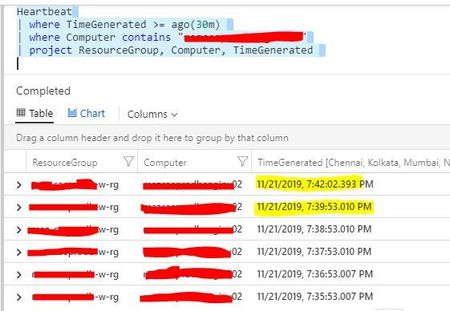
- Nov 22, 2019
personally I prefer the example query of// Availability rate // Calculate the availability rate of each connected computer Heartbeat // bin_at is used to set the time grain to 1 hour, starting exactly 24 hours ago | summarize heartbeatPerHour = count() by bin_at(TimeGenerated, 1h, ago(24h)), Computer | extend availablePerHour = iff(heartbeatPerHour > 0, true, false) | summarize totalAvailableHours = countif(availablePerHour == true) by Computer | extend availabilityRate = totalAvailableHours*100.0/24Heartbeats are expected to be missed (pauses, glitches, load etc...) and the data will catch-up - so you may get false positives.
You can use a date_diff to compare
Go to Log Analytics and Run QueryHeartbeat | where TimeGenerated >= ago(1h) | where Computer == "hardening-demo" | project Computer, TimeGenerated | order by TimeGenerated desc | project n = TimeGenerated, nminus = prev(TimeGenerated), TimeGenerated, Computer | where isnotempty(nminus) // show time NOW vs time n -1 row | extend second = datetime_diff('second',nminus, n) | where second >= 60Results for seconds below 60 (mainly 9 and 51 for the demo data) - just remove the last line of the above query to see this
n nminus TimeGenerated Computer second 2019-11-22T17:42:37.88Z 2019-11-22T17:42:46.523Z 2019-11-22T17:42:37.88Z hardening-demo 9 2019-11-22T17:41:46.52Z 2019-11-22T17:42:37.88Z 2019-11-22T17:41:46.52Z hardening-demo 51 2019-11-22T17:41:37.877Z 2019-11-22T17:41:46.52Z 2019-11-22T17:41:37.877Z hardening-demo 9 2019-11-22T17:40:46.52Z 2019-11-22T17:41:37.877Z 2019-11-22T17:40:46.52Z hardening-demo 51 2019-11-22T17:40:37.873Z 2019-11-22T17:40:46.52Z 2019-11-22T17:40:37.873Z hardening-demo 9

personally I prefer the example query of
// Availability rate
// Calculate the availability rate of each connected computer
Heartbeat
// bin_at is used to set the time grain to 1 hour, starting exactly 24 hours ago
| summarize heartbeatPerHour = count() by bin_at(TimeGenerated, 1h, ago(24h)), Computer
| extend availablePerHour = iff(heartbeatPerHour > 0, true, false)
| summarize totalAvailableHours = countif(availablePerHour == true) by Computer
| extend availabilityRate = totalAvailableHours*100.0/24
Heartbeats are expected to be missed (pauses, glitches, load etc...) and the data will catch-up - so you may get false positives.
You can use a date_diff to compare
Go to Log Analytics and Run Query
Heartbeat
| where TimeGenerated >= ago(1h)
| where Computer == "hardening-demo"
| project Computer, TimeGenerated
| order by TimeGenerated desc
| project n = TimeGenerated, nminus = prev(TimeGenerated), TimeGenerated, Computer
| where isnotempty(nminus)
// show time NOW vs time  n -1 row
| extend second = datetime_diff('second',nminus, n)
| where second >= 60
Results for seconds below 60 (mainly 9 and 51 for the demo data) - just remove the last line of the above query to see this
| n | nminus | TimeGenerated | Computer | second |
|---|---|---|---|---|
| 2019-11-22T17:42:37.88Z | 2019-11-22T17:42:46.523Z | 2019-11-22T17:42:37.88Z | hardening-demo | 9 |
| 2019-11-22T17:41:46.52Z | 2019-11-22T17:42:37.88Z | 2019-11-22T17:41:46.52Z | hardening-demo | 51 |
| 2019-11-22T17:41:37.877Z | 2019-11-22T17:41:46.52Z | 2019-11-22T17:41:37.877Z | hardening-demo | 9 |
| 2019-11-22T17:40:46.52Z | 2019-11-22T17:41:37.877Z | 2019-11-22T17:40:46.52Z | hardening-demo | 51 |
| 2019-11-22T17:40:37.873Z | 2019-11-22T17:40:46.52Z | 2019-11-22T17:40:37.873Z | hardening-demo | 9 |

CliveWatson Just to add to this conversation, I've come up with a slightly different way of doing this--would love feedback:
let current = now();
let ostype = 'Windows';
let computername = '';
let environment = 'Non-Azure';
let threshold = 600;
Heartbeat
| where TimeGenerated >= ago(1h)
// --for a specific computer:
| where Computer contains computername
// --for a specific computer group:
//| where Computer in (group)
// --for a specific OS type:
| where OSType contains ostype
// --for on-prem or Azure VMs:
| where ComputerEnvironment contains environment
| project Computer, TimeGenerated, current
| order by TimeGenerated desc
| project nminus = prev(TimeGenerated), current, Computer
| where isnotempty(nminus)
| extend ['LastHeartbeat (in seconds)'] = datetime_diff('second', current, nminus)
| summarize arg_max(nminus, *) by Computer
| where ['LastHeartbeat (in seconds)'] >= threshold
| project Computer, QueryTime = current, LastTimeStamp = nminus, ['LastHeartbeat (in seconds)']
- CliveWatsonJan 29, 2020Former Employee
Looks good ScottAllison , I would just swap contains to has as per best practise https://docs.microsoft.com/en-us/azure/kusto/query/best-practices
- ScottAllisonJan 29, 2020Iron Contributor
CliveWatson Thanks! I've seen weirdness with has versus contains. I haven't noted what that weirdness is, but if I run across it again, I'll be sure to share.
- ScottAllisonFeb 03, 2020Iron Contributor
CliveWatson - here's a perfect example of why the HAS operator isn't useful for many operations:
This query returns the expected results every time:Heartbeat | where Computer contains 'abc' | distinct ComputerFor example, this would return:
SERVERABC1
SERVERABC2
COMPUTERABC24
When I replace CONTAINS with HAS, I get 0 results. So in 99% of my use cases, HAS doesn't work at all.