Forum Discussion

Deleted
Apr 24, 2019How to extract a field without the +- buttons
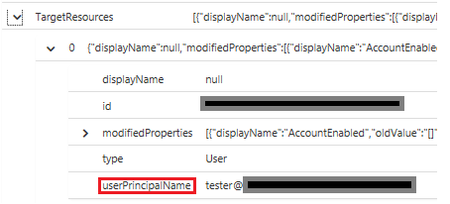
Hello, I'm new to this. I was trying the following line as part of my query: | project TargetUsername = parse_json(TargetResources).["userPrincipalName"] without success, I also noticed that...
- Apr 25, 2019
Deleted
Hi,
This example might help you.
AuditLogs
| where SourceSystem == "Azure AD"
| extend PropertiesJSON = parse_json(TargetResources)
| extend myUser = PropertiesJSON[0].userPrincipalName
| where isnotempty(myUser)
| project myUser
if the data was a level lower the technique is:
AzureActivity
| where ResourceId has "virtualmachines"
| where Properties has "policyAssignmentSku"
| extend PropertiesJSON = parse_json(Properties)
| extend PoliciesJson = parse_json(tostring(PropertiesJSON.policies))
| extend PolicyAssignmentSkuTier = PoliciesJson[0].policyAssignmentSku.tier
| extend PolicyAssignmentSkuName = PoliciesJson[0].policyAssignmentSku.name
| project PolicyAssignmentSkuTier, PolicyAssignmentSkuName, PoliciesJson

CliveWatson
Apr 25, 2019Former Employee
Deleted
Hi,
This example might help you.
AuditLogs
| where SourceSystem == "Azure AD"
| extend PropertiesJSON = parse_json(TargetResources)
| extend myUser = PropertiesJSON[0].userPrincipalName
| where isnotempty(myUser)
| project myUser
if the data was a level lower the technique is:
AzureActivity
| where ResourceId has "virtualmachines"
| where Properties has "policyAssignmentSku"
| extend PropertiesJSON = parse_json(Properties)
| extend PoliciesJson = parse_json(tostring(PropertiesJSON.policies))
| extend PolicyAssignmentSkuTier = PoliciesJson[0].policyAssignmentSku.tier
| extend PolicyAssignmentSkuName = PoliciesJson[0].policyAssignmentSku.name
| project PolicyAssignmentSkuTier, PolicyAssignmentSkuName, PoliciesJson