Forum Discussion

How to aggregate results from a query
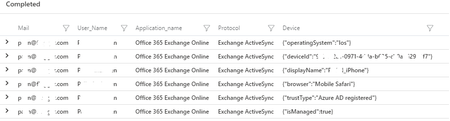
- Sep 17, 2020
instead of mv-expanding DeviceDetail (you're creating new rows) you should extend it to new columns, by using the extend operator, such as
| extend OS = DeviceDetail.operatingSystem, Browser = DeviceDetail.browser


 Microsoft
Hi MichalZiemba,
In order to summarize you first need to figure out what are the expected results, and how you want to summarize your results, I couldn't figure out from your description what is the desired result set.
For summarize you should use an aggregation function (if you don't use one the functionality is the same as the 'distinct' operator).
I'd suggest here the simplest function which is 'count()', it will give you the count of unique combinations occurrences of the columns mentioned on the right hand of the expression (after 'by'), try adding the following line to the end of your query:
| summarize count() by Mail, User_Name, Application_name, Protocol, tostring(Device.displayName), tostring(Device.operatingSystem)
Here is a link to 'summarize' documentation: https://docs.microsoft.com/en-us/azure/data-explorer/kusto/query/summarizeoperator
Thanks,
Rafi
- MichalZiembaSep 17, 2020MCT
Hi Rafi_Rabo
Sorry if I were not clear about my goal and thank you for your tip.
If I run a simple query:
SigninLogs
    |where CorrelationId == "###-#-#-10c620ed816d"
I got 36 rows as a result. They are all looking the same, referring to the same sign-in event, comes from the same device. They differ with some details about conditional access policy results.So what I was trying to achieve is filter out the desired policy ID from ConditionalAccessPolicies and list the user, app, and device details.And I wanted to present it that way, that if some of the rows are sign-ins from the same app and device, list it only once.The result of this query would be presented to the ServiceDesk, where they instruct the user which device and which app triggers the conditional access before they block the user.I hope it is more clear now.- hspintoSep 17, 2020
instead of mv-expanding DeviceDetail (you're creating new rows) you should extend it to new columns, by using the extend operator, such as
| extend OS = DeviceDetail.operatingSystem, Browser = DeviceDetail.browser- MichalZiembaSep 17, 2020MCT
Thank you very much.
I have combined it to this (maybe not so elegant) query and it does what I wanted.
SigninLogs
| where TimeGenerated > ago(14d)
| mvexpand PolicyResults = ConditionalAccessPolicies
| where PolicyResults.id == "e60d3233-####-004016656ca4" and PolicyResults.result != "reportOnlyNotApplied"
| extend OS = DeviceDetail.operatingSystem, Browser = DeviceDetail.browser,  displayName=tostring(DeviceDetail.displayName),deviceId= tostring(DeviceDetail.deviceId), trustType= tostring(DeviceDetail.trustType)
|summarize count() by   Mail=UserPrincipalName, User_Name=UserDisplayName, Application_name=AppDisplayName, Protocol=ClientAppUsed, displayName, deviceId, trustType , tostring(OS), tostring(Browser)
