Forum Discussion

SurbhiGupta
Sep 06, 2021Copper Contributor
disk managment
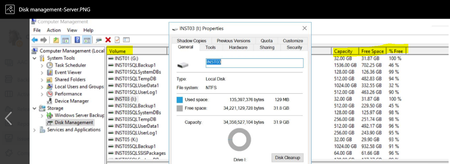
hi, I am looking for way using KQL query or powerShell commands on how to automate capacity free space % free like we get from disk managment in windows server. Screenshot for example ...

SurbhiGupta
Sep 06, 2021Copper Contributor
DennesTorres thanks for looking into it.
i am not looking into any alert setup there is already powershell script giving CPU, memory info in which i have to amend and include disk managment data also.
For extracting that i need KQL query which can give data like total disk capacity of drive in GB, free space etc.
Hope you are able to understand it.

DennesTorres
Sep 06, 2021MVP
Hi,
Your environment is unusual, at least, so it becomes difficult to help without a more complete explanation about your environment.
KQL means Kusto Query Language. It's being used in log analytics and/or Azure Data Explorer to handle big amounts of data, especially logs from azure services.
However, KQL will not provide any information by itself. The queries relies on log collection made by log analytics and/or data ingestion in azure data explorer.
Powershel, on the other hand, has many different uses, and it's able to collect performance counters from the machine where it's running.
You could be collecting the performance counters using powershell, no KQL. Or you could build log analytics workbooks with dashboards exposing the collected information using KQL, no powershell.
Use powershell to run KQL queries over log analytics is strange. Power BI would be easier. My guess is that you need to investigate your log analytics workspace and the agents configuration. However, it may be easier if who created this solution could explain it to you.
Kind Regards,
Dennes
Your environment is unusual, at least, so it becomes difficult to help without a more complete explanation about your environment.
KQL means Kusto Query Language. It's being used in log analytics and/or Azure Data Explorer to handle big amounts of data, especially logs from azure services.
However, KQL will not provide any information by itself. The queries relies on log collection made by log analytics and/or data ingestion in azure data explorer.
Powershel, on the other hand, has many different uses, and it's able to collect performance counters from the machine where it's running.
You could be collecting the performance counters using powershell, no KQL. Or you could build log analytics workbooks with dashboards exposing the collected information using KQL, no powershell.
Use powershell to run KQL queries over log analytics is strange. Power BI would be easier. My guess is that you need to investigate your log analytics workspace and the agents configuration. However, it may be easier if who created this solution could explain it to you.
Kind Regards,
Dennes
- SurbhiGuptaSep 06, 2021Copper ContributorDennesTorres Everything is set up in azure environment from monitoring agents to performance counters.
i just need KQL query which can give me data like one i have attached in a screenshot.
As if now my client is logging to individual machine and going to disk management to extract drive info like capacity , free space ,%free . All he wants that from azure portal can he extract that all using KQL minimizing his effort.
i know we can use perf parameter in log analytics workspace to get data but i am not able to frame correct KQL which can give all 3 parameters that my client is looking for
at present i am using below query.
Perf
| where TimeGenerated > startofday(datetime($From)) and TimeGenerated < endofday(datetime($To))
| where CounterName == '% Free Space' or CounterName == '% Used Space'
| where InstanceName!='/mnt' and InstanceName!='/mnt/resource'
| extend Free_Disk = iff(CounterName == '% Free Space',CounterValue, 100 - CounterValue )
| summarize AvgPercentFreeSpace = avg(Free_Disk) by CounterPath, Computer, bin(TimeGenerated, $Freq), CounterName, CounterValue, InstanceName, _ResourceId
| project ResourceID = split(_ResourceId, '/')[2], TimeGenerated=format_datetime(TimeGenerated, 'dd-MM-yyyy hh:mm:ss tt'), Computer, InstanceName, AvgPercentFreeSpace"
But it is not giving total capacity of individual drives just %free is giving
i want all three parameters like in attached screenshot from perf query. Is it possible or not
Regards,
Surbhi- DennesTorresSep 07, 2021MVPHi,
1) Check the agent configuration. You can't query if the information is not there and you don't know how the agent is configured.
2) Use log analytics workspace to check the existing tables and test your query.
Kind Regards,
Dennes - CliveWatsonSep 07, 2021Former EmployeePlease see https://techcommunity.microsoft.com/t5/azure-monitor/assistance-with-log-analytics-disk-query/m-p/2595220#M3718 for some ideas
