Forum Discussion

Bobmc859
Mar 25, 2022Copper Contributor
Did Azure Alert Summary Page Change Format?
Hello, I noticed that my Azure Alert summary page format has changed within the last week or so. Is this a known change, if so I can't seem to find any information on it. I would really like to cha...
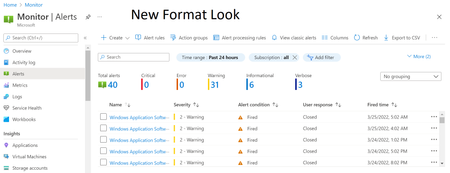
- Mar 28, 2022Hi Bobmc859,
Yes, the alerts summary page has changed recently. This is a result of an extensive usability study conducted around the alerts user experience, which surfaced several issues in the previous summary page. The new design focuses on the following aspects:
- When selecting "Alerts", you immediately see the list of fired alerts that require action. Previously, the summary page only provided a summation of data and counters, and an extra click was required to see the actual alerts.
- The summary blade is now focused on fired alerts. Previously, the total number of alerts included both fired and resolved alerts, which made it harder to identify how many alerts require attention.
- The terminology used in the page has been simplified, with terms that users found ambiguous like "Monitor condition" and "Alert state", replaced with "Alerts condition" and "User response" respectively.
Hope this helps clarify.

Bobmc859
Mar 31, 2022Copper Contributor
Thank you Harel Broitman , though I do miss the ability to close large number of alerts at once, but I suppose I'll get use to the new format.

Harel Broitman Microsoft
Mar 31, 2022MicrosoftYou're absolutely right Bobmc859.
Part of the redesign also included moving to use a newer grid control, which currently doesn’t support the “select all” feature. We’re aware of that and planning to add this functionality back.
Part of the redesign also included moving to use a newer grid control, which currently doesn’t support the “select all” feature. We’re aware of that and planning to add this functionality back.