Forum Discussion

AzureDiagnostics table scema not found in LA
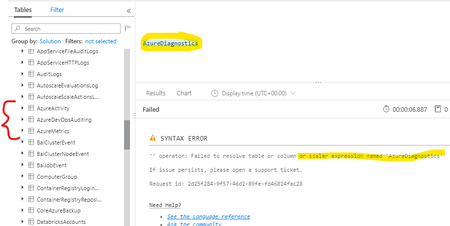

It can take 15min+ for the first log to appear. Do you have read only or greater access, in case you are excluded from that table?
https://docs.microsoft.com/en-us/azure/azure-monitor/platform/manage-access
 Ashok42Apr 20, 2020Copper Contributor
- CliveWatsonApr 20, 2020Former Employee
Is it possible there is a RBAC rule that prevents you seeing that Table? https://techcommunity.microsoft.com/t5/azure-sentinel/table-level-rbac-in-azure-sentinel/ba-p/965043
Have you made sure the data is ticked and its going to the workspace you think?Is the resource active and running so that it will generated log data?
- Ashok42Apr 22, 2020Copper Contributor
There are no granualar controls configured in RBAC on table level. In fact, this is a new environment and i am only admin who is working on it. Actually we are facing this problem only loadbalancer service. Tried to enable diagnostics settings for Recovery service vault and the data is showing up in LA.
To repro this issue, i have created free subscription and created required resources (basic Load balancer, RSV, LA workspace and few VMs). Tried enabling the data using using Portal and Powershell.
Still no luck and don't see any data for LB.
$workspace=Get-AzOperationalInsightsWorkspace -ResourceGroupName rg123 -Name ashtstoms
Set-AzDiagnosticSetting -ResourceId /subscriptions/a5f28804-de0c-4fa3-b976-deeb9b261faa/resourceGroups/RG123/providers/Microsoft.Network/loadBalancers/ashlb -Enabled $true -WorkspaceId ($workspace.ResourceId) -Name testdiagps: ready to provide guest access on my Free subscription.
- Ashok42Apr 20, 2020Copper Contributor
Thanks for the quick response CliveWatson
Its been more than 6 hours without any data after enabling. OK, it can be understandable that sometimes data ingestion might got delayed with different reasons. But i wonder why the 'AzureDiagnostics' table doesn't exist at all ? Schema table for 'AzureDiagnostics' should atleast exist with zero data by default,right?