Forum Discussion

roopesh_shetty
Apr 09, 2026Tin Contributor
Azure VMs host (platform) metrics (not guest metrics) to the log analytics workspace ?
Hi Team, Can some one help me how to send Azure VMs host (platform) metrics (not guest metrics) to the log analytics workspace ? Earlier some years ago I used to do it, by clicking on “Diagnosti...

kyazaferr
Apr 10, 2026MCT
Go to the VM resource in Azure Portal
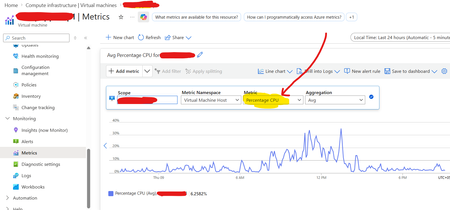
Navigate to Monitor → Metrics to confirm platform metrics are available.
Set Diagnostic Settings
In the VM blade, open Monitoring → Diagnostic settings.
Click + Add diagnostic setting.
Select Metrics (platform metrics).
Choose Send to Log Analytics workspace as the destination.
Pick your workspace.
Save.
Verify in Log Analytics
In your workspace, run a query such as:
InsightsMetrics
| where Namespace == "vm.azm.ms"
| summarize avg(Val) by Name, bin(TimeGenerated, 5m)
This confirms host metrics are flowing.