Forum Discussion

Azure Monitor disk space used report
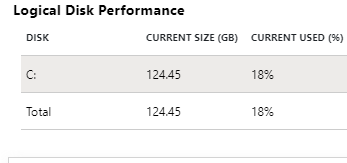

yea , for Linux - % free space and for Windows - %used space are not direct
check this link - https://www.catapultsystems.com/blogs/calculating-total-memory-and-total-disk-space-in-log-analytics/
try adding a last column with the values got from free space and total size - we can calculate the %
hope this helps

I'm a little closer now. I was wondering if theirs a way to show the output without the "_". So instead of seeing "Used_Space_Percentage" the output would show "Used Space %"?
Also is there a way to show the output without the numbers after the decimal point? I used round in the query but I have to keep at least two spaces. Here's what I have for the query so far;
InsightsMetrics
| where TimeGenerated >= ago(1h)
| where Origin == "vm.azm.ms" and Namespace == "LogicalDisk" and Name == "FreeSpaceMB"
| extend Disk = tostring(todynamic(Tags)["vm.azm.ms/mountId"]),
Disk_Size_GB =(todynamic(Tags)["vm.azm.ms/diskSizeMB"]) / 1024
| summarize Disk_Free_Space_GB = avg(Val) / 1024 by Computer, Disk, Disk_Size_GB, _ResourceId
| extend Used_Space_GB = Disk_Size_GB - Disk_Free_Space_GB
| extend Used_Space_Percentage = round((todouble(Used_Space_GB / Disk_Size_GB) * 100) ,2)
| where Used_Space_Percentage >= 90
| project Computer, Disk, Disk_Size_GB, Disk_Free_Space_GB, Used_Space_GB, Used_Space_Percentage
Thanks.