Forum Discussion

Siva_Kumar_menta
Jun 02, 2023Copper Contributor
Azure Alert ITSM Servicenow Connector Payload not appearing in ticket description
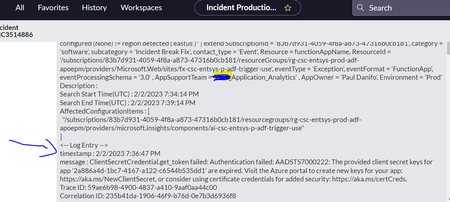
Hello, Trying to create ServiceNow tickets based on alerts from Azure alert rule in "Log Analytics Workspace" for Machine learning Job failures with ITSM connector based action group. In this pro...

Allan_Solomon_Mejia
Jul 15, 2026Brass Contributor
Hi Siva,
A few things I'd check, as this is often related to how the alert payload is being generated and consumed by the ITSM connector rather than ServiceNow itself.
- Verify whether you're using the Common Alert Schema in the Action Group. The payload format differs depending on whether the common schema is enabled, and some fields may not be populated as expected.
- Inspect the Activity Log or use the Test Action Group feature to confirm that the SearchResults, Essentials, or AlertContext sections actually contain the Log Analytics query results before the payload reaches the connector.
- If you're using a Scheduled Query Alert, remember that the ITSM connector doesn't always include the complete Log Analytics query output in the incident description. In many cases, only the alert metadata is passed.
- Check whether the ServiceNow field mapping or any business rules are truncating or filtering the incoming payload. I've seen custom business rules remove parts of the description before the incident is created.
- If your intent is to include detailed query results in the ticket, you may have more flexibility by using a Logic App or Power Automate between Azure Monitor and ServiceNow. That lets you parse the alert JSON, format the results, and explicitly populate the incident description or work notes.
A couple of questions that would help narrow this down:
- Are you using Scheduled Query Alerts (Log Analytics) or the newer Alert Processing Rules?
- Is the Common Alert Schema enabled on your Action Group?
- Is this the native Azure Monitor ITSM Connector or the ServiceNow ITSM Connector integration?
Those details will help determine whether this is a connector limitation, a payload issue, or a ServiceNow mapping/configuration problem.