Forum Discussion

Siva_Kumar_menta
Jun 02, 2023Copper Contributor
Azure Alert ITSM Servicenow Connector Payload not appearing in ticket description
Hello, Trying to create ServiceNow tickets based on alerts from Azure alert rule in "Log Analytics Workspace" for Machine learning Job failures with ITSM connector based action group. In this pro...

Jamony
Jul 12, 2026MCT
Hi Siva,
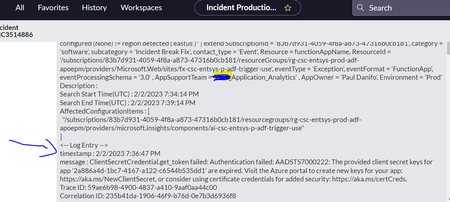
Since the ServiceNow ticket is created successfully, the connector itself is working. The missing <-- Log Entry --> content is usually related to the Azure Monitor alert payload.
Newer Log Analytics alert rules may not include the actual query-result rows in the payload. In that case, ServiceNow receives only the alert metadata, so the log-entry section stays empty.
Please check the alert payload using a temporary webhook or Logic App. If the query results are missing, use a Logic App to retrieve the Log Analytics results, format the description, and then create the ServiceNow incident.
Also ensure the KQL query returns important fields such as job name, run ID, status, error message, and _ResourceId.