Forum Discussion

Help! - How is VNet traffic reaching vWAN/on‑prem when the VNet isn’t connected to the vWAN hub
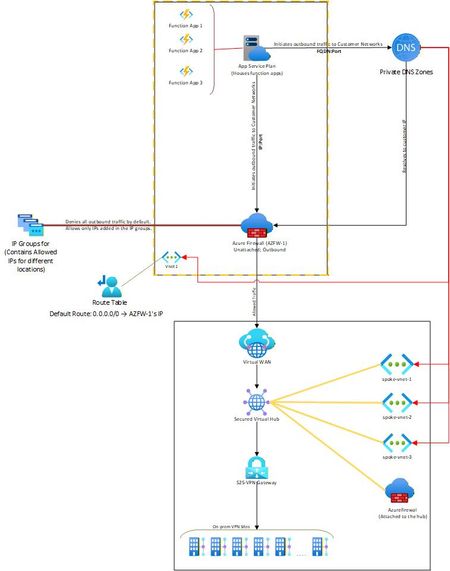

Azure is able to route traffic to the Virtual WAN hub because the firewall’s subnet contains the appropriate route entries. In this configuration, the firewall effectively serves as the gateway for VNet‑1, ensuring that outbound traffic from the function apps can reach the hub without requiring a direct VNet‑to‑hub connection.
Why It Works Without Direct VNet‑Hub Connection
The “missing link” is that the firewall itself has connectivity into the vWAN hub. Azure networking doesn’t require every subnet to be directly attached; if you force traffic through a firewall that has the right routes, Azure will honor that path. In effect:
- Function app → Firewall (via UDR)
- Firewall → vWAN hub (via system routes / effective routes)
- vWAN hub → On‑prem (via S2S VPN)
So although VNet‑1 isn’t directly connected to the hub, the firewall is acting as the bridge.
 YuktiVerma2025Feb 25, 2026Copper Contributor
Hi Kidd_Ip, can you guide me on how I can check the effective/system routes that you mentioned. I am unable to see how the firewall knows how to reach the VWAN because they are not connected, they don't have a common vNet and I am unable to figure out the routing that is happening at this particular point. It works, but how? Thank you so much for the help though. 🙂
- YuktiVerma2025Feb 25, 2026Copper Contributor
Kidd_Ip Can you please help on where can I look for the system routes/effective routes for the firewall? I am not able to see any visible routes to the VWAN. Thank you for the detailed response :)