Forum Discussion

Azure AD Connect & WVD
 Oct 10, 2020
I managed to fix this myself.
I want to share the issue and what solution worked for me, and also give a big thanks to all the people that had engagement in this thread.
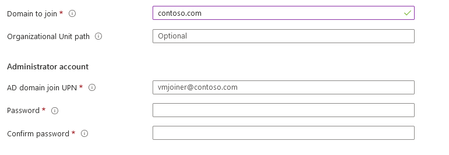
my on prem AD had the same domain name as my Azure AD tenant.
Also, my on prem AD join user had the same UPN as one of my Office365 users (which is a part of Azure AD Tenant)
So I suppose wvd deployment was trying to authenticate with the wrong catalog, and since I don't have Azure ADDS deployed it failed.
Hope someone troubleshooting this same issue will find this thread.

SamirAbdou1999 Be careful about the info you get from youtube videos, the fall edition of WVD is not the same as the spring update of WVD, but that screenshot in the first post you showed is where you come to the part where you tell to add the machines to the domain, and I'm 100% sure you should be using an on-premises account (in the form of a upn, so something like mailto:wvdadmin@contoso.com). Should that account be joined? I'm not sure, but the demo I got this morning from a colleague had that account synced (she showed me a setup with AADDS, so that naturally is joined), but it just needs to be the account to join to the domain.
However, your second screenshot I saw something with "vmcreation-LinkedTemplate" in the name.. Are you using ARM templates? I've heard of issues before regarding domain joining and those nested ARM templates that are provided by Microsoft.
A quick search gave me something from Azure Academy https://www.youtube.com/watch?v=DrkQFSVD9Ik from which I know who is heavily into WVD at the moment. There may be some info in there too.
Good Point, Travis video is probably not up to date with todays standards.
Yea, I have also made it worked with Azure ADDS but in this case im trying it with AD Connect since most of my clients will use hybrid environments.
Im using the local AD join UPN and for the record, its like this "Administrator@domain.com"
However, im not using ARM Templates, im doing this manualy from azure portal.
This one is a weird one isn't it? The only thing I can come up with is that my AD join Account maybe has to be synced to with Azure AD. I don't know. would love some correction on this.