Forum Discussion

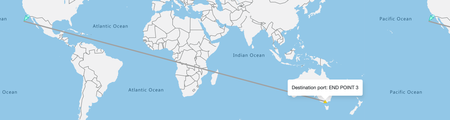
Azure maps: Trying to draw direct line between two point at two corners of world
- Sep 02, 2020
Managed to reproduce the issue and after talking with one of our architects I was reminded that the GeoJSON specification does not allow shapes to cross the antemeridian. I'm not a fan of this, luckily there are a few ways around this:
Options 1:
-
Similar to above, but break the line into segments to minimize complexity and shift longitude values outside of the -180/180 range as needed. Then create a MultiLineString from the segments.
-
You end up with a line with coordinates outside of the standard range but should render any line back and forth over the antemeridian as needed.
Option 2:
-
Leverage a library to split the line segments on the antemeridian and create a MultiLineString.
-
This method is a lot more work and and might not be as accurate, but should also work with any line.
Here is a code sample showing all two options:
<!DOCTYPE html> <html lang="en"> <head> <title></title> <meta charset="utf-8" /> <meta http-equiv="x-ua-compatible" content="IE=Edge" /> <meta name="viewport" content="width=device-width, initial-scale=1, shrink-to-fit=no" /> <!-- Add references to the Azure Maps Map control JavaScript and CSS files. --> <link rel="stylesheet" href="https://atlas.microsoft.com/sdk/javascript/mapcontrol/2/atlas.min.css" type="text/css" /> <script src="https://atlas.microsoft.com/sdk/javascript/mapcontrol/2/atlas.js"></script> <!-- Load turf.js a spatial math library. https://turfjs.org/ --> <script src='https://npmcdn.com/@turf/turf/turf.min.js'></script> <script type='text/javascript'> var map, datasource; var data = { "type": "Feature", "properties": {}, "geometry": { "type": "LineString", "coordinates": [ [ 144.9586, -37.848381 ], [ -118.1948, 33.767109 ] ] } }; function GetMap() { //Initialize a map instance. map = new atlas.Map('myMap', { view: 'Auto', //Add your Azure Maps subscription client ID to the map SDK. Get an Azure Maps client ID at https://azure.com/maps authOptions: { authType: 'subscriptionKey', subscriptionKey: '<Your Azure Maps Key>' } }); //Wait until the map resources are ready. map.events.add('ready', function () { //Create a data source to add your data to. datasource = new atlas.source.DataSource(); map.sources.add(datasource); //Add a layer for rendering data. map.layers.add(new atlas.layer.LineLayer(datasource)); map.setCamera({ bounds: atlas.data.BoundingBox.fromData(data) }); }); } function option1 () { //Trick map to render one of the points on an adjacent map. Doing a deep copy of the coordinates to be safe since reusing in sample. var c = data.geometry.coordinates.map(function(arr) { return arr.slice(); }); var lastCoord = c[0]; var newCoords = []; var newCoord; for(var i = 1, len = c.length; i < len; i++){ let diff = lastCoord[0] - c[i][0]; if(diff > 180){ //Line going left to right, but should go opposite direction. newCoord = [c[i][0] + 360, c[i][1]]; } else if (diff < -180) { //Line going right to left, but should go opposite direction. newCoord = [c[i][0] - 360, c[i][1]]; } else { //Leave coord as is. newCoord = c[i]; } newCoords.push([lastCoord, newCoord]); lastCoord = c[i]; } datasource.setShapes(new atlas.data.MultiLineString(newCoords)); } function option2() { //Split the line into segments and split each segment on the antimeridian, then create a MultuLineString from the segments. var c = data.geometry.coordinates; var newCoords = []; for(var i = 1, len = c.length; i < len; i++){ newCoords = newCoords.concat(splitLineSegment(c[i - 1], c[i])); } datasource.setShapes(new atlas.data.MultiLineString(newCoords)); } function splitLineSegment(fromPos, toPos) { var path; //Check to see if path should cross anti-meridian. if (Math.abs(fromPos[0] - toPos[0]) > 180 && Math.abs(fromPos[0]) > 90) { var l1, l2; var rightMostPos = toPos; var leftMostPos = fromPos; if (fromPos[0] > toPos[0]) { rightMostPos = fromPos; leftMostPos = toPos; } //Wrap the left most coordinate to a value between 180 and 540, then split on anti-meridian. var fc = turf.lineSplit( //Line to split. turf.lineString([rightMostPos, [leftMostPos[0] + 360, leftMostPos[1]]]), //Line to split with. turf.lineString([[180, 90], [180, -90]])); //Get the first line segment. var seg1 = fc.features[0].geometry.coordinates; shiftPositions(seg1[0], seg1[1]); //Its possible that there is a shared coordinate in the two line segments, do a deep copy of the second segment cooridnates to be safe. var seg2 = fc.features[1].geometry.coordinates.map(function(arr) { return arr.slice(); }); shiftPositions(seg2[0], seg2[1]); return [ //Segment 1 seg1, //Segment 2 seg2 ]; } else { //Only a single line segment. return [[fromPos, toPos]]; } } function shiftPositions(p1, p2) { //If either position has a longitude value outside of the -180 to 180 range, shift the longitude value of both positions as needed. if(p1[0] > 180 || p2[0] > 180){ p1[0] -= 360; p2[0] -= 360; } else if(p1[0] < -180 || p2[0] < -180){ p1[0] += 360; p2[0] += 360; } } </script> </head> <body onload="GetMap()"> <div id="myMap" style="position:relative;width:100%;height:600px;"></div> <input type="button" onclick="option1()" value="Option 1"/> <input type="button" onclick="option2()" value="Option 2"/> </body> </html> -

 Microsoft
Managed to reproduce the issue and after talking with one of our architects I was reminded that the GeoJSON specification does not allow shapes to cross the antemeridian. I'm not a fan of this, luckily there are a few ways around this:
Options 1:
-
Similar to above, but break the line into segments to minimize complexity and shift longitude values outside of the -180/180 range as needed. Then create a MultiLineString from the segments.
-
You end up with a line with coordinates outside of the standard range but should render any line back and forth over the antemeridian as needed.
Option 2:
-
Leverage a library to split the line segments on the antemeridian and create a MultiLineString.
-
This method is a lot more work and and might not be as accurate, but should also work with any line.
Here is a code sample showing all two options:
<!DOCTYPE html>
<html lang="en">
<head>
    <title></title>

    <meta charset="utf-8" />
    <meta http-equiv="x-ua-compatible" content="IE=Edge" />
    <meta name="viewport" content="width=device-width, initial-scale=1, shrink-to-fit=no" />

    <!-- Add references to the Azure Maps Map control JavaScript and CSS files. -->
    <link rel="stylesheet" href="https://atlas.microsoft.com/sdk/javascript/mapcontrol/2/atlas.min.css" type="text/css" />
    <script src="https://atlas.microsoft.com/sdk/javascript/mapcontrol/2/atlas.js"></script>

	<!-- Load turf.js a spatial math library. https://turfjs.org/ -->
    <script src='https://npmcdn.com/@turf/turf/turf.min.js'></script>

    <script type='text/javascript'>
        var map, datasource;

		var data =  {
					"type": "Feature",
					"properties": {},
					"geometry": {
						"type": "LineString",
						"coordinates": [
							[
								144.9586,
								-37.848381
							],
							[
								-118.1948,
								33.767109
							]
						]
					}
				};

        function GetMap() {
            //Initialize a map instance.
            map = new atlas.Map('myMap', {
                view: 'Auto',

                //Add your Azure Maps subscription client ID to the map SDK. Get an Azure Maps client ID at https://azure.com/maps
                authOptions: {
                    authType: 'subscriptionKey',
                    subscriptionKey: '<Your Azure Maps Key>'
                }
            });

            //Wait until the map resources are ready.
            map.events.add('ready', function () {
                //Create a data source to add your data to.
                datasource = new atlas.source.DataSource();
                map.sources.add(datasource);

                //Add a layer for rendering data.
                map.layers.add(new atlas.layer.LineLayer(datasource));

				map.setCamera({
					bounds: atlas.data.BoundingBox.fromData(data)
				});
			});
        }

		function option1 () {
			//Trick map to render one of the points on an adjacent map. Doing a deep copy of the coordinates to be safe since reusing in sample.
			var c = data.geometry.coordinates.map(function(arr) {
					return arr.slice();
				});

			var lastCoord = c[0];
			var newCoords = [];
			var newCoord;

			for(var i = 1, len = c.length; i < len; i++){
				let diff = lastCoord[0] - c[i][0];

				if(diff > 180){
					//Line going left to right, but should go opposite direction.
					newCoord = [c[i][0] + 360, c[i][1]];
				} else if (diff < -180) {
					//Line going right to left, but should go opposite direction.
					newCoord = [c[i][0] - 360, c[i][1]];
				} else {
					//Leave coord as is.
					newCoord = c[i];
				}

				newCoords.push([lastCoord, newCoord]);
				lastCoord = c[i];
			}

			datasource.setShapes(new atlas.data.MultiLineString(newCoords));
		}

		function option2() {
			//Split the line into segments and split each segment on the antimeridian, then create a MultuLineString from the segments.
			var c = data.geometry.coordinates;

			var newCoords = [];

			for(var i = 1, len = c.length; i < len; i++){
				newCoords = newCoords.concat(splitLineSegment(c[i - 1], c[i]));
			}

			datasource.setShapes(new atlas.data.MultiLineString(newCoords));
		}

		function splitLineSegment(fromPos, toPos) {
			var path;

			//Check to see if path should cross anti-meridian.
			if (Math.abs(fromPos[0] - toPos[0]) > 180 && Math.abs(fromPos[0]) > 90) {
				var l1, l2;

				var rightMostPos = toPos;
				var leftMostPos = fromPos;

				if (fromPos[0] > toPos[0]) {
					rightMostPos = fromPos;
					leftMostPos = toPos;
				}

				//Wrap the left most coordinate to a value between 180 and 540, then split on anti-meridian.
				var fc = turf.lineSplit(
					//Line to split.
					turf.lineString([rightMostPos, [leftMostPos[0] + 360, leftMostPos[1]]]),

					//Line to split with.
					turf.lineString([[180, 90], [180, -90]]));

				//Get the first line segment.
				var seg1 = fc.features[0].geometry.coordinates;
				shiftPositions(seg1[0], seg1[1]);

				//Its possible that there is a shared coordinate in the two line segments, do a deep copy of the second segment cooridnates to be safe.
				var seg2 = fc.features[1].geometry.coordinates.map(function(arr) {
					return arr.slice();
				});

				shiftPositions(seg2[0], seg2[1]);

				return [
					//Segment 1
					seg1,

					//Segment 2
					seg2
				];
			} else {
				//Only a single line segment.
				return [[fromPos, toPos]];
			}
		}

		function shiftPositions(p1, p2) {
			//If either position has a longitude value outside of the -180 to 180 range, shift the longitude value of both positions as needed.

			if(p1[0] > 180 || p2[0] > 180){
				p1[0] -= 360;
				p2[0] -= 360;
			} else if(p1[0] < -180 || p2[0] < -180){
				p1[0] += 360;
				p2[0] += 360;
			}
		}
    </script>
</head>
<body onload="GetMap()">
    <div id="myMap" style="position:relative;width:100%;height:600px;"></div>

	<input type="button" onclick="option1()" value="Option 1"/>
	<input type="button" onclick="option2()" value="Option 2"/>
</body>
</html>
rbrundritt Great efforts! Thanks Ricky for investing your time in this and doing lot of trials on this topic.
Day before yesterday,I tried similar solution as below which seems working:
But i thought Azure Maps must be having better/ standard way of handling it than this approach.
This works for both scenarios of line going from 'left to right' and right to left'
I played along longitude only as latitude doesn't cause any issue in crossing pacific.
Do you see any other issue with this approach that i must test?