Forum Discussion

Default exclusions in Suspicious communication over DNS SA

Hi Paul,
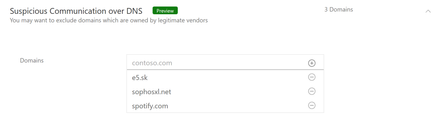
These 3 domains are the most popular in organizations with Azure ATP, most of Suspicious communication over DNS alerts were opened on them. In addition we observed that these 3 are also the most popular domains customers excluded from this alert. All 3 domains are known domains which owned by known companies that send to the domains data regarding their applications.
e5.sk - Eset
sophosxl.net - Sophos
spotify.com - Spotify
Therefore we decided to exclude these 3 domains by default, which will help for a lot of customers from doing it by their own, and give an option to remove it for others.
If we will see such similar need in the future to exclude more domains by default we will do it, and currently the communication channel is through the communities and it will also be updated in Azure ATP release notes.
Thanks,
Tali

Tali Ash Is there complete documentation containing a list of all default domain names in Microsoft's exclusions?
We're still generating the alert multi-times daily for excessive ('suspicious) sophosxl(.)net and e5(.)sk despite having modified the policy with our own exclusion. Our exclusions appear to be just be ignored by the policy.
- EliOfekDec 19, 2021
Microsoft
The list of exclusions is what you see in the exclusion list.
There are no overwrites in the code.
Not sure what you mean by "your own" exclusions, do you mean that the above 3 were removed from the list?
How exactly did you induce suspicious communication over dns ?
Just sending a simple DNS query will not suffice to trigger, doesn't matter how many times.- Niv DolginDec 30, 2021Copper Contributor
Hi EliOfek
Here's the screenshot of our alert (taken this morning, but generated every ~hour) showing that both domains trigger/induce the alert for both sophosxl.net and e5.sk:
And selecting "Adjust Policy" allows an admin to create domain exclusions. Originally, this policy listed no domains (was blank) until I added the domains in the screenshot (below). I've also experimented with wildcard characters but saw no change in behavior (i.e., *.e5.sk or %.e5.sk). Despite our efforts, this policy seems to ignore domain name exclusions:
Any suggestions?
- EliOfekDec 30, 2021
In the native portal it should look like this by default:
If the list is empty it means it was cleared since the workspace was created.
We exclude them by default as they are considered harmless and very common.
In the new security portal it should look like that:It seems that your screenshot is coming from Cloud App Security policy rules which are a different thing.
I suggest you try to modify it using the native MDI portal <workspace>.atp.azure.com or using security.microsoft.com.
Make it look like the pictures I added and you should be OK.
