Forum Discussion

Why does PSRule produce more findings than Template Analyzer when both use PSRule Azure rules?
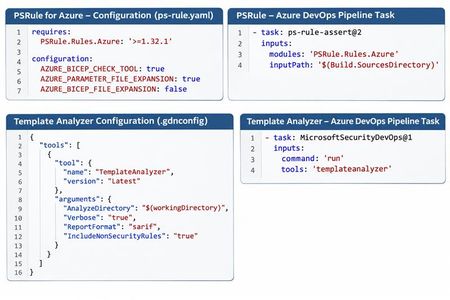

The difference is likely expected. Template Analyzer and standalone PSRule for Azure should not be assumed to produce identical findings, even when they use related Azure rules.
The main things to check are:
1. Rule coverage: Template Analyzer may expose only a subset of PSRule checks. `IncludeNonSecurityRules` does not necessarily enable every standalone PSRule rule.
2. Versioning: Check the effective PSRule.Rules.Azure version used by each scanner; don't assume Template Analyzer uses the version installed separately in your pipeline.
3. Bicep expansion: Verify that nested modules and registry-based AVM modules are fully expanded before scanning.
4. Parameter files: Confirm that `.bicepparam` values are actually passed into the analysis. Different parameter handling can change findings.
For Template Analyzer 0.8.6, its NuGet dependency specifies PSRule.Rules.Azure 1.33.2 or later, so it is not necessarily using your separately installed 1.32.1 version.
Azure.Templates.Analyzer.Core 0.8.6
Recommendation: For Bicep + AVM repositories, use standalone PSRule for Azure as your primary assessment tool. It provides more explicit control over expansion and parameter handling.
Useful configuration:
yaml
```yaml
configuration:
AZURE_BICEP_FILE_EXPANSION: true
```
For `.bicepparam` support, note that PSRule added this in version 1.34.0.
PSRule for Azure
Documentation: [PSRule Bicep configuration https://azure.github.io/PSRule.Rules.Azure/using-bicep/.