Forum Discussion

This is a scheduled windows-2016 brownout
 Mar 18, 2022
juliensl You probably already figured this out. I just ran into it today and for me it was associated with 3 release pipelines that didn't get processed.
For me, I needed to go to dev.azure.com, and check each of my releases:
1) click on a release.
2) click on Edit in the upper right corner
3) click on the deploy stage
4) click on Run on agent
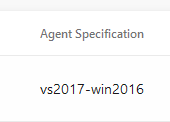
5) you should see something like this:
If your Agent Specification shows vs2017-win2016, you need to change it to one of the newer versions.
(You can just run that fixed release, and it'll take care of the one that failed previously)
juliensl You probably already figured this out. I just ran into it today and for me it was associated with 3 release pipelines that didn't get processed.
For me, I needed to go to dev.azure.com, and check each of my releases:
1) click on a release.
2) click on Edit in the upper right corner
3) click on the deploy stage
4) click on Run on agent
5) you should see something like this:
If your Agent Specification shows vs2017-win2016, you need to change it to one of the newer versions.
(You can just run that fixed release, and it'll take care of the one that failed previously)

Exactly what I did, thank you to explained it here, could be usefull for everybody 🙂
Have a nice day
 Binway2010Mar 22, 2022Copper ContributorHello Folks,
Thanks for putting this together as it helped me resolve this brownout issue.
All the best