Forum Discussion

Why does a VM take 1.5 hours to start?
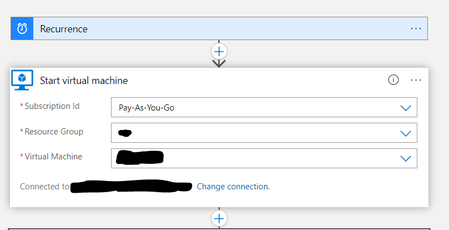

Still nobody answering my follow up questions. I may have to set up another thread to see if I get any better responses. Also, had a message to my inbox yesterday (right at the time of start for the process) that the auto start logic app process had failed, but looked and it had not failed : the VM was running ! Microsoft is building functionality in Azure that does not work and they are not supporting it. Today's message from the logic app process on my VM says that it worked, but again, still took 1.5 hours.
So, to summarize:
- Logic app process to auto start the VM starts, message to my inbox from logic app process says it finishes 1.5 hours later, but VM does start at the programmed time. This functionality makes no sense, and nobody has given me a good reason why this happens.
- Logic app yesterday sent a message to me immediately upon running that the process had failed. Looked at the VM and it was started successfully at the programmed time. This functionality makes no sense - why do I get a message that the process failed when it didn't?
- Logic all process again reverted back to the 1.5 hour finish that actually started the VM at the scheduled time. Why is this process sending me a "success" message 1.5 hours after it started?
Microsoft : billions upon billions of dollars in revenue and profit, but not enough money to support their product for users. - ? Go figure.

- pflipperDec 02, 2023Brass ContributorUPDATE : as of Tuesday, November 28th, this process is now RUNNING ON TIME. Process runs at 6am, and finishes at 6:02am after about a month and a half of taking 1.5 hours. Two minutes to start up the VM, then send me a message that it succeeded. And I did nothing to the process, either time.
Now, the question this immediately brings up is "why?" Not, "why did it work now", but "why isn't Microsoft more transparent with the issues with their Azure product". Microsoft broke their product, then did something to fix it. Could you address this with your clients, instead of keeping them in the dark and shoveling s**t on them? It isn't just this about this issue - there are more. But the fact that I have to waste my time (and many of the responders time here) on software that gets broken and not addressed with users unless they pay Microsoft $30/ month for support is a joke. - pflipperNov 16, 2023Brass Contributor
I found one extension that failed - enablevmaccess. From what I read, that VM extension is used to reset the local password inside the VM and that since on a Domain Controller there is no "local" password to reset; the extension doesn't support VMs running as Domain Controllers. As such is the case, I just removed it. Let's see if that solves the issue. If so, you will be the winner of the "best response" contest I've been running here for the past month 🙂
Back to your suggestion of raising a case with Azure Support... as I mentioned before, Microsoft does not allow for adding a tech support ticket unless you sign up for their $30/ month support plan. No thanks.  petarivanov365Nov 16, 2023
Microsoft
I've seen a similar issue in the past.
There's probably an extension on the VM that's crashing, and the default timeout is 1.5 hours.
I suggest you check if you have any extensions on that VM that are failed and if all are showing up fine you can try to re-install all of them and try again.
If that doesn't help I suggest raising a case with Azure Support.
They should be able to help you out.
- pflipperNov 13, 2023Brass Contributor
"What's the start time if you manually turn on the vm?
If you just want a job to start the VM at a certain time, then I find A function that gets triggered by an automation job much more reliable. "
I'm not sure why you are asking about manually turning on the vm. I don't manually turn it on. That's the point of having a way to have Azure automatically turn it on for you. I have an automatic process to do this - an autostart logic app. Unless I am not understanding something about your question, I'm not sure what you are asking about the start time of manually turning it on. I don't. I set up a logic app to turn it on, and that logic app is supposed to work automatically, no manual intervention.
As to your other suggestion, I'm not sure what you are further saying about an "automation job". Could you describe this further? I will say that your point that this automation job is more reliable (then presumably a logic app that I am using to automatically start the vm) isn't really a reason to let Microsoft off the hook to fix it's software, or have some explanation as to why the logic app is sending me a message 1.5 hours after the set start time of the logic app to tell me that the process finished. It's like telling someone to gear down to slow a car instead of using the brakes because gearing down is much more reliable. No. Make it function correctly. If Microsoft is going to incorporate functionality, it needs to work as expected OR there needs to be a logical explanation as to why it is behaving differently OR they need to fix it. Plain and simple.
- PryglerSlyngelNov 12, 2023Copper Contributor
pflipper What's the start time if you manually turn on the vm?
If you just want a job to start the VM at a certain time, then I find A function that gets triggered by an automation job much more reliable.
- pflipperNov 09, 2023Brass Contributor
In Microsoft's infinite need for more of our money in their coffers, they do not allow for adding a tech support ticket unless you sign up for their $30/ month support plan. No thanks. Then they funnel people to these community forums where I suppose such issues as mine go to die - ?
