Forum Discussion

Problem uploading PFX cert to Azure Automation account (now password prompt)
- Sep 13, 2020
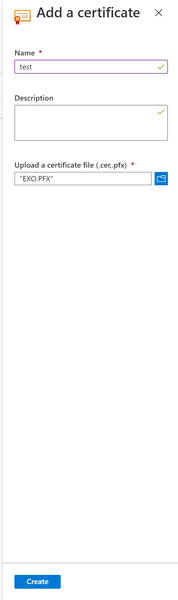
AFAIK, there isn't any issue with the Certificate upload UI in Azure Automation. Once you select a valid PFX file, the UI adds automatically two fields, being one them the password field, as you can see by the screenshot below. Are you sure the PFX was correctly generated? See below a sample PowerShell that generates a valid PFX.
$Cert = New-SelfSignedCertificate -DnsName "CertificateName" -CertStoreLocation cert:\LocalMachine\My -KeyExportPolicy Exportable -Provider "Microsoft Enhanced RSA and AES Cryptographic Provider" -NotAfter (Get-Date).AddMonths(12) -HashAlgorithm SHA256

$CertPassword = ConvertTo-SecureString $PfxCertPlainPassword -AsPlainText -Force
Export-PfxCertificate -Cert ("Cert:\localmachine\my\" + $Cert.Thumbprint) -FilePath $certPath -Password $CertPassword -Force | Write-Verbose

 Microsoft
AFAIK, there isn't any issue with the Certificate upload UI in Azure Automation. Once you select a valid PFX file, the UI adds automatically two fields, being one them the password field, as you can see by the screenshot below. Are you sure the PFX was correctly generated? See below a sample PowerShell that generates a valid PFX.
$Cert = New-SelfSignedCertificate -DnsName "CertificateName" -CertStoreLocation cert:\LocalMachine\My -KeyExportPolicy Exportable -Provider "Microsoft Enhanced RSA and AES Cryptographic Provider" -NotAfter (Get-Date).AddMonths(12) -HashAlgorithm SHA256

$CertPassword = ConvertTo-SecureString $PfxCertPlainPassword -AsPlainText -Force
Export-PfxCertificate -Cert ("Cert:\localmachine\my\" + $Cert.Thumbprint) -FilePath $certPath -Password $CertPassword -Force | Write-Verbose
 JeremyTBradshawSep 14, 2020Steel Contributor
hspinto Thanks for your help. I am unable to reproduce my issue today using the same exact steps as last time. The best I can think of is that my PFX password had an invalid character as I've seen a few posts on Stack Overflow about that issue. I thought for sure I tested with a very basic password.
After I tested successfully using a PFX generated using your code, I got to comparing my code and then the two generated certs, both essentially identical. If you'd like to spot my code, it is the last/3rd function in this module within my GitHub PowerShell repo: https://github.com/JeremyTBradshaw/PowerShell/blob/master/.Modules/msGraphFunctions.psm1
One thing I'm going to do is take away my Subject parameter and replace it with a validation-backed DnsName parameter. That's because I have a feeling maybe the subject was part of the issue, so I'll just let that generate based on my supplying the DnsName parameter instead.