Forum Discussion

Problem ASR IIS Fail
- Mar 11, 2021
Hi
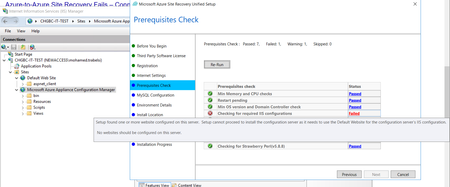
As you already have IIS configured for another purpose you can not configure ASR on top of that install . You should install it with a clean default website
Operating system
Windows Server 2012
R2Windows Server 2016
Windows Server roles
Don't enable these roles:
- Active Directory Domain Services
- Internet Information Services
- Hyper-V
Group policies Don't enable these group policies:
- Prevent access to the command prompt.
- Prevent access to registry editing tools.
- Trust logic for file attachments.
- Turn on Script Execution.
IIS - No pre-existing default website
- No pre-existing website/application listening on port 443
- Enable anonymous authentication
- Enable FastCGI setting
FIPS (Federal Information Processing Standards)
Do not enable FIPS mode

Hi
As you already have IIS configured for another purpose you can not configure ASR on top of that install . You should install it with a clean default website
Operating system
Windows Server 2012
R2Windows Server 2016
Windows Server roles
Don't enable these roles:
- Active Directory Domain Services
- Internet Information Services
- Hyper-V
Group policies Don't enable these group policies:
- Prevent access to the command prompt.
- Prevent access to registry editing tools.
- Trust logic for file attachments.
- Turn on Script Execution.
IIS - No pre-existing default website
- No pre-existing website/application listening on port 443
- Enable anonymous authentication
- Enable FastCGI setting
FIPS (Federal Information Processing Standards)
Do not enable FIPS mode
