Forum Discussion

henry_coding101
Sep 26, 2024Tin Contributor
Peering Virtual Network Access to OpenAI resources?
In tenant A, I have an existing OpenAI resource that is set to only be accessible from a virtual network, in which a VM rests in place. The VM can connect to the OpenAI resource successfully. ...

Kidd_Ip
Dec 22, 2024MVP
Try referring to this:
- Check Network Security Groups (NSGs)
- Ensure that the Network Security Groups (NSGs) associated with both virtual networks allow traffic between them. Specifically, check for inbound and outbound rules that permit traffic on the necessary ports.
- Update Firewall Rules
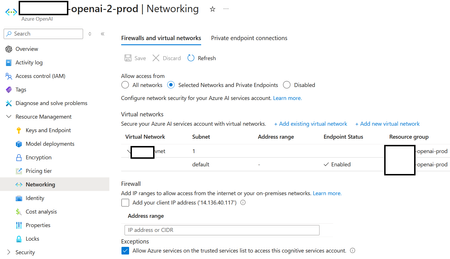
- Verify that the firewall rules for the OpenAI resource in tenant B allow traffic from the peered virtual network in tenant A. You may need to add the IP address range of the peered network to the allowed list.
- Private Endpoint Configuration
- If you're using private endpoints, ensure that the private endpoint for the OpenAI resource in tenant B is correctly configured to accept traffic from the peered network in tenant A.
- DNS Configuration
- Ensure that DNS settings are correctly configured to resolve the OpenAI resource's private endpoint from the VM in tenant A. You might need to set up custom DNS or use Azure Private DNS zones.
- Virtual Network Peering Settings
- Double-check the peering settings to ensure that "Allow forwarded traffic" and "Allow gateway transit" options are enabled if necessary.
- Service Endpoint Configuration
- If you're using service endpoints, ensure that they are enabled for the necessary services on both virtual networks.