Forum Discussion

Microsoft Azure Backup Server
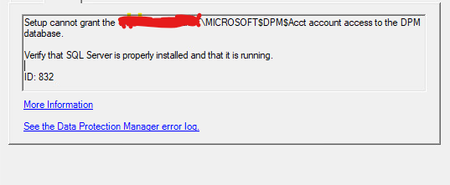

That error is too high-level. You'd be better off checking:
- The DPM installation log (for which a hyperlink is at the bottom of your screenshot);
- The SQL Server error logs, via SQL Server Management Studio.
As an aside, MABS uses DPM under the hood, so you are indeed running DPM - just under the branding of MABS. But this isn't important.
There should not be any network issues as the SQL Server instance has to be local - regardless of whether you've selected a new or existing instance on the SQL Settings screen.
However, if you selected "existing SQL server instance" then you need to ensure that it was installed as a named instance, as per step 3 in the installation guide.
If you installed SQL Server in the usual manner of "next, next, finish" then it won't be a named instance, which could be one reason you're seeing the SQL Server high-level failure.
You can check quickly via PowerShell if you've installed only the default instance using the following command:
(Get-ItemProperty -Path "HKLM:\SOFTWARE\Microsoft\Microsoft SQL Server\" -Name "InstalledInstances").InstalledInstances
If you only get back one value named "MSSQLSERVER" then you only have the default instance, which is not considered a named instance.
There's a lot of other things to check in that installation guide - many of the relevant ones under point 3.
Have another read and see if you haven't missed some, or actioned some incorrectly.
Cheers,
Lain