Forum Discussion

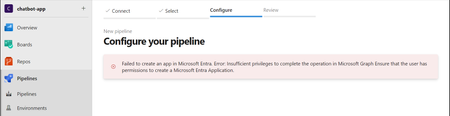
Azure Devops -- Pipeline Issue

supri0390
Error means your account doesn’t have the right permissions to create an app in Microsoft Entra (formerly Azure AD). Here's how to fix it step by step
Check Your Permissions
Ask your IT admin (or Entra admin) to give you the right permissions.
Specifically, you’ll need either the Application Administrator or Cloud Application Administrator role.
If You Have Admin Access:
Go to the Microsoft Entra Admin Center https://entra.microsoft.com.
If this doesn’t work or you get another error, it confirms you don’t have the necessary permissions.
To fix this, go to Roles and administrators and give yourself the Application Administrator or Cloud Application Administrator role.
If You Don’t Have Admin Access:
Contact your IT/Entra admin and ask them to:
Grant you an Application Administrator to manage and create app registrations.
Or at least Directory Readers so you can view Entra resources.
Check DevOps Permissions:
In Azure DevOps, go to Project Settings - Service Connections.
Make sure your service principal (or the account running the pipeline) has the right permissions to create and manage resources.
Try Again
Once your permissions are updated, go back to Azure DevOps and try setting up the pipeline again.
Let me know if you need any help