Forum Discussion

about routes
- Apr 26, 2022
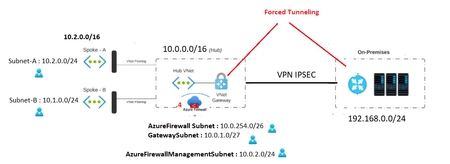
Hi Ensure that you have the proper peering enabled
hub-to-spoke A with gateway transitspoke A-tohub : Default + Use this virtual network's gateway or Route Server
hub-to-spoke B with gateway transitspoke B-tohub : Default Use this virtual network's gateway or Route Server
If you want the incoming traffic (from the gateway ) to be filtered by the firewall attach a route table to the gateway subnet with the routes
Adress Prefix 10.1.0.0/16
Next Hop Type : Virtual Appliance
Next Hop IP address : Firewall private IPAdress Prefix 10.2.0.0/16
Next Hop Type : Virtual Appliance
Next Hop IP address : Firewall private IPEnsure also that proper routes are present in spoke route tables
Route Table associated to Subnet Spoke A
Adress Prefix 10.0.0.0/16
Next Hop Type : Virtual Appliance
Next Hop IP address : Firewall private IP
Adress Prefix 10.1.0.0/16
Next Hop Type : Virtual Appliance
Next Hop IP address : Firewall private IPAdress Prefix 192.168.0.0/24
Next Hop Type : Virtual Appliance
Next Hop IP address : Firewall private IPAdress Prefix 0.0.0.0/0
Next Hop Type : Virtual Network Gateway (forced tunelling)Route Table associated to Subnet Spoke B
Adress Prefix 0.0.0.0/0
Next Hop Type : Virtual Network Gateway (forced tunneling)Adress Prefix 10.2.0.0/16
Next Hop Type : Virtual Appliance
Next Hop IP address : Firewall privatAdress Prefix 192.168.0.0/24
Next Hop Type : Virtual Appliance
Next Hop IP address : Firewall private IPRead the full doc for forced tunneling if needed : https://docs.microsoft.com/fr-fr/azure/vpn-gateway/vpn-gateway-forced-tunneling-rm

Hi Ensure that you have the proper peering enabled
hub-to-spoke A with gateway transit
spoke A-tohub : Default + Use this virtual network's gateway or Route Server
hub-to-spoke B with gateway transit
spoke B-tohub : Default Use this virtual network's gateway or Route Server
If you want the incoming traffic (from the gateway ) to be filtered by the firewall attach a route table to the gateway subnet with the routes
Adress Prefix 10.1.0.0/16
Next Hop Type : Virtual Appliance
Next Hop IP address : Firewall private IP
Adress Prefix 10.2.0.0/16
Next Hop Type : Virtual Appliance
Next Hop IP address : Firewall private IP
Ensure also that proper routes are present in spoke route tables
Route Table associated to Subnet Spoke A
Adress Prefix 10.0.0.0/16
Next Hop Type : Virtual Appliance
Next Hop IP address : Firewall private IP
Adress Prefix 10.1.0.0/16
Next Hop Type : Virtual Appliance
Next Hop IP address : Firewall private IP
Adress Prefix 192.168.0.0/24
Next Hop Type : Virtual Appliance
Next Hop IP address : Firewall private IP
Adress Prefix 0.0.0.0/0
Next Hop Type : Virtual Network Gateway (forced tunelling)
Route Table associated to Subnet Spoke B
Adress Prefix 0.0.0.0/0
Next Hop Type : Virtual Network Gateway (forced tunneling)
Adress Prefix 10.2.0.0/16
Next Hop Type : Virtual Appliance
Next Hop IP address : Firewall privat
Adress Prefix 192.168.0.0/24
Next Hop Type : Virtual Appliance
Next Hop IP address : Firewall private IP
Read the full doc for forced tunneling if needed : https://docs.microsoft.com/fr-fr/azure/vpn-gateway/vpn-gateway-forced-tunneling-rm
 hamma91Apr 26, 2022Brass Contributor
Hello Ibrahima,
Thank you for your reply and assistance.
1-Can you confirme that for the :
** Route table attached to gateway subnet ( disable_bgp_route_propagation = true)
** All Route tables for the spokes ( disable_bgp_route_propagation = false)
2- You use the address space /16 and not the subnet /24 for every spoke in the routes ? Just to confirm that.
Thanks- ibnmbodjiApr 26, 2022Steel ContributorHello yes correct !
- hamma91Apr 26, 2022Brass ContributorFor the peering, i use this code , can you confirm for me please :
1- For HUB TO SPOKE :
resource "azurerm_virtual_network_peering" "peering-Hub-SPOKE" {
name =xxxxx
resource_group_name = xxxx
virtual_network_name = xxxxx
remote_virtual_network_id = xxxx
allow_gateway_transit = true
allow_forwarded_traffic = true
allow_virtual_network_access = true
use_remote_gateways = false
}
2- For SPOKE to HUB :
resource "azurerm_virtual_network_peering" "peering-SPOKE-HUB" {
name = xxxxx
resource_group_name = xxxxx
virtual_network_name = xxxxxx
remote_virtual_network_id = xxxxx
allow_virtual_network_access = true
allow_forwarded_traffic = true
allow_gateway_transit = false
use_remote_gateways = true
}
Thank you