Forum Discussion

 Microsoft
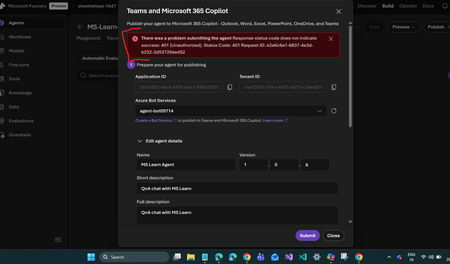
Unable to publish Foundry agent to M365 copilot or Teams
- Dec 28, 2025
hi ShwetaI you’re not alone, and yes, parts of what you’re seeing are expected, but the 401 Unauthorized means something important is missing or misaligned in the setup.
About the Bot Service / Application ID
Yes — this is expected behavior.
When you publish a Foundry agent to M365 Copilot or Teams, Foundry automatically creates:
An Azure Bot Service
An Entra ID (Azure AD) App Registration
Both will share the same Application (Client) ID.
This is by design — the bot and the app registration are tightly coupled and represent the same identity.So the matching IDs are not the problem
401 Unauthorized error
A 401 during publishing almost always points to permissions or consent issues, not a broken resource.
The most common causes are:
1.Missing Entra ID permissions or admin consent
The auto-created App Registration often does not have all required permissions granted.
Check the App Registration:
- Go to Azure Portal → Entra ID → App registrations
- Open the app with the same Application ID
- Verify API permissions, especially:
- Microsoft Graph permissions required for Copilot / Teams
- Make sure Admin consent has been granted
If admin consent is missing, publishing will fail with 401.
2.You’re not signed in as the correct tenant admin
To publish to M365 Copilot or Teams, you must be signed in as:
- Global Administrator or
- Teams Administrator
Being a subscription owner or resource contributor is not enough.
Double-check:
- The tenant you’re signed into
- Your directory role at publish time
3.Bot Service not fully configured
Sometimes the Bot Service exists but isn’t fully ready.
Verify:
- Bot Service → Configuration
- Microsoft App ID matches the App Registration
- Messaging endpoint is present
- No errors in the Bot Service overview
4.Tenant-level restrictions
Some tenants block:
- Third-party or custom apps in Teams
- Copilot extensibility without explicit allow rules
Check:
- Teams Admin Center
- Custom app and Copilot extensibility policies
- App publishing permissions
Next steps :
- Confirm you’re logged in as Global Admin or Teams Admin
- Open the App Registration → grant Admin consent
- Verify Bot Service configuration is complete
- Check Teams Admin Center app policies
- Retry publishing after waiting ~5–10 minutes (propagation delay is real)
This is a very common issue right now with Foundry agent publishing, especially in newly created tenants or when permissions were auto-generated but not consented.
If everything looks correct and it still fails:
- Try re-publishing after deleting and recreating only the Bot Service
- Or open a Microsoft support ticket with the Request ID you shared (that’s useful)
Hope this helps

hi ShwetaI you’re not alone, and yes, parts of what you’re seeing are expected, but the 401 Unauthorized means something important is missing or misaligned in the setup.
About the Bot Service / Application ID
Yes — this is expected behavior.
When you publish a Foundry agent to M365 Copilot or Teams, Foundry automatically creates:
An Azure Bot Service
An Entra ID (Azure AD) App Registration
Both will share the same Application (Client) ID.
This is by design — the bot and the app registration are tightly coupled and represent the same identity.
So the matching IDs are not the problem
401 Unauthorized error
A 401 during publishing almost always points to permissions or consent issues, not a broken resource.
The most common causes are:
1.Missing Entra ID permissions or admin consent
The auto-created App Registration often does not have all required permissions granted.
Check the App Registration:
- Go to Azure Portal → Entra ID → App registrations
- Open the app with the same Application ID
- Verify API permissions, especially:
- Microsoft Graph permissions required for Copilot / Teams
- Make sure Admin consent has been granted
If admin consent is missing, publishing will fail with 401.
2.You’re not signed in as the correct tenant admin
To publish to M365 Copilot or Teams, you must be signed in as:
- Global Administrator or
- Teams Administrator
Being a subscription owner or resource contributor is not enough.
Double-check:
- The tenant you’re signed into
- Your directory role at publish time
3.Bot Service not fully configured
Sometimes the Bot Service exists but isn’t fully ready.
Verify:
- Bot Service → Configuration
- Microsoft App ID matches the App Registration
- Messaging endpoint is present
- No errors in the Bot Service overview
4.Tenant-level restrictions
Some tenants block:
- Third-party or custom apps in Teams
- Copilot extensibility without explicit allow rules
Check:
- Teams Admin Center
- Custom app and Copilot extensibility policies
- App publishing permissions
Next steps :
- Confirm you’re logged in as Global Admin or Teams Admin
- Open the App Registration → grant Admin consent
- Verify Bot Service configuration is complete
- Check Teams Admin Center app policies
- Retry publishing after waiting ~5–10 minutes (propagation delay is real)
This is a very common issue right now with Foundry agent publishing, especially in newly created tenants or when permissions were auto-generated but not consented.
If everything looks correct and it still fails:
- Try re-publishing after deleting and recreating only the Bot Service
- Or open a Microsoft support ticket with the Request ID you shared (that’s useful)
Hope this helps
 Microsoft
Looks like it was a tenant issue. I was trying with my personal account (non-microsoft email address) in personal subscription's tenant.
On trying the same with my microsoft account (@microsoft.com) inside the Microsoft tenant in Azure subscription, the agent's publish to M365 copilot and Teams worked. Backend API call gave 200 response also.
Thank you for your quick help!
- Dec 30, 2025
glad to know that issue is resolved.