Recent Discussions

Paytmgateway integration throwing exception error
While integration paytmgateway to my asp.net project, throwing exception "exception occurred while verifying checksum. Invalid padding can't be removed. What to do? I put every data right like merchant key ,MID etc . Plz guide me71Views0likes0CommentsVisualize Workflows and Architecture with Mermaid Charts in Visual Studio 2026
Modern software systems are more complex than ever. Microservices talk to APIs. Background workers process queues. Frontend apps interact with authentication layers, caching services, and databases. In the middle of all this complexity, one thing becomes absolutely critical: clear visualization. With Visual Studio 2026, developers no longer need third-party plugins to visualize workflows and architecture. Visual Studio 2026 renders Mermaid charts directly in the editor — no extensions required. You can write Mermaid syntax yourself or let GitHub Copilot generate it for you. Flowcharts, sequence diagrams, and other visualizations render inline, keeping documentation inside your development workflow. This is more than just a convenience feature. It’s a shift in how developers document, collaborate, and communicate system design. https://dellenny.com/visualize-workflows-and-architecture-with-mermaid-charts-in-visual-studio-2026/1.5KViews1like0Comments
Edm Model Generation Fails
Using an Azure ASP.NET MVC API from a Maui app, I am encountering the following error in the app when attempting to access the API. A few days ago, the initalization was working properly. The cloud app has been under further development, but the base api code has not been modified, only the response from the endpoints. The latest release NuGets are in use. What elements are being sought? System.TypeInitializationException: The type initializer for 'GeneratedEdmModel' threw an exception. ---> System.InvalidOperationException: Sequence contains no elements at System.Linq.ThrowHelper.ThrowNoElementsException() at System.Linq.Enumerable.First[TSource](IEnumerable`1 source) at SentryCloud.Models.Container.GeneratedEdmModel.CreateXmlReader()105Views0likes0Comments
Windows Forms user control layout issues at runtime
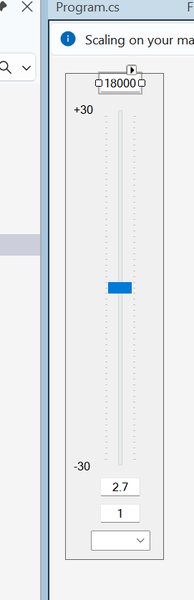
I'm hoping the good folls of this community can help me figure out what's going on with a Windows Forms user control that I created and am trying to use. I created a user control that represents a single band of a parametric equalizer. In the designer, the control looks like this: When I debug the control in the Test Container, things look good: If we take a look at the actual PEQ application that will use the control, things still look OK in the designer: It's only when I fire up the application that things go... awry: What happened to all the TextBoxes? And the ComboBoxes? I''ve got a feeling that the fix for this is something really simple, and I'm going to feel like a complete idiot for not figuring out the obvious. Can anyone tell me what my dumb self did wrong?98Views0likes0CommentsThe Evolution of Conversational AI in Microsoft’s Ecosystem
Over the past two decades, conversational AI has shifted from a futuristic curiosity to a core part of how we interact with technology. And while many companies have shaped this field, one of the most influential players has consistently been Microsoft. From the early days of clippy (yes, that Clippy) to the cutting-edge Copilot ecosystem today, Microsoft’s journey mirrors the broader evolution of conversational AI itself. It’s a story of ambition, experimentation, setbacks, breakthroughs, and ultimately, transformation. In this blog, we’ll explore how conversational AI has developed within Microsoft’s ecosystem—how it started, the key milestones along the way, and where it’s all heading next. https://dellenny.com/the-evolution-of-conversational-ai-in-microsofts-ecosystem/140Views2likes0CommentsGitHub Copilot for Python: Real-World Coding Scenarios & Practical Examples
When GitHub Copilot first launched, many developers wondered whether an AI pair-programmer could truly make an impact on everyday coding tasks. Today, after widespread adoption, the verdict is clear: Copilot can significantly boost productivity, reduce repetitive work, and help developers focus on high-level thinking. This is especially true for Python developers, who frequently deal with tasks ranging from data processing to API integration, automation, and web development. In this blog, we’ll explore real-world Python scenarios where GitHub Copilot shines. Whether you’re a beginner experimenting with your first scripts or a seasoned engineer working on large systems, Copilot can help streamline your workflow in ways that feel surprisingly human. https://dellenny.com/github-copilot-for-python-real-world-coding-scenarios-practical-examples/321Views0likes0CommentsSecurity and Compliance Considerations When Using Copilot in Enterprise Environments
We see these new AI tools, like Copilot, helping us do work faster, write better emails, and summarize long documents. It’s like having a super-smart assistant right next to you. But for people who look after company rules, like the security and compliance teams, a new tool also means new questions. We need to be sure that while Copilot helps us be fast, it does not accidentally share our company’s secrets or break any important laws about data. This is what we call security and compliance—it’s about keeping our digital house safe and following the rules. In this blog, I want to talk about the important things we must think about when we bring a powerful tool like Copilot into our enterprise environment. It’s not just about turning it on; it’s about making sure we set it up in a smart and safe way. https://dellenny.com/security-and-compliance-considerations-when-using-copilot-in-enterprise-environments/153Views0likes0CommentsTurbocharge Your Coding Top GitHub Copilot Shortcuts and Productivity Tips for VS Code
GitHub Copilot isn’t just a fancy autocomplete; it’s a true AI pair programmer that can fundamentally change how you write code. But like any powerful tool, mastering it requires knowing the hidden tricks and, most importantly, the keyboard shortcuts that keep your hands on the keys and your focus in the flow. If you’re using VS Code, you’ve got the ideal setup. Let’s dive deep into the must-know shortcuts and best practices to transform you from a Copilot novice into a speedy! https://dellenny.com/turbocharge-your-coding-top-github-copilot-shortcuts-and-productivity-tips-for-vs-code/264Views0likes0CommentsYour Guide to Debugging and Reviewing Copilot-Generated Code
The rise of AI coding assistants like GitHub Copilot has been a game-changer. It’s like having a hyper-efficient, incredibly well-read junior developer peering over your shoulder, offering code snippets and completing functions almost as fast as you can think. This boost in productivity is phenomenal—until a tricky bug crawls into a piece of AI-generated code, or a security vulnerability lurks undetected. The truth is, while Copilot is an amazing accelerator, it is not a replacement for a developer’s critical thinking and review process. AI-generated code, for all its brilliance, is still code written by an engine trained on massive datasets, including the good, the bad, and the slightly outdated. You, the human developer, are the crucial “Human-in-the-Loop”—the final guardian of code quality, security, and logic. This blog post is your essential guide to navigating this new landscape. We’ll lay out the best practices for debugging and reviewing code generated by your AI partner, ensuring you leverage its speed without compromising on quality or security. https://dellenny.com/your-guide-to-debugging-and-reviewing-copilot-generated-code/371Views0likes0Comments
The .NET News daily newsletter for C# developers
Hi everyone! I'd like to invite you to my C# and Azure newsletter that I launched a little over a year ago: https://dotnetnews.co/ Its a labor of love project I use to help my fellow C# devs keep up on all the latest developer articles. We finally hit over 2,000 subscribers! Most importantly, If anyone has any ideas on how to make it better, I'd love to hear from you.199Views0likes0CommentsPrompt Engineering for Developers Getting the Best Out of Copilot
Artificial intelligence has revolutionized the way we code. GitHub Copilot, powered by OpenAI’s models, has become a game-changer for developers, offering real-time code suggestions, generating boilerplate code, and even helping solve complex problems. But like any tool, its effectiveness depends on how you use it. Enter prompt engineering—the art of crafting instructions that get the most accurate and useful results from AI. In this blog, we’ll explore how developers can master prompt engineering to get the best out of Copilot, maximize productivity, and improve code quality. https://dellenny.com/prompt-engineering-for-developers-getting-the-best-out-of-copilot/189Views1like0CommentsPractical Use Cases Writing, Refactoring, and Testing Code with GitHub Copilot
In today’s fast-paced software development environment, efficiency and code quality are paramount. Developers are constantly seeking tools that can accelerate coding tasks without compromising quality. One tool that has rapidly gained popularity among programmers is GitHub Copilot. Powered by AI, Copilot can assist in writing code, refactoring existing code, and testing, making it an invaluable addition to any developer’s toolkit. In this blog, we’ll explore practical use cases for leveraging GitHub Copilot to streamline your coding workflow. https://dellenny.com/practical-use-cases-writing-refactoring-and-testing-code-with-github-copilot/140Views0likes0CommentsUnderstanding the GitHub Copilot Exam Blueprint Skills Measured & Topics Covered
The world of software development is rapidly evolving, especially with the rise of AI-assisted coding tools. One key certification that’s gained attention is the one for GitHub Copilot, the AI-pair programmer developed by GitHub (in conjunction with Microsoft). This blog dives deep into the exam blueprint — what domains it covers, what skills are measured, and how you can prepare effectively. https://dellenny.com/understanding-the-github-copilot-exam-blueprint-skills-measured-topics-covered/122Views0likes0CommentsFree & Official Learning Resources for the GitHub Copilot Certification Exam
The GitHub Copilot Certification Exam is an exciting new way to prove your skills in using one of the most innovative AI tools for software development. Designed for developers, DevOps engineers, administrators, and technical leaders, this certification tests your ability to use GitHub Copilot effectively and responsibly in real-world scenarios. The best part? You don’t have to pay for premium courses or third-party study materials. GitHub and Microsoft provide free, official learning resources that cover everything you need to know. This guide breaks down those resources, how to use them, and how to structure your preparation to maximize your success. https://dellenny.com/free-official-learning-resources-for-the-github-copilot-certification-exam/382Views0likes0CommentsDebugging and Testing Your Copilot Studio Bots Efficiently
When you build conversational agents using Copilot Studio, deploying them is only half the job. To deliver reliable and useful bots, you must invest time in testing and debugging—and do so efficiently. This guide walks you through structured strategies for testing and debugging Copilot Studio bots, highlights built-in tools and practices, and offers expert tips to help you identify and resolve issues quickly. https://dellenny.com/debugging-and-testing-your-copilot-studio-bots-efficiently/180Views0likes0CommentsHow to Register and Prepare for the GitHub Copilot Exam Step-by-Step Guide
If you’re planning to validate your AI-assisted coding skills, the GitHub Copilot Certification Exam is a great way to prove your expertise. This guide walks you through everything — from registration to preparation — so you can approach exam day with confidence. https://dellenny.com/how-to-register-and-prepare-for-the-github-copilot-exam-step-by-step-guide/160Views0likes0CommentsWriting Cleaner Code with GitHub Copilot Suggestions
In today’s fast-moving software development world, maintaining readable, maintainable, and reliable code is more crucial than ever. Tools like GitHub Copilot offer developers a new way to assist in that journey—by suggesting code, refactorings, tests, and improvements in real time. In this blog, we’ll explore how to use Copilot (and its suggestions) not just for speed—but for cleaner code. https://dellenny.com/writing-cleaner-code-with-github-copilot-suggestions/64Views0likes0CommentsWhat Is the GitHub Copilot Certification and Why It Matters for Developers
In the ever-evolving world of software development, AI-powered tools are taking centre stage. Among them, GitHub Copilot has become a significant player. But what exactly is the GitHub Copilot Certification, and why should developers care? Let’s dive in. https://dellenny.com/what-is-the-github-copilot-certification-and-why-it-matters-for-developers/121Views0likes0CommentsOrchard Harvest Community Conference
Hello everyone! I would like to invite you to our Orchard Harvest Conference, which is the annual gathering of the Orchard Core community. For those who may be new to Orchard Core, Microsoft Orchard is an open-source content management system (CMS) and web application framework that allows developers to build websites, blogs, and web applications. It provides a modular and extensible architecture that allows developers to create custom features, themes, and modules to suit their specific needs. The Orchard Harvest conference will be in https://www.hotelbotanique.com/meetings/magnolia/ in Prague on the 11th and 12th of November. It's going to be a great opportunity to share knowledge, talk about development plans and ideas, and foremost, meet the rest of the worldwide community. In addition to the presentations and networking opportunities, Orchard Harvest provides a unique platform for developers, designers, and users to connect, learn, and contribute to the ongoing development of Orchard Core. You can get your ticket and find more details here: https://orchardcore.net/harvest We can't wait to see you at Orchard Harvest!69Views0likes0Comments
PowerShell hosting in C#
Don't know if this is the correct place to post my question... I want to use the PowerShell 7 cmdlet Get-ClusterResource in C# under Windows 11, like this: using System.Collections.ObjectModel; using System.Management.Automation; namespace PSHosting; class Program { static void Main() { using (var powerShell = PowerShell.Create()) { powerShell.AddScript("Get-ClusterResource -Cluster 'WSFC1'"); Collection<PSObject> result = powerShell.Invoke(); } } I have the RSAT FailoverCluster Windows package installed. When calling Get-ClusterResource in a PowerShell session, PowerShell uses the implicit remoting technique to create and load a proxy module for the original FailoverCluster module, and then execute the command on the remote computer. At some point during my attemps to get a working Get-ClusterResource in my C# code, I included the following in the above code (before the using statement): A Set-ExecutionPolicy command that lets PowerShell execute arbitrary scripts (most probably required because module loading (see below) and/or implicit remoting would run .ps1 and/or .psm scripts contained in the FailoverCluster module folder) An Import-Module command that loads the FailoverCluster module into the current session Interestingly, the above code still works in my environment after stripping the commands 1. and 2. above from the code, deleting the proxy module C:\Users\<UserName>\AppData\Local\Temp\remoteIpMoProxy_FailoverClusters_2.0.0.0_localhost_<ID>, and rebooting the computer. My ultimate goal is to publish code like the above together with all required modules and other stuff so it can run successfully on a computer with stock Windows 11 installed only (single exception: .NET runtime matching my C# version is installed, so I don't need to distribute that too). From what I think I know at the moment, this means that I need to: Include the FailoverCluster module folder in my publication, and Add the commands 1. and 2. above in my code (hopefully, referencing the FailoverCluster module works with a relative path) Am I correct here, or do I miss something out?112Views1like0Comments