
Most startups I work with have between 3 and 15 engineers. None of them have a dedicated SRE. The infrastructure runs on Azure, the team ships fast, and reliability is everyone's job until something breaks at 2 AM and it becomes one person's problem.
This is not a criticism. It is the rational allocation of scarce engineering time. But it creates a gap: nobody is watching the slow drift toward misconfiguration, overspend, and compliance debt. By the time these surface, they surface as incidents.
I spent the last few months building something to close that gap, and I want to share both the tool and the thinking behind it.
The problem with reactive operations
When a 10-person startup hits its first real outage, the postmortem usually reveals the same pattern: a quota was at 94% and nobody checked, a Network Security Group rule was too broad and nobody audited, a storage account had public access enabled six months ago during a debugging session and nobody reverted it.
The fixes are trivial. The problem is that nobody had the bandwidth to look. Traditional monitoring covers the "is it up?" question well. It does not cover "are we accumulating risk?"
Azure SRE Agent was built to fill exactly this space. It runs proactive, scheduled checks against your infrastructure and surfaces findings before they become pages. The built-in skills cover common scenarios, but every environment has its own shape. A fintech startup cares about different things than a gaming company.
Custom skills: teaching the agent your priorities
SRE Agent supports custom skills, which are structured prompts that tell the agent what to check, how to check it, and how to present findings. Think of them as runbooks that execute themselves on a schedule.
I built a pack of 8 skills that cover the gaps I kept seeing across startup engagements:
- A Well-Architected Framework review that scores all 5 pillars and flags the weakest one
- A compliance audit covering RBAC drift, missing resource locks, inconsistent tagging
- Capacity planning that checks quota utilization and projects when you will hit limits
- FinOps analysis combining cost optimization with chargeback allocation
- Blameless postmortem generation using the 5 Whys method
- Defender for Cloud Secure Score monitoring with prioritized remediation
- A governance maturity assessment designed specifically for Digital Native companies
- An AI Foundry and Azure OpenAI posture check for teams running LLM workloads
Each skill runs read-only. No write operations, no deployments, no changes to your environment. The agent reads your infrastructure state and produces a scored report with specific remediation commands you can choose to run or ignore.
Design decisions that matter
A few choices shaped how these skills work, and I think they are worth explaining because they apply to anyone building custom skills.
Scoring over pass/fail
Every skill produces a numeric score. A binary "compliant / not compliant" result is less useful than knowing you are at 41/100 on governance maturity and your weakest area is identity management. Scores let you track improvement over time and prioritize effort.
Inline documentation links
Each finding includes a link to the relevant Microsoft Learn page. When the agent tells you that your Azure OpenAI deployment lacks a private endpoint, the remediation section includes the exact az CLI command and a link to the documentation explaining why it matters. The goal is that an engineer can go from finding to fix without opening a browser to search.
Tiered scheduling
Not all checks need the same frequency. The capacity planning skill should run daily because quotas can spike fast. The Well-Architected review is a weekly check because architectural drift happens slowly. I organized the 8 skills into three priority tiers so teams can configure schedules that match the volatility of each risk category.
No write operations, ever
This was a hard line from day one. These skills read infrastructure state through Azure Resource Graph, Azure CLI queries, and REST API calls. They never create, modify, or delete resources. The remediation commands appear in the output as suggestions for a human to review and execute. This constraint makes the skills safe to run on production subscriptions without additional approval workflows.
What the output looks like
Here is a real example from the Digital Native Governance skill running against a test subscription.
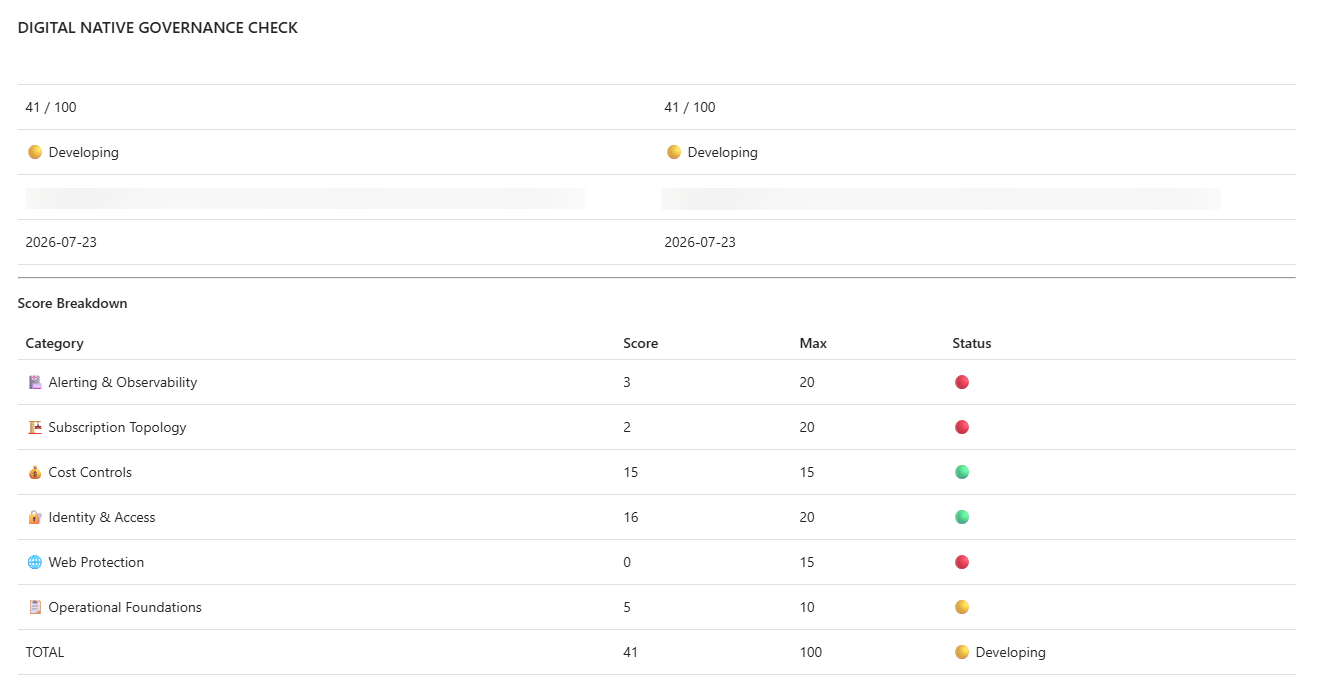
The agent checks 6 governance categories: Alerting, Subscription Topology, Cost Controls, Identity, Web Protection, and Operational Foundations. Each category gets a score against its maximum, and the total determines a maturity level (Foundation, Developing, Established, or Optimized).
In my test run, the subscription scored 41/100, placing it at "Developing" maturity. Web Protection scored 0/15 because there was no WAF, no custom domain, no DDoS protection. Alerting scored 3/20 because Service Health and Resource Health alerts were missing entirely. That is specific enough to act on immediately.
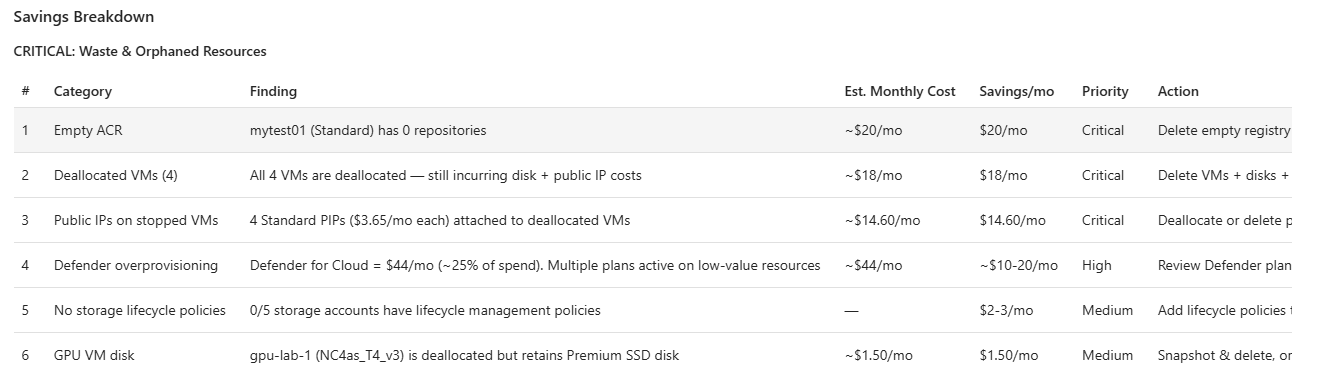
The FinOps skill found ~$43/month in recoverable waste on a subscription that costs about $177/month. Empty container registries, deallocated VMs still paying for disks and public IPs, overprovisioned Defender plans. Not a huge number, but for a pre-seed startup running lean, that is real money sitting idle.
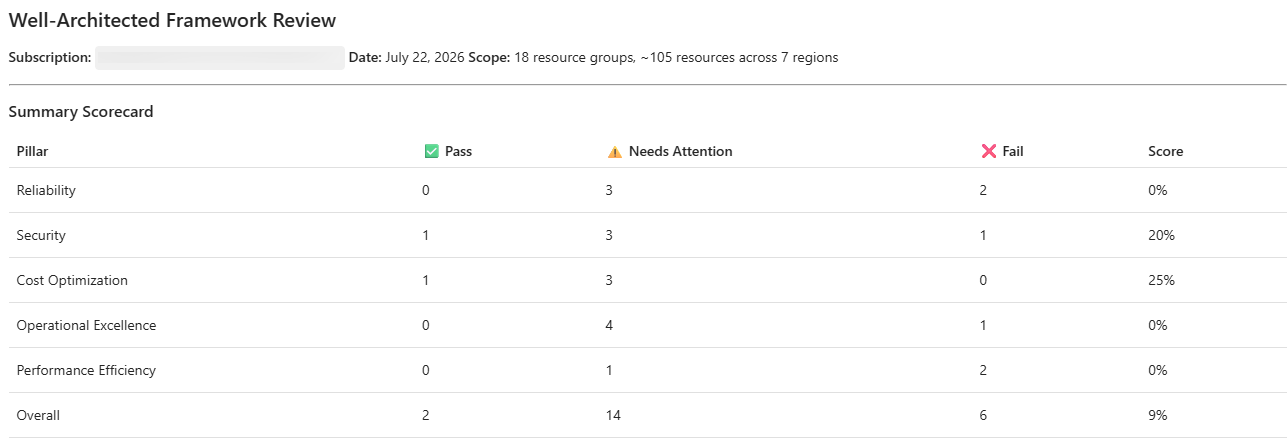
And here is what the Well-Architected review looks like when it scores all five pillars:
Lessons from building this
Three things I did not expect when I started.
First, prompt structure matters more than prompt length. Early versions of these skills were verbose, with long explanations of each check. The agent performed better with terse, structured instructions that clearly separated what to check, how to check it, and how to format the result. Clarity beats volume.
Second, the LLM behind the agent occasionally rendered emoji shortcodes (:red_circle:) as literal text instead of Unicode characters. This sounds minor but it made the output hard to scan visually. The fix was a single line in the skill definition: "Use Unicode emoji characters directly, never use emoji shortcodes." Explicit formatting instructions prevent the model from making stylistic choices that degrade readability.
Third, scoring philosophy requires intentional calibration. If you weight security checks too heavily, every subscription looks terrible and the report loses signal. If you weight them too lightly, teams ignore real risk. I landed on roughly 35% security, 30% reliability, 25% cost, and 10% architecture for the AI workload skill after testing against several real environments and seeing which distributions produced actionable variance between "good" and "needs work" subscriptions.
How to use this
The skills are open-source at github.com/ricmmartins/azure-sre-agent-skills. Each skill is a single Markdown file you paste into the SRE Agent portal at sre.azure.com. Setup takes about five minutes per skill.
You do not need all eight. If your startup is pre-revenue and running a single subscription, start with Capacity Planning and FinOps. If you are preparing for an enterprise customer's security questionnaire, start with Compliance and Defender Secure Score. Pick the two or three that match your current pain.
The skills are MIT-licensed and designed to be forked. If your compliance requirements include specific tagging conventions or naming standards, edit the skill to check for those. The structure is documented so you can build your own from scratch if none of mine fit.
How this differs from Azure Advisor
The first question people ask: why not just use Azure Advisor?
Advisor gives you a flat list of recommendations per resource. It tells you "this VM could be smaller" or "enable HTTPS on this App Service." Useful, but limited in three ways.
First, Advisor has no concept of correlation. It does not know that your failing health probe, your missing Resource Health alert, and your absent backup vault are three symptoms of the same problem: nobody set up operational foundations for that workload. These skills connect findings across domains and produce a single maturity score that tells you where you actually stand.
Second, Advisor does not generate narrative reports. It exports a CSV of individual recommendations, but there is no scored document with correlated findings, maturity levels, and prioritized remediation commands that you can forward to a CTO or attach to a security questionnaire. These skills produce that artifact directly in the chat, ready to copy or download.
Third, Advisor is passive. You go to the portal and look at it. SRE Agent runs your skills on a schedule and surfaces problems before they surface themselves as incidents. The difference between "there is a recommendation waiting in the portal" and "the agent flagged a quota at 85% utilization this morning" is the difference between a suggestion and a safety net.
Think of Advisor as a linter. These skills are closer to a staff SRE who reads everything, correlates the findings, and writes you a report with priorities and az CLI commands ready to paste.
What this is not
This is not a replacement for proper observability, incident management, or SRE staffing. When your startup reaches the scale where you need a dedicated SRE function, you should build one.
What these skills give you is coverage during the phase when you do not have that function yet. They catch the slow-moving risks that slip through the cracks when everyone is heads-down shipping features. Think of them as a part-time auditor who checks in daily and tells you what drifted since yesterday.
For startups on Azure, that gap between "we should probably check our security posture" and "we have someone whose job it is to check our security posture" can last years. These skills are one way to fill it.

 Microsoft