We are happy to announce that we shipped another version of Skype for Business on Mac. You can find all changes in our release notes and I copied them below for your convinience:
Users who are Presenters in a meeting can now end the meeting from Skype for Business on Mac by selecting More Options (...) and then End Meeting. When a meeting is ended, all users in the meeting are disconnected.

Note: Skype for Business Online users only.
Display Join Meeting Audio dialog box for every meeting
Users will now see the Join Meeting Audio dialog box when joining a meeting from the Meetings tab in addition to when they join a meeting from outside of Skype for Business on Mac.
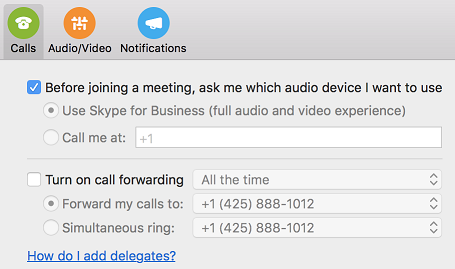
Help for adding delegates
A new help link in the Calls page of Preferences dialog box will make it easier for users to access documentation describing how to add delegates in Skype for Business.
Improvements
-
Fixed an issue where the app doesn't automatically select a connected audio headset when making a call or joining a meeting.
-
Fixed an issue where incorrect dial-in phone numbers for some regions were displayed for online meetings in Outlook. This requires Outlook for Mac 15.37.170815 or later.
-
Fixed an issue where the Take over as Presenter button is not disabled when the user is demoted from Presenter to Attendee in a meeting.
-
Fixed an issue where users see an incorrect error message when a presenter ends a meeting.
-
Fixed an issue where users might see a black or gray screen when someone shares a screen in a meeting.
For questions on comments, please post in our community!
Updated Sep 08, 2017
Version 2.0
Thomas Binder
Former Employee
Joined September 20, 2016
Skype for Business Blog
Follow this blog board to get notified when there's new activity


