Simplifying management of Oracle workloads on Azure with workload intelligence and AI agents
Running mission-critical Oracle workloads on Azure requires more than managing individual virtual machines, databases, networks, and monitoring alerts. Operations teams need to understand the health, configuration, and performance of the entire Oracle workload across application, database, and infrastructure layers, quickly identify where attention is needed, and resolve issues faster.
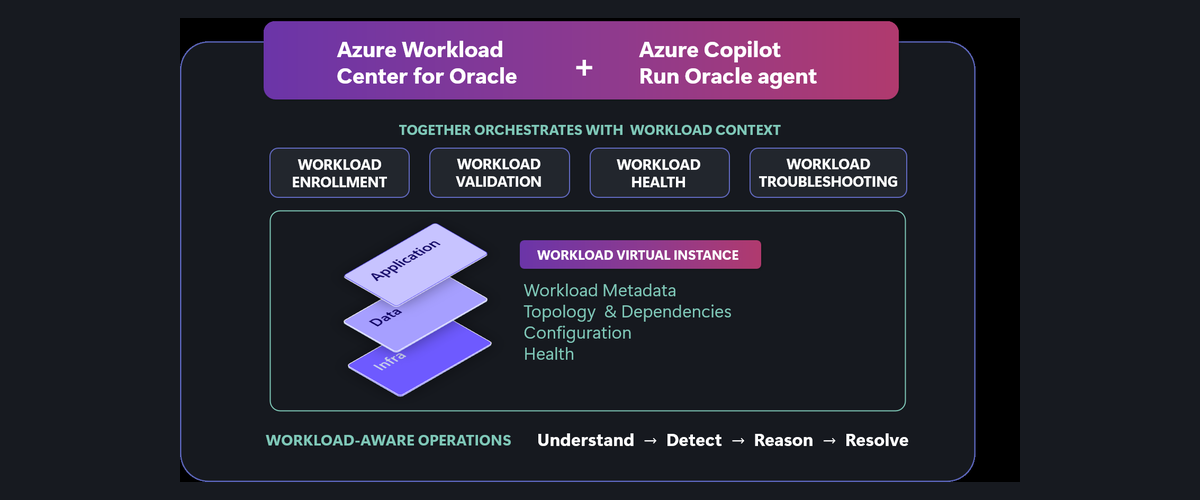
Today at Microsoft Ignite, we’re excited to announce the limited preview of Azure Workload Center for Oracle, together with the Azure Copilot Run Oracle Agent, a workload-aware experience, powered by Workload Virtual Instance(WVI) for operating Oracle workloads on Azure. Azure Workload Center for Oracle helps teams understand workload health, identify configuration deviations, and assess the impact of platform issues in the context of the applications they support.
Introducing the Workload Virtual Instance for Oracle Workloads
Azure Workload Center for Oracle introduces the Workload Virtual Instance (WVI), a logical collection of application services, database services, networking, and supporting Azure infrastructure that make up a workload. Teams can model their application running on Azure with Oracle AI Database@Azure service offerings as one WVI in the Azure Portal.
Once onboarded, the WVI provides context for health monitoring, configuration deviations, and Run Oracle Agent. Rather than piecing together resource relationships during an incident, operators have a workload-aware starting point for understanding what needs attention.
Faster Time to Insights with Workload Health Observability
Understanding the health of your Oracle workload starts with seeing how their components work together. Workload health observability shows the health of your Oracle workload, its components and the underlying infrastructure in one view, so you can quickly determine if there are deviations and where they are located. Built on Azure Monitor health models, it combines infrastructure metrics with database metrics and rates the overall workload as healthy, degraded, or unhealthy.
When an application is modeled as a WVI, predefined metrics, thresholds, and health logic provide an out-of-the-box view of workload health, with flexibility to customize what healthy means. Signals across Azure infrastructure and Oracle databases are brought together, while workload and component-level alerts, timelines, dependencies, and resource views help teams quickly identify what changed, what is affected, and where to investigate.
Workload Health Observability also includes a Copilot-generated AI health summary that brings together the WVI’s current health, the signals driving component and resource health states, and relevant events from the past 24 hours, helping operators quickly understand what needs attention without manually correlating individual health signals.
Identify configuration deviations proactively
Oracle environments depend on configurations across Azure infrastructure, operating systems and Oracle components. Settings that were correct at deployment can deviate over time, and new resources do not always follow the same configuration standards. Configuration Validation in Azure Workload Center for Oracle checks your systems against Microsoft WAF/WARA recommendations and Oracle best practices and flags deviation risks before it becomes an operational problem. Operators can enable notifications, consolidated by workload, reducing repetitive alerts and enabling you to stay on top of high impact deviations, with the ability to quickly drill in to get more details.
With the Azure Copilot Run Oracle agent, you can ask what changed, understand the impact, check current settings through configuration retrieval and get a workload-aware remediation plan with scripts to immediately resolve the issue. Together, the workload center and agent help you move from visibility to action with control over when and where you execute changes.
Assess platform impact when problems occur
When a platform issue affects an Azure VM, identifying the VM is only part of the answer. Operators also need to know what impact it plays in the Oracle workload and whether other mapped VMs or workloads may be affected.
Azure Copilot Run Oracle Agent uses WVI context to connect impacted Azure VMs to the workload components they support. Operators can ask about an issue at a specific time, understand the reason for the impact, and examine affected workloads in a region. This turns a resource-level event into a more useful view of workload impact, helping teams focus their investigation and prioritize their response.
Looking ahead: End-to-end troubleshooting using AI agents across Azure and Oracle Stacks
We’re excited to share our vision for workload-aware troubleshooting using AI agents across Azure and Oracle stacks at Ignite. The in-session demo illustrates how expertise across layers contribute to a more connected investigation. The Azure Copilot Run Oracle agent uses the workload context to help operators move from a reported issue to understanding where the problem is occurring, why it is happening, and what to do next. By bringing together Azure signals and Oracle database intelligence, it reduces the manual effort of correlating issues across application, infrastructure, network, and database boundaries; reducing days and hours of effort into hours and minutes.
Get started with the limited preview
Azure Workload Center for Oracle is available to a limited set of customers in limited preview.
- Fill this form https://aka.ms/workloadcenter/Oracle-Ignite and we will reach out to you on next steps.
- Documentation https://aka.ms/workloadcenter/Oracle-learn
Alongside Azure Workload Center for Oracle, Azure Workload Center for SAP is also now in limited preview.
See it live at Microsoft Ignite
Listen to it in person or online Bring agentic operations to Oracle and SAP on Azure.
Visit our partner Oracle booth #6163 at Microsoft Ignite to experience an Azure Workload Center for Oracle and Azure Copilot Run Oracle Agent demo
Learn more about the latest from the Microsoft and Oracle partnership aka.ms/Microsoft_OracleAgenticAI

 Microsoft