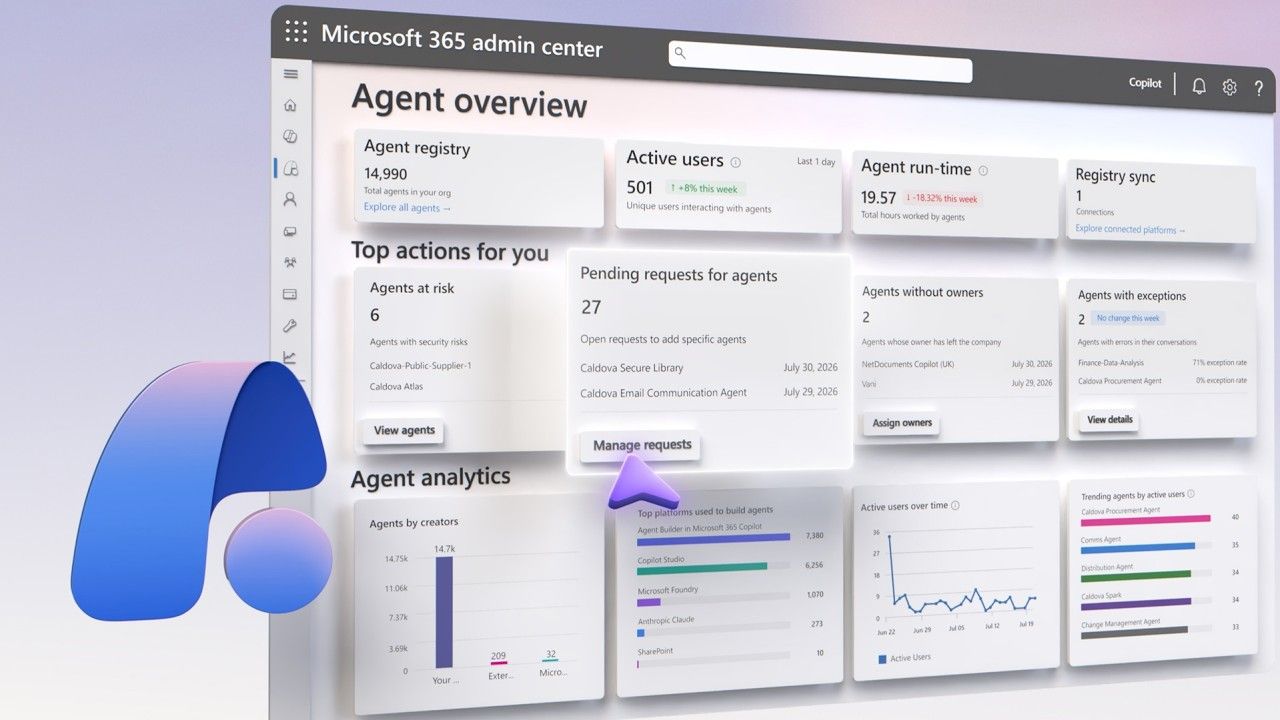
Govern every AI agent running across your organization with Agent 365.
Track agents from Microsoft, Amazon, Google, and Salesforce in one registry, sync in agents you’re already running on AWS Bedrock, Google Cloud, Databricks Genie, and Anthropic Claude, and lock down shadow AI with default blocks and Execution Container isolation.
Agent 365 inspects your environment for every agent Microsoft and partners have registered, then layers control on top. Reusable security policy templates apply Conditional Access, Access Packages, and Custom Security Attributes the moment you approve an agent, Tools governance blocks risky MCP servers and connectors org wide, and the Adoption Dashboard breaks down usage by group, job function, and license type for every manager in your org.
Jeremy Chapman, Microsoft 365 Director, shares how to bring every agent in your organization under one governed registry, and how to shut down shadow AI before it ever compromises your environment.
One registry. Every agent. Full context.
Agent 365 tracks ownership, permissions, and activity across platforms in a single pane. See it here.
Block risky tools. Approve the rest.
Agent 365 unifies the MCP servers, plugins, and connectors that your agents use. Start here.
Lock down shadow AI by default.
Agent 365 lets you block unsanctioned local agents with Intune policies and isolate them using Microsoft Execution Containers. Check it out.
👥 Who it’s for:
IT admins, security engineers, and identity teams governing AI agents across Microsoft 365, Entra, Purview, Defender, and Intune; solution architects designing agent access, tools, and security policy at scale; developers and DevOps teams building and registering agents and custom MCP servers in Copilot Studio, Agent Builder, and Foundry; and team leads, finance, and IT leaders tracking agent adoption, usage, and spend across the organization.
⏱️ Chapters:
00:00 Why you need an AI agent control plane
02:00 See every AI agent across your environment with the unified agent registry
02:50 Track local AI activity with OpenTelemetry and the Agent Map
03:16 Sync AI agents from AWS Bedrock, Google Cloud, Databricks and Claude with Registry Sync
03:55 Approve, publish and block AI agents across your organization
04:42 Manage MCP servers, plugins and connectors with Tools governance
05:18 Apply reusable security policy templates across Entra, Purview, Defender and Intune
06:06 Block shadow AI and isolate local agents with Microsoft Execution Containers
06:23 Track agent adoption and usage with the Agent 365 dashboard
07:06 Set spending limits and cost alerts for AI agents
08:02 Monitor AI agent costs and buy prepaid credits
09:07 Get started with Agent 365 today
Agent 365 gives you one place to govern every AI agent running across your organization, no matter where it was built or who owns it. In this demo, the unified agent registry surfaces agents from Microsoft Foundry, Copilot Studio, Agent Builder, and SharePoint, alongside agents from Amazon, Google, and Salesforce, each with its identity, owner, permissions, and usage history attached. Local AI running on managed devices shows up too, logged through standardized OpenTelemetry and mapped visually in the Agent Map so you can trace connections between agents, people, data, and tools. Registry Sync pulls in agents you’re already running on AWS Bedrock, Google Cloud, Databricks Genie, and Anthropic Claude with nothing more than a connection string, and from the same registry you approve agents for broader use, publish or pin them to specific groups, automate ownership handoffs when an employee leaves, and block any agent you don’t want in production.
From there, Agent 365 puts you in control of what agents can touch and how they’re secured. The Tools view gives you one place to see every MCP server, plugin, and connector your agents rely on, block the risky ones, and approve or reject new tool requests as they come in. Reusable security policy templates apply Conditional Access, Access Packages, and Custom Security Attributes the moment you approve an agent, drawing on native signals from Microsoft Entra, Purview, Defender, and Intune so your identity, data security, SecOps, and device teams enforce the same controls. Shadow AI running as unsanctioned local agents gets blocked by default through Intune policy and isolated from user sessions with Microsoft Execution Containers. Team leads and managers track adoption and usage in the Agent 365 Dashboard, filtered by group, organization, job function, or license type. IT and finance teams set monthly spending limits, per user budget caps, and weekly usage alerts for Copilot Cowork and the Work IQ API, and can pre purchase discounted credits to keep spend predictable.
�� Related links:
Get started at https://aka.ms/agent365
Unfamiliar with Microsoft Mechanics?
Microsoft’s Official Video Series for IT
— Subscribe https://www.youtube.com/c/MicrosoftMechanicsSeries
— Microsoft Tech Community: https://techcommunity.microsoft.com/t5/microsoft-mechanics-blog/bg-p/MicrosoftMechanicsBlog
— Podcast: https://microsoftmechanics.libsyn.com/podcast
Join us on social:
— https://twitter.com/MSFTMechanics
— https://www.linkedin.com/company/microsoft-mechanics/
— https://www.instagram.com/msftmechanics/
— https://www.tiktok.com/@msftmechanics
Video Transcript:
-AI agents are quickly becoming the newest members of your work environment, and they’re showing up everywhere. They’re being created by employees, your developers, your business partners, and external software vendors. They’re running across multiple platforms and are increasingly interacting with your organization’s data and systems. The challenge is how to stay in control of these agents at scale. You need visibility into which agents exist, who owns them, what they can access, and what they’re doing across your environment.
-And that’s where Agent 365 comes in as Microsoft’s control plane for AI agents. It gives you a single solution to observe, manage, govern, and secure agents across your organization wherever they run. It helps you understand how agents are being used, what resources they can access, along with what they can do and their unique permissions. It surfaces agents that are introducing risk into your environment, including those brought in by a shadow AI, while placing you in control of approving agents before they’re broadly available, defining which people or groups can use them, and establishing guardrails ahead of their deployment.
-Then beyond individual agents, you can define policies that apply to all potential agents running in your environment while governing the tools they can access all up. And because Agent 365 includes native capabilities and signals for Microsoft Entra, Purview, Defender, and Intune, this means that your identity, data security, security operations, and device endpoint teams can work together consistently to enforce the controls that keep agents secure.
-Today I’ll demonstrate the unified controls for Agent 365 in the Microsoft 365 admin center, covering what’s available now and what’s coming next. And everything starts with visibility, understanding which agents exist across your environment, who owns them, how they’re being used, and the risks they may introduce. Here, the unified agent registry, which is core to the experience, gives you visibility into the agents in use across platforms for Microsoft and providers including Amazon, Google, Salesforce, and others all in one place. Microsoft agents can be running in Foundry, built using Copilot Studio, or Agent Builder in Microsoft 365. They can be SharePoint agents or agents built by both Microsoft and Microsoft partners.
-For any agent, you can see whether it’s managed with its own identity and corresponding permissions and whether it has an owner assigned as well as which people have access to the agent, the data and tools it’s been configured to work with, security controls applied to the agent, its defined permissions for APIs, connectors, and MCP servers, and insights into its recent activity and usage metrics over time. You also have visibility into local AI being used across platforms with details for which computers it’s running on. All agent actions are recorded using standardized OpenTelemetry, or OTel, for consistency and visibility across connected AI stacks. And the agent map helps you visualize agents running across platforms so that you can see connections between agents, people, data, and tools. And we also make it easy to bring in agents from other agent platforms into Agent 365 using registry sync.
-Here I’ve already connected sync for Databricks, AWS Bedrock, and Google Cloud, which gives us visibility into agents running on those platforms. And just to show you what’s behind this and your options, I’ll click Connect a platform. And under external platforms, we see Bedrock, Google, and Databricks Genie along with Anthropic Claude and Salesforce AgentForce. You just need to enter the API or service domain connection details, and the respective agents will appear in the agent registry once these platforms sync. Beyond visibility into your agents and activities, Agent 365 also puts you in control over who can use agents and the resources they can access. As an Agent 365 admin, you control who can access agents in Microsoft Copilot as well as who can share them.
-For requested agents, you’re in control of which agents are approved for broader use, or you can publish them for specific users or groups to your agent store for discovery or pin them on behalf of users and groups. To help scale this, you can use automated rules to perform common management operations like assigning ownerless agents to the departing user’s manager. And from the agent registry, you can block unwanted agents from being used as well as change owner assignments for existing agents.
-In Agent 365, tools are the capabilities that agents use to take action such as using MCP servers, plugins, and connectors to find information as context across various apps and services. And you have a unified view of all the tools in your organization across all types. And tool categories will expand to include your own defined agent skills. From here, from any tool, you can also block unwanted or high-risk tools from being used. Then in the request tab, you can approve or reject new tool requests as they come in, and you can register and manage your organization’s own custom MCP servers.
-Next, security controls in Agent 365 continually assess access requests, prevent data loss, and defend against other threats. These controls are enforced using Microsoft Entra, Purview, Defender, Intune, and SharePoint protections. Back in Agent 365 settings, you can create reusable policy templates where protections are managed in their respective security platform. These can be scoped to agents with or without their own identities, and you can configure Conditional Access policies, access packages, and custom security attributes, along with default policies across additional solutions in the Microsoft security stack.
-Now if I go back to the requested agent publishing flow, these reusable templates can be applied as you approve and deploy agents for broader consumption. And now for Shadow AI running as unsanctioned local agents, you can configure default blocks, all enforced by underlying Intune policies, as well as require that local agents are isolated from primary user sessions using Microsoft execution containers. This level of visibility into your agents and how they’re being used is not just for admins. The Agent 365 dashboard and insights gives team leads and managers inside your organization the ability to understand agent usage and drive adoption.
-You can find details about each agent along with adoption metrics filterable by group, organization, job function, or license type. And you can also understand where the agents were built. Moving over to the Adoption tab, you’ll also find details with trends by group with comparisons, and below that are your top agent highlights and a snapshot that shows the top agents in use. And you can drill into each for review of its specific details and usage trends.
-Next, let’s look at cost management, where you can enable and manage usage-based services to avoid unexpected costs and set controls to manage your spend. Now this applies to Copilot Cowork as well as Work IQ API, which are turned off by default. To enable these services, from here, you can get started to set up the default policy for your organization. Here you’ll select the appropriate Azure subscription, which is pre-populated and used for billing. And optionally, you can set monthly spending limits, and I’ll do that here at the org level.
-Below that, you can optionally set monthly limits at a per-user level as I’ll do here. And you can also define alerts to get weekly summaries, notifications when limits are reached, and set thresholds to trigger alerts as usage approaches budget limits. So I’ll set it here to around 80% of my limit and then hit Activate to confirm. With a default policy in place, I’ll switch over to another tenant where this has been running for a while. First, the Overview tab shows you key metrics for credits used in the current month by type and number of active users. You’ll also see which users have requested additional credits and spending versus thresholds per policy, which in this case was configured per department. You’ll also see the users closest to hitting their limits.
-And scrolling down, you can find spend comparisons by group along with month-to-date trends and the distribution by service type. Scrolling back up and moving to the Configuration tab, you can create spending policies like I showed at the company level for specific groups with their own budget limits as you can see here. And you can also optionally buy prepaid credits at a discount. For example, to reduce costs, you could pre-purchase 300,000 credits at the discounted rate and use pay-as-you-go pricing for any credits beyond that. Finally, the Consumption tab gives you details for each user to view their current usage and spending limits.
-That’s how Agent 365 gives you a single control plane to get the right level of visibility, configuration, and management over all your agents wherever they run. To learn more and get started, check out aka.ms/agent365. Keep watching Microsoft Mechanics for the latest updates, and thanks for watching.
