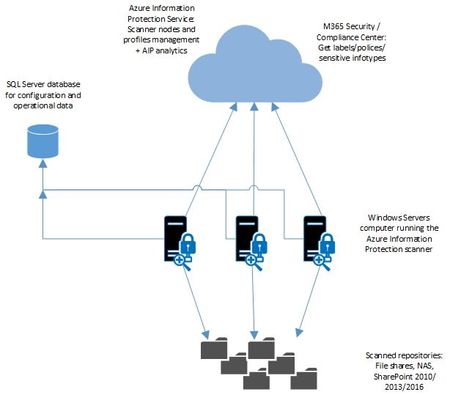
Since its release, the Azure Information Protection scanner has been adopted by many different types of customers. For example, some small businesses have deployed single scanners to address all thei...
I was able to scan all of my on-prem content with the AIP Scanner after adding that service account to a label policy, thanks. However, I’ve encountered a bug and I’m not sure where to report it. So I thought I’d throw it out here, in case anyone has any thoughts on it before I open a support ticket with Microsoft.
The AIP Scanner did find files using the sensitive information I defined in my auto-labeling rules. However, it’s not honoring the rule conditions.
For example, I have a rule in a sensitivity label the requires both a US Social Security Number AND a value from a keywords list (e.g. SSN, Social Security, SS#, etc.) to be considered a match. The AIP Scanner, however, is matching on the first condition and second condition and both conditions. This is not what I want because I consider those first two matches to be false positives. In other words, if the AIP Scanner finds a SSN, don’t label and encrypt it unless there’s a keyword in the file, as well.
As is, if I apply labels using the AIP Scanner, it will label and encrypt 98,000 files that shouldn’t be. Below is a screenshot of my sensitivity label with the rules and their conditions. The second screenshot is a pivot table I made from combing the AIP Scanner results. As you can see, it’s not honoring the settings defined where BOTH conditions need to be met for the two rules:
AIP Sensitivity LabelAIP Scanner Report
Any thoughts on how I can get the AIP Scanner to process the auto-labeling rules correctly, or have it apply labels only if certain combinations of sensitive info types are discovered within a file?