Visibility to your organization’s AI agents is the first step in a comprehensive identity and access management solution for non-human identities.
Updated May 23, 2025
Version 4.0
Alex_Simons Microsoft
Microsoft MicrosoftMicrosoft
TobiasAT that's some very helpful information right there, thank you. Your blog post is extremely valuable. I will go ahead and try this with PowerShell as you've described. Although I am now also thinking that the reason I am not seeing our Azure AI Foundry projects as managed identities in Entra ID, is that all projects have been created way before Microsoft introduced this change. So, I will also simply create a new project and check back under Enterprise Apps whether the project shows up, like yours do as shown in your blog. Thanks a lot!

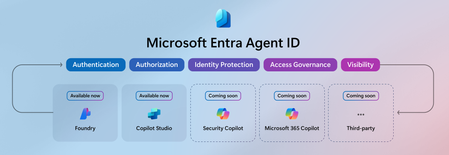
dmusil It makes sense that you cannot find your Azure AI Foundry projects with the Agent ID filter, as I also noted this in my analysis for Copilot Studio agents. Microsoft has been adding the new tag AgenticInstance since May. The Agent ID view filters on that tag. What is your situation if you remove all the filters from the Enterprise apps view. Can you find your Azure AI Foundry projects if no filter is applied?
TobiasAT You were absolutely right. With no filters applied, we can see all our Azure AI Foundry projects. I guess I was confused, as to me the second screenshot in your blog post looks like you are seeing your Azure AI Projects with the Agent ID filter applied. That's probably a misinterpretation on my end.
dmusil You are right, the second screenshot is filtered for Agent ID and shows the Copilot Studio agents and Azure AI Foundry projects. In my private tenant I have four for the simulation.
If you don't see the projects, there is a simple explanation. Microsoft has been adding the Agent ID tags to all new projects since May (or somewhere in that time range). The tags from your past projects are missing, so the filter does not list your existing projects.
Try to create a new project and check if this project is listed. I assume the project is on the list as a new project gets the tags assigned. If you delete the project, the service principal is deleted instantly and removed from the Agent ID filter.