Work rarely begins and ends with a single request. A quick question turns into a document, a launch plan grows into a weeks-long project, and some tasks need to keep moving after you step away. As AI takes on more of that work, using it should get simpler, without making you choose from a growing list of tools before you begin.
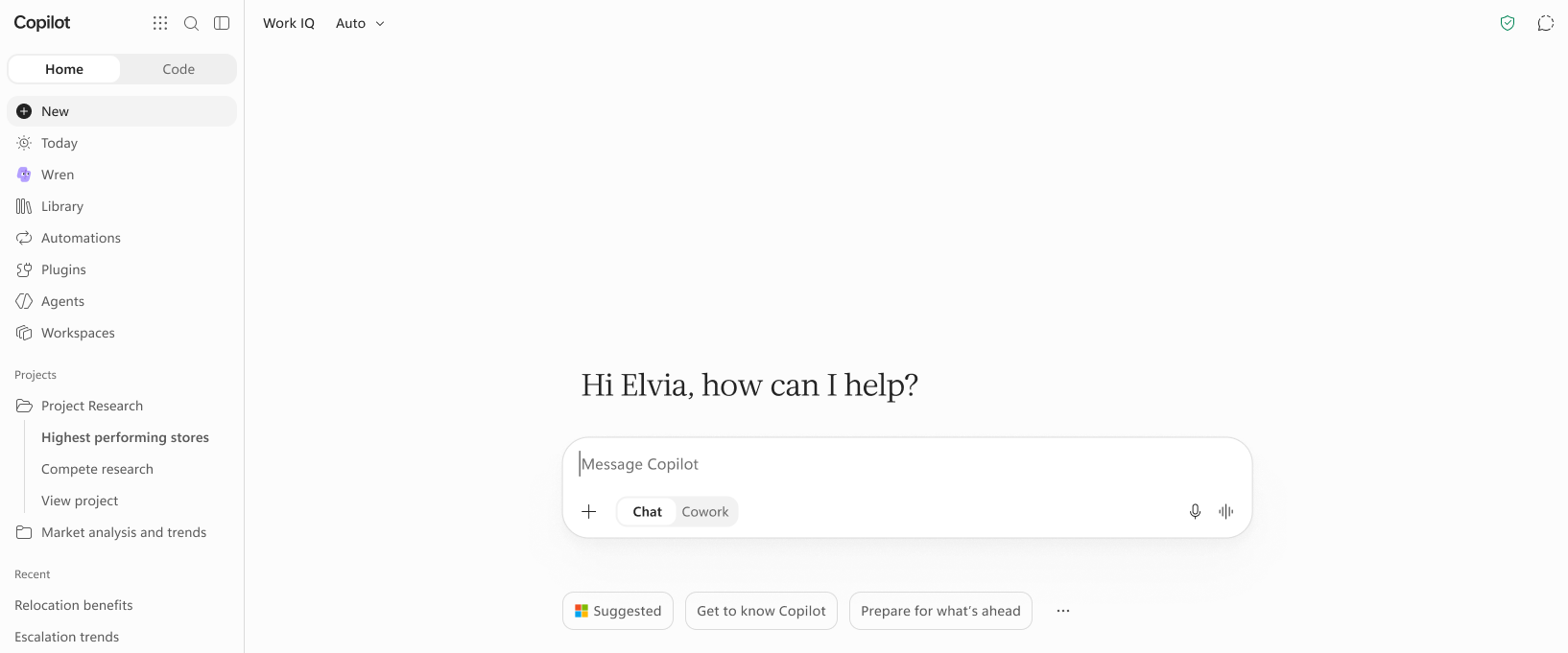
At Ignite this year, we're unveiling the next chapter for Home in the Microsoft Copilot app. Home is your starting place for work, where you can ask questions and delegate multi-step tasks, see what needs your attention, keep projects and team context together, and track what Copilot is creating and running for you.
Ask, create, and delegate work
Home starts with one prompt box, whether you need a quick answer, a polished document, or a multi-step outcome you can hand off. We brought Chat and Cowork together, now generally available, so you can move easily from asking quick questions and creating a first draft to delegating complex, multi-step tasks. Your Chat and Cowork conversation history is also in one shared place so you can find the meeting recap you asked Chat for in the morning, as well as the larger workstream you delegated to Cowork later.
In Home, Auto routes to the right models and effort for your task. For complex, delegated work, Auto may also recommend switching from Chat to Cowork. If you switch, Copilot carries over the prompt and relevant Chat context so you do not have to copy, paste, or explain the task again. Chat to Cowork recommendations are now generally available.
In addition to bringing Chat and Cowork to Home, we’re rolling out new capabilities to both experiences. With the full power of Office now generally available in Chat and Cowork, you can create editable Word, Excel, and PowerPoint files and collaborate on them with your team without leaving the Copilot app. Files are saved directly in OneDrive with familiar security and compliance controls.
Auto routing in Cowork, which dynamically picks the right model and effort for your task, now uses Microsoft-Decision-1.1 to automatically adjust the effort level for a given task. Auto splits complex work across subagents that run side by side, each using a model selected for its specific requirements, and then brings the results together into one finished output. Auto routing in Cowork is rolling out to Frontier this week. For more Cowork news, read the Cowork blog.
Stay on top of what needs your attention
Work doesn’t always have to start from a prompt. The new Today view in Home brings proactive assistance to you, helping you spend less time tracking down priorities across your apps. Today is your command center across mail, calendar, Teams, meetings, and Cowork tasks, and is available in Frontier private preview in the Copilot app and Outlook. It proactively surfaces what needs your attention and prepares drafts and proposals for you to review and approve directly – no prompting required.
Note: Final design for Today is subject to change.
Keep related work together
Work often persists beyond one conversation and continues over time. Copilot Workspaces and Projects hold that context together in Home, whether the work is shared with your team or personal. Copilot Workspaces, the evolution of Copilot Notebooks, make it easier to collaborate with your team and Copilot. Workspaces bring context, collaborators, and working files for an ongoing workstream into a shared space in the Copilot app. Get started quickly with suggested workspaces based on your current workstreams, then collaborate with your team across different documents and see what they’re working on with live team presence. As teammates create files and make updates, Copilot connects the dots across the Workspace, showing what changed and what is still open so everyone stays on the same page. Workspaces is now available in Frontier.
Projects, now generally available, keep your related Chat conversations, Cowork tasks, and outputs together in the Copilot app. Add instructions and relevant sources once, then return to the project to start new chats and tasks without reestablishing context or losing track of your Copilot interactions. Projects draw first from the context you add, and then from your broader Microsoft 365 work context to deliver more relevant results. Outputs are listed within the project and stored in OneDrive so you can easily find, share, and continue iterating on them.
Track and manage AI work in one place
As Copilot takes on more of your work in various forms, Home becomes the place to track and manage what it has created and is autonomously running for you. For automating ongoing work, Autopilot is now accessible from Home and rolling out in Frontier. Autopilot is a personal, proactive agent with its own identity, memory, and tools that keeps work moving for you in the background. Chat with your Autopilot and track its activity across your apps directly from Home. To learn more, read the Autopilot blog.
Automations, now generally available, provides one view to manage scheduled and ongoing Copilot tasks across Chat and Cowork. Review what is running, make changes, and open the related Copilot conversation directly from Automations.
As we bring more capabilities into Copilot, we also want it to be simple and intuitive to use. Home in the Copilot app provides a single front door for your conversations, tasks, and context so you can pick up where you left off and keep work moving.
Updated Nov 17, 2026
Version 1.0
anniepearl Microsoft
Joined November 11, 2025
Microsoft Copilot Blog
Follow this blog board to get notified when there's new activity