Updated Apr 30, 2026
Version 4.0
NatachaC Microsoft
MicrosoftMicrosoftMicrosoft
I don't recall receiving any notification. I last signed drivers in early 2025, but on Jan 19, 2026 I needed to sign more and the account is locked out. I can't complete the identity verification because there is no "resolve" or "fix it" button (only contact support). Says: Identity Verification - "Estimated data by 1/15/2026", "Pending Partner Action". The open ticket is on its forth day now with only generic response when someone just needs to take a minute to enable the ability to complete verification. I can't get help from the link listed above because the AI won't do anything with hardware and must go through the Partner Center - Account Settings support. You should have a special support for developers running in to this.

Hi dftb, I ran into the same issue recently. In my case the verification flow in Partner Center was stuck (no 'Resolve' or 'Fix it' button), so I opened a support ticket and asked them to reset/unblock the identity verification so I could restart it in the new verification system. After they enabled it, I was able to complete the verification, and the account was working again within about a day.
Hope this helps, and fingers crossed they can unblock yours quickly as well.
Thanks for the encouragement. I did get something today from a ticket I have no clue where it came from, but it had a link to complete the Identity Verification which I did and added to MS authenticator on the phone as well. The Legal Info now says "in progress" for Identity Verification even though I completed it successfully. Not sure if it just takes time manually to make it move pass that step?
I do see in the authenticator it says it shared it with "SAS T3 Support" (whatever that is).
It took about a day then the Legal Info had a "Resolve" button that brought me to a screen with a QR code to scan using the MS Authenticator app on the phone. I choose Verified IDs, clicked the Scan button, Scanned the QR and allowed it to Share the ID. After that it moved on to the next step and eventually completed in the same day. So I'm good to go now.
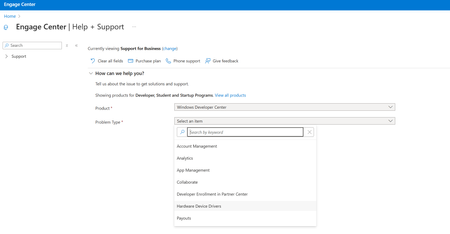
As far as Update: Create a New Support Request | Microsoft Community Hub, that now has AI and to get past it to a screen matching the aforementioned article, I had to keep telling AI I wanted to create a new support request for the "dev center" dealing with "hardware device drivers". You can tell it you need to Restart Identity Verification and creates a ticket that goes to Account Settings. I can't tell you which ticket did the trick because those are still open (The one I had no clue where it came from closed as soon as they sent the link). Took a total of 5 days.