Blog Post

Exchange Team Blog
1 MIN READ

Video: demo of upgrading a CCR cluster from Exchange 2007 RTM to SP1

The_Exchange_Team's avatar
The_Exchange_Team
Platinum Contributor
Dec 04, 2007

To demonstrate upgrading a CCR cluster from Exchange 2007 RTM to SP1, I have created a video demo that takes you through the process of upgrading the passive node followed by upgrading the CMS to SP1 and finally upgrading the active node. This demo also demonstrates "Managing Clustered Mailbox Server" via the Exchange 2007 SP1 Exchange Management Console.

I also want to make a few points clear. The demo is actually for upgrading the entire CCR environment to SP1, not just the CMS.  It is important that both nodes be upgraded for the entire environment to work properly. I would also like to clarify that at some point in the video, I mention that before you do the upgrade, all resources on CCR-NodeA need to be taken offline or moved to the other node.  You should move the resources to the other node and NOT take them offline. This is because one of the groups should be the default Cluster Group, and if you take that offline, the cluster shuts down.

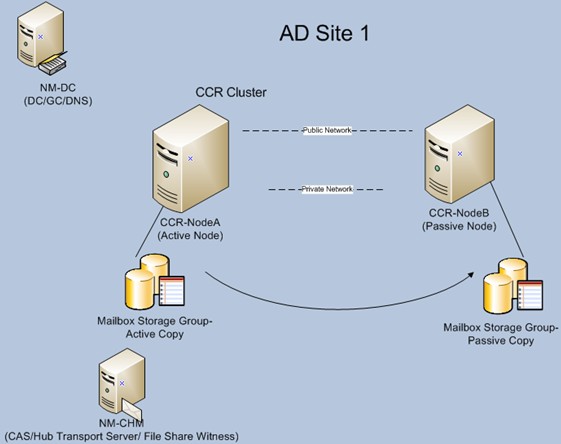
The following illustrates the environment that was used when creating this video:
You can find product documentation on "How to Upgrade a Clustered Mailbox Server in a CCR Environment to Exchange 2007 SP1", with very detailed steps, at http://technet.microsoft.com/en-us/library/bb676320.aspx.

Your feedback is always welcome. Thanks for watching. There are more demos on Installing CCR and SCC on Windows Server 2008 coming soon. Stay tuned!

- Nagesh Mahadev

Published Dec 04, 2007
Version 1.0

17 Comments

  • Anonymous's avatar
    Anonymous
    plus, why is it not available on MSDN yet?
  • Anonymous's avatar
    Anonymous
    Thank you very much Kevin. something strange happened. I checked on 3rd of December and the page was still showing 'come back later' perhaps a cached page. well i am not a bad guy but i think i'll have to ditch my X2K3 again!
  • Anonymous's avatar
    Anonymous
    Hi Jason,

    You could do something along the lines of a logon disclaimer via registry edit as mentioned here:  http://www.microsoft.com/technet/scriptcenter/resources/qanda/jan05/hey0117.mspx

    Or you can do it via the Domain Group Policy.  Edit the Domain Policy and go to computer configuration - security settings - local policies - security options.  Then edit the "Interactive logon:  Message text for users attempting to log on" with your disclaimer.  Of course this only happens when they log on to the workstation and not their Outlook client but could serve as a blanket disclaimer for company network resources.  Would this satisfy your legal department's requirements?
  • Anonymous's avatar
    Anonymous
    my question is pretty off topic, but I'm not sure where I can post on here.. maybe I'll get lucky.
    Is there a way to set a rule or something that populates every new mailbox with an email (or anything really) for our acceptable email use policy. (dang lawyers ;))
    thank you.. and sorry.
  • Anonymous's avatar
    Anonymous
    easy1ndian

    I guess you missed it because SP1 came out last week.

    http://msexchangeteam.com/archive/2007/11/29/447611.aspx
  • Anonymous's avatar
    Anonymous
    Thanks Nagesh for this useful post.
    I'm looking for an article which describes the upgrade process of an CCR cluster with ForeFront Security for Exchange (SP1) installed on.
    Could someone please provide us with at least the steps? Thanks in advance, TOM
  • Anonymous's avatar
    Anonymous
    I really appreciate you guys preparing us for the 'never coming' Exchange 2007 SP1 with your articles, videos, etc. For my surprise, even Windows XP SP3 has got RC1 status. Come on guys, Management is killing me for delaying the project more than 4 months waiting for SP1. Your 'Q4 Calendar Year' is not good for me. I will wait till next week and then I'm gonna apologize to My Exchange 2003 for ditching her for Exchange 2007 and bring her back!!!