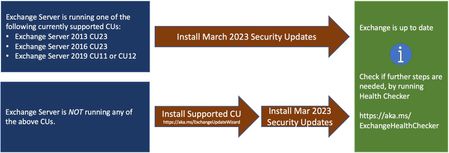
Microsoft has released Security Updates (SUs) for vulnerabilities found in:
Exchange Server 2013
Exchange Server 2016
Exchange Server 2019
SUs are available in a self-extracting auto-elev...
i did initially see some problems where add-ins were missing from OWA for several hours post update, but the same workaround that worked for the Feb SU seemed to work this time as well
-> toggling one of the add-ins off/on in the EAC -> if that didnt work for a given user, toggling one of the add-ins off/on specifically by the user in their OWA would resolve
eventually all users had access to the add-in whether or not they had forced an off/on transition
NOTE: i did need to access the "manage add-ins" page using the Options | General | Manage Add-Ins route as when a user was having a problem with this the path of picking Manage Add-Ins using the gear icon menu resulted in a blank page
i'm wondering if the update process isnt forcing a rebuild of the add-in related IIS pages, and its only on access/change that they are getting rebuilt...either way its a problem that seems to eventually resolve itself over time (at least it did for me in the few environments that i looked at)
this path worked
when there was an issue with the add-ins, this path did NOT WORK