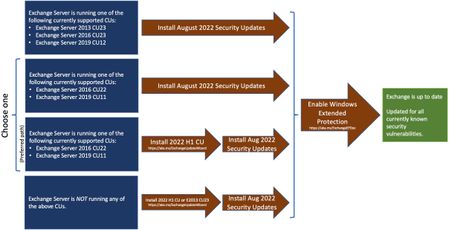
I've been reading and re-reading the details and comments and I'm unsure if our particular Exchange setup is referenced for whether I can enable Extended Protection. Here are the details.
- We used the Hybrid Configuration Wizard as part of the process to set up AAD Connect while we were prepping to migrate all users from Exchange 2016 on-premises to Office 365. That was done a couple years ago and there are no mailboxes hosted on-premises now. Exchange 2016 (with the latest CU and SU) is used for management purposes only. Exchange is not in 'hybrid mode' although HealthChecker detects that 'Organization Hybrid Enabled' is true. This is just information I thought I'd share, as it's not specifically mentioned other than to note that 'Modern Hybrid' is not supported.
- Back when users had mailboxes on-premises, a majority had an Archive mailbox with the applicable retention policies in place. Those retention policies are still in use in Office 365 for those users. Any new users created since the move to Office 365 have not had an Archive mailbox made available to them. I understand that the archiving impact is being investigated and I'm hoping this scenario can be clarified as to whether it means Extended Protection should not be enabled or if it's irrelevant because Archiving is not on-premises.
The hybrid config and archiving are the only two aspects that gave me pause. The fact that Extended Protection can be rolled back if there are issues suggests I should just go ahead and run it and, if something doesn't work, I'll just reset it to the backup.
I could not find mention of a management-only scenario and use of AAD Connect in relation to Extended Protection, but please point me to the info if it exists (there's a lot!). Thanks! I appreciate the work that is going into all of this.