ChrisToelke the "ConfigSupported" value highlights if the current Extended Protection configuration is supported.
Example:
If you run Exchange Server 2019 CU12 with the May 2022 Security Update, a supported Extended Protection configuration is "None" (as Exchange 2019 CU12 + May 2022 SU doesn't support Extended Protection). Therefore, the "ConfigSupported" value highlights in green if Extended Protection is not configured (turned off).
If you run Exchange Server 2019 CU12 with the August 2022 Security Update, a supported Extended Protection configuration can also be "None" (as this means that Extended Protection is turned off which is - for sure - supported, but it will highlight if this has not been set to the highest supported value [if Extended Protection is supported, these scenarios are almost "Allow" or "Required"]). However, we highlight in this case that Extended Protection needs to be turned on to be in a protected state regarding the
CVE-2022-24516, CVE-2022-21979, CVE-2022-21980, CVE-2022-24477, CVE-2022-30134 vulnerabilities.
So, if you have the August 2022 SU installed on the machine, you can run the ExchangeExtendedProtectionManagement.ps1 script to automatically configure Extended Protection. The script performs some prerequisite checks and if some of these checks aren't successful, it stops processing and will show the required actions to perform to make sure that Extended Protection can be enabled.
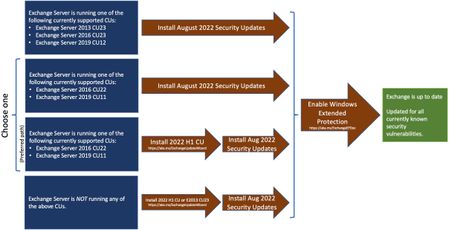
If you're still on the May 2022 SU (or older), you should install the August 2022 SU (based on the update paths shown in this blog post) and then continue with the Extended Protection activation process.