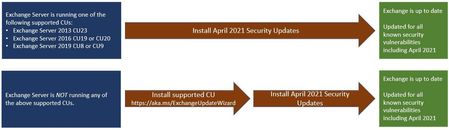
We have Win 2012 R2 w/ Exchange 2016 CU20 with March updates installed and was working. Just used Windows updates to download new patch and installed. Rebooted and now Exchange Management Shell on server is broken. We get
VERBOSE: Connecting to MBX1.host.local.
New-PSSession : [mbx1.host.local] Connecting to remote server mbx1.host.local failed with the following error message
: [ClientAccessServer=MBX1,BackEndServer=mbx1.host.local,RequestId=8d98dcd9-de12-4964-8813-d7f731557639,TimeStamp=4/16/
2021 8:54:24 PM] [FailureCategory=Cafe-SendFailure] For more information, see the about_Remote_Troubleshooting Help
topic.
At line:1 char:1
+ New-PSSession -ConnectionURI "$connectionUri" -ConfigurationName Microsoft.Excha ...
+ ~~~~~~~~~~~~~~~~~~~~~~~~~~~~~~~~~~~~~~~~~~~~~~~~~~~~~~~~~~~~~~~~~~~~~~~~~~~~~~~~
+ CategoryInfo : OpenError: (System.Manageme....RemoteRunspace:RemoteRunspace) [New-PSSession], PSRemotin
gTransportException
+ FullyQualifiedErrorId : -2144108477,PSSessionOpenFailed
Failed to connect to an Exchange server in the current site.
Enter the server FQDN where you want to connect.: