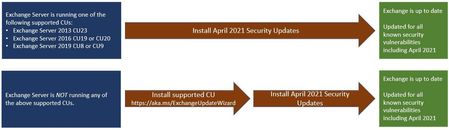
After install KB5001779 on Exchange 2016 CU20, NetApp SnapManager for Exchange (7.2.1) is stopped working.
I see the following error:
[04/15 22:42:16 028] Getting dash board info...
[04/15 22:42:16 028] Calling PowerShell to get current exchange server...
[22:42:16.028] [PowerShell Cmdlet]: get-exchangeserver -status -identity HQ-EX1
[04/15 22:42:16 028] [PowerShell Cmdlet]: get-exchangeserver -status -identity HQ-EX1
[22:42:16.075] [Remote PowerShell Cmdlet Error]:The syntax is not supported by this runspace. This can occur if the runspace is in no-language mode.
[04/15 22:42:16 075] [Remote PowerShell Cmdlet Error]:The syntax is not supported by this runspace. This can occur if the runspace is in no-language mode.
[22:42:16.075] [PowerShell Cmdlet]: get-exchangeserver -status -identity HQ-EX1
[04/15 22:42:16 075] [PowerShell Cmdlet]: get-exchangeserver -status -identity HQ-EX1
[22:42:16.106] [Remote PowerShell Cmdlet Error]:The syntax is not supported by this runspace. This can occur if the runspace is in no-language mode.
[04/15 22:42:16 106] [Remote PowerShell Cmdlet Error]:The syntax is not supported by this runspace. This can occur if the runspace is in no-language mode.
[22:42:16.106] [PowerShell Cmdlet]: Get-DatabaseAvailabilityGroup -Identity HQ-EX1
[04/15 22:42:16 106] [PowerShell Cmdlet]: Get-DatabaseAvailabilityGroup -Identity HQ-EX1
[22:42:16.169] [Remote PowerShell Cmdlet Error]:The syntax is not supported by this runspace. This can occur if the runspace is in no-language mode.
[04/15 22:42:16 169] [Remote PowerShell Cmdlet Error]:The syntax is not supported by this runspace. This can occur if the runspace is in no-language mode.
How to fix that ?