On Saturday 4 April 2026, I made the following changes to my Org, which relies on Apple Mail to access ~40 Exchange Online accounts.
PowerShell:
Set-OrganizationConfig -EwsApplicationAccessPolicy True
(was previously $null)
Set-OrganizationConfig -EwsApplicationAccessPolicy EnforceAllowList -EwsAllowList @{Add="f8d98a96-0999-43f5-8af3-69971c7bb423"}
---
Next day (Sunday, yesterday), none of my users could access their Exchange accounts through Apple Mail!
---
Why? Is there a known bug here? How can I enable EWS access for Apple Mail successfully, using the Allow List and EWSEnabled=True?
---
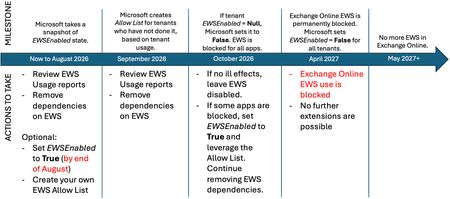
Also, it seems there a mistake in the table in this article on the last row.
- In the last row of the table, it says that for Orgs with EWSEnabled = Null, that in Oct 2026, they will be switched to EWS Allowed = True (i.e. "All EWS Allowed"), allow list ignored.
- Then, in the sentence after the table, it says that for any tenant with EWSEnabled = Null, on 1 October, it will be switched to EWS Allowed = False, thereby blocking all EWS access.
- These 2 pieces of information contradict each other. Which is it?
The EWSEnabled property in your tenant will change on (or soon after) Oct 1, 2026, as follows:
EWSEnabled value | Before Oct 2026 | Starting Oct 2026 |
True | All EWS Allowed | Only Apps in the Allow List Allowed |
False | All EWS Blocked | All EWS Blocked |
Null | All EWS Allowed | All EWS Allowed (allow list ignored) |
Any tenant with EWSEnabled still set to Null on October 1, 2026, will see the value changed to False as the deployment rolls out. That will block EWS for all applications in the tenant at that time.