In November 2005 I posted an article on the DSProxy referral changes that are included in Exchange Server 2003 Service Pack 2. For the full article, please see http://blogs.technet.com/exchange/archive/2005/11/04/413669.aspx.
To refresh everyone's mind, prior to Exchange 2003 Service Pack 2, a DSProxy Referral would provide the Outlook client with a global catalog server from one of two locations:
1. The global catalog is located within the same AD site as the Exchange server (normal behavior).
2. The global catalog is located within an AD site that is directly connected to the Exchange server's AD site (when all in-site GCs are unavailable).
In addition to honoring site membership, DSProxy prefers to use global catalog servers that are members of the same domain as the Exchange server. If none are available, then DSProxy will utilize the other global catalog servers in the AD site.
This poses a few issues in multi-domain environments where DomainPrep has been executed against the domains. Specifically, if an Outlook client is referred to a global catalog server that does not reside in the same domain as the mailbox-enabled user, then that user will be accessing data that is in a read-only fashion. This means that updates to certain objects (whether it be updates to the mailbox-enabled user like delegate access, or distribution group membership) may fail.
In Exchange 2003 SP2, the referral process will now attempt to provide the Outlook client with a GC that belongs to the same domain as the mailbox-enabled user using a new algorithm. The new algorithm will solve the delegation issue, provided a global catalog server exists and is reachable by the Exchange server for the mail recipient. It may address the distribution group issue if the distribution group resides in the same domain as the mailbox (otherwise it won't because the GC only contains a read-only copy of the distribution group).
Recall that with SP2, we score the desirability of a global catalog based several constraints:
1. A GC that is available (RPC ping) - 16 points
2. A GC that supports the Clients protocol - 8 points
3. A GC belonging to the users domain - 4 points
4. A GC within the same AD site as the Exchange Server - 2 points
5. A GC that is one of the GCs that the Exchange Server is currently using - 1 point
With this model, a client could be referred a global catalog that does not belong in the AD Site of the Exchange server due to the global catalog's domain membership matching that of the mailbox-enabled user.
The new referral mechanism may not be advantageous if:
- You deployed distribution groups in a centralized domain and placed GCs of that domain in the Exchange Server's AD site to allow for membership updates to occur through Outlook.
- You did not deploy mailbox home-domain GCs in the Exchange Server's AD site.
Post-SP2 DSProxy Referral Mechanism Update
The good news is that the DSProxy Referral behavior can be altered to so that you can simulate Pre-SP2 behavior. In order to do that you must install KB 912584, which provides a Post-SP2 version of DSProxy.dll. This fix allows for the use of the following registry key:
Location: HKEY_LOCAL_MACHINE\System\CurrentControlSet\MSExchangeSA\Parameters
REG_DWORD Value: RFR Prefer In-Site GCs
Data: 0 (Disabled, default behavior)
Data: 1 (Enabled)
With this registry key set to a value of 1, the constraint cost will change and utilize the following model:
1. A GC that is available (RPC ping) - 16 points
2. A GC that supports the Clients protocol - 8 points
3. A GC belonging to the users domain - 1 point
4. A GC within the same AD site as the Exchange Server - 2 points
5. A GC that is one of the GCs that the Exchange Server is currently using - 4 points
So if we go back to the SP2 example I provided in the original blog post, enabling this registry key will alter the way in which the DSProxy service assigns points to the global catalog servers:
|
Server |
Active Directory Site |
In-Use by DSAccess? |
Constraint |
Total Points | ||||
|
1 |
2 |
3 |
4 |
5 | ||||
|
ExDomain GC1 |
Exchange AD Site |
Yes |
16 |
8 |
0 |
2 |
4 |
16+8+2+4=30 |
|
ExDomain GC2 |
Exchange AD Site |
Yes |
16 |
8 |
0 |
2 |
4 |
16+8+2+4=30 |
|
UserDomain GC1 |
Client AD Site |
No |
16 |
8 |
1 |
0 |
0 |
16+8+1=25 |
|
UserDomain GC2 |
Client AD Site |
No |
16 |
8 |
1 |
0 |
0 |
16+8+1=25 |
|
UserDomain GC3 |
AD Site B |
No |
16 |
8 |
1 |
0 |
0 |
16+8+1=25 |
|
UserDomain GC4 |
AD Site B |
No |
16 |
8 |
1 |
0 |
0 |
16+8+1=25 |
|
ExDomain GC4 |
AD Site A |
No |
16 |
8 |
0 |
0 |
0 |
16+8=24 |
|
ExDomain GC5 |
AD Site B |
No |
16 |
8 |
0 |
0 |
0 |
16+8=24 |
|
ExDomain GC6 |
AD Site B |
No |
16 |
8 |
0 |
0 |
0 |
16+8=24 |
The net effect of this change is that global catalog servers that are currently being utilized by the Exchange server will be preferred by the DSProxy Referral service.
Please note that even with this registry change, DSProxy can still refer clients to a global catalog server that is in use by the Exchange server and that is a member of the same domain as the mailbox-enabled user due to the constraint cost assignment. Consider the following scenario:
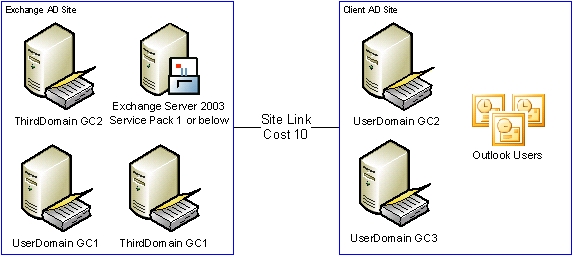
In this scenario, the global catalog servers will be assigned the following points by the DSProxy service (assuming the registry key is enabled):
|
Server |
Active Directory Site |
In-Use by DSAccess? |
Constraint |
Total Points | ||||
|
1 |
2 |
3 |
4 |
5 | ||||
|
UserDomain GC1 |
Exchange AD Site |
Yes |
16 |
8 |
1 |
2 |
4 |
16+8+1+2+4=31 |
|
ThirdDomain GC1 |
Exchange AD Site |
Yes |
16 |
8 |
0 |
2 |
4 |
16+8+2+4=30 |
|
ThirdDomain GC2 |
Exchange AD Site |
Yes |
16 |
8 |
0 |
2 |
4 |
16+8+2+4=30 |
|
UserDomain GC2 |
Client AD Site |
No |
16 |
8 |
1 |
0 |
0 |
16+8+1=25 |
|
UserDomain GC3 |
Client AD Site |
No |
16 |
8 |
1 |
0 |
0 |
16+8+1=25 |
In this particular example, Exchange will provide the UserDomain GC1 server that is in-use by Exchange to the Outlook clients due to that global catalog server having a higher point calculation than the ThirdDomain GC1 or GC2 servers. If UserDomain GC1 were to become unavailable, DSProxy would utilize the ThirdDomain GC1 and GC2 servers before referring clients out of the Exchange AD site.
So to summarize, enabling the "RFR Prefer In-Site GCs" registry key:
- Prioritizes GCs that are being used by Exchange over home domain membership.
- GCs that are both being utilized and are members of the same domain as the mailbox-enabled user will be preferred over non-home domain GCs.
- DSProxy will only refer clients out of site if all GCs within the Exchange server's AD site are unavailable. Constraint assignment will determine which GCs are utilized by the DSProxy Referral Process.
Please contact Microsoft Support to obtain fix KB 912584 if you would like to deploy the updated DSProxy Referral mechanism (the article itself is still being written).

