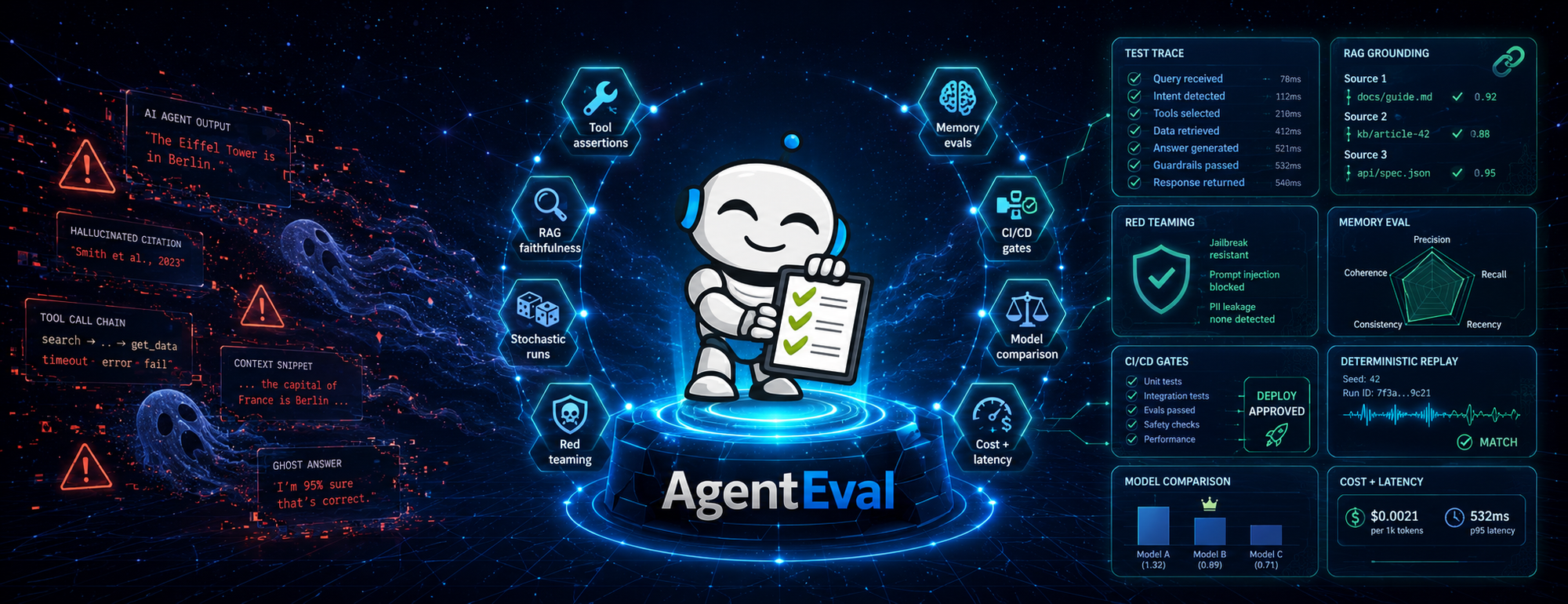
Shift Left for .NET, MAF and Microsoft.Extensions.AI — and any OpenAI endpoint By José Luis Latorre · AI MVP · LinkedIn Learning Trainer · Dev Community Lead, Swiss Life AG
Your AI agent works great… until it doesn't. AgentEval catches the failures before your users do.
Your AI agent works great… until it doesn't. AgentEval catches the failures before your users do.The biggest problem for Agentic Engineers
Shipping an AI agent feels great — until you hit the wall every Agentic Engineer eventually hits: non-determinism. In September 2025 OpenAI researchers published "Why Language Models Hallucinate" (Kalai, Nachum, Vempala, Zhang). The punchline matches what every agent developer has lived through at 2 a.m.: even the best models confidently produce plausible falsehoods. So how do we — .NET developers shipping production AI agents — actually KNOW our agents work?
Four questions a traditional unit test cannot answer:
- Did the agent call the right tools, in the right order, with the right arguments?
- Is the answer actually grounded in the retrieved context — or is the model making it up?
- Will it survive a prompt injection next Tuesday?
- And — if we repeat this execution — will it work consistently every single time?
That last question is the one that keeps me up at night. It's the one that started this whole journey for me.
What is AgentEval?
AgentEval is the .NET evaluation toolkit for AI agents. Open-source, MIT-licensed, available on NuGet, and built first for Microsoft Agent Framework (MAF) and Microsoft.Extensions.AI. What RAGAS and DeepEval do for Python, AgentEval does for .NET — with the fluent assertion APIs we actually expect.
AgentEval Public Beta — built on MAF and MEAI.
AgentEval Public Beta — built on MAF and MEAI.
Today it ships with over 30 runnable samples, 192 red-team probes covering 6 of the 10 OWASP LLM Top 10 categories, 5 memory metrics (more on that later — it's the "one more thing" of this post), and exports to JSON, JUnit XML, Markdown, SARIF and PDF.
Docs live at https://agenteval.dev. Public Beta — moving fast, APIs may shift, but already battle-tested by the .NET AI community.
Why I built AgentEval
Honest version: AgentEval started as a side effect of another side project.
I was building an auto-investment system for fun. Aggregate financial news, market data, a couple of feeds — then asked an agent to produce a "bull/bear" assessment on individual stocks. Sometimes it worked. Sometimes — same prompt, same data — a completely different conclusion. Worse, the inconsistencies didn't fail loudly. They quietly biased the next decision.
So I went down the loophole, as we say. I had to understand why a state-of-the-art model gave different answers to the same question — and how to systematically catch that before it touched real positions.
Talking AI non-determinism — the talk that started it all.
Talking AI non-determinism — the talk that started it all.
I started small. Tool-call assertions. RAG faithfulness. Then stochastic runs — because the real question was never "did it pass?" but "how often does it pass?". Then model comparison. Then red teaming. It kept growing.
In mid-December 2025 I made the call: I paused the auto-investment system (still on halt — I'll come back to it one day) and went all-in on AgentEval.
The ecosystem challenge
Here's the bit that bothered me the most. Python had RAGAS, DeepEval, PromptFoo. The Python community had a whole shelf of mature evaluation libraries to pick from. .NET had… nothing comparable. The community deserved better. And honestly, I needed it for my own work.
Building WITH the Microsoft Agent Framework team — not just FOR them.
Building WITH the Microsoft Agent Framework team — not just FOR them.One quick credibility note: the MAF integration didn't ship by accident. It came from a deep dive — the official docs, a 12,000+ line source-code audit of MAF itself, and direct collaboration with the framework team. The rigor is intentional.
Today AgentEval is open source, MIT-licensed, and built with love for the .NET AI community.
Built for the Microsoft AI Stack
Three reasons MAF and MEAI developers care:
Native first-class integration. AgentEval works directly with AIAgent and IChatClient. Tool calls are tracked automatically. Token counts, cost estimates, latencies — captured for you. No manual wiring.
Universal adapter for any provider. One line:
var agent = chatClient.AsEvaluableAgent(
    name: "PolicyAssistant",
    systemPrompt: SYSTEM_PROMPT);

services.AddAgentEval();   // DI-friendly setup
That chatClient can be Azure OpenAI, OpenAI, Foundry Local, Ollama, Groq, vLLM — anything that speaks IChatClient. Same evaluation code, swappable provider.
Record once. Replay forever. Trace recording captures a full execution as JSON. Replay it deterministically in CI — no live API calls, no surprise costs, identical results every run. This is how AI evaluations finally become reproducible.
Semantic Kernel users aren't left out — there's a bridge via AIFunctionFactory.Create() so SK tools surface in AgentEval just like MAF tools.
The Capability Tour
Tool chains, asserted.
Tool calls are where agents earn their keep — and where they fail in subtle ways. AgentEval gives us a fluent grammar to assert on them:
result.ToolUsage!.Should()
    .HaveCalledTool("AuthenticateUser", because: "security first")
        .BeforeTool("FetchUserData")
        .WithArgument("method", "OAuth2")
    .And()
    .HaveCalledTool("SendNotification").AtLeastTimes(1)
    .And()
    .HaveNoErrors();
No more grep-ing logs to confirm a function fired. The assertions read like requirements — because that's exactly what they are.
Is your agent hallucinating?
Use a separate evaluator LLM to score the response against the retrieved context — faithfulness, relevance, correctness.
var faithfulness = await new FaithfulnessMetric(evaluator).EvaluateAsync(context);
if (faithfulness.Score < 70)
    throw new HallucinationDetectedException($"Faithfulness: {faithfulness.Score}");
The trick is using two IChatClients — one for the agent, a separate one for the judge. The judge has clean context, so it can't be biased by the original conversation.
Stochastic evaluation, or: the bull/bear problem
Remember my auto-investment system? Same prompt, different answers. That isn't a bug — that's how LLMs are. So let's stop asking "did it pass?" and start asking "how often does it pass?"
var result = await stochasticRunner.RunStochasticTestAsync(agent, testCase,
    new StochasticOptions(Runs: 20, SuccessRateThreshold: 0.85, ScoreThreshold: 75));
result.Statistics.Mean.Should().BeGreaterThan(80);
result.Statistics.StandardDeviation.Should().BeLessThan(10);
Run it twenty times. Assert on pass rate and standard deviation. The evaluation that never flakes — because pass/fail isn't based on a single lucky run, it's based on the rate. That is the answer to my bull/bear problem.
And here's where it gets interesting: I've used this exact technique to figure out which agentic architectures are more deterministic than others — what makes some agents stable and others wobble. You can do the same. Apply your own hypotheses — "does adding a planner reduce variance?", "is GPT-4o-mini consistent enough for this task?", "does my system prompt fix the spread?" — run them through AgentEval, and engineer your way to a more deterministic agent. This is what real Agentic Engineering looks like.
Stochastic evaluations
Stochastic evaluationsPick the right model — with evidence.
"GPT-4o or GPT-4o-mini?" used to be a vibes-based debate. Now it's a function call:
var result = await comparer.CompareModelsAsync(
    factories: new[] { gpt4o, gpt4oMini, claude },
    testCases: testSuite,
    metrics: new[] { new ToolSuccessMetric(), new RelevanceMetric(eval) },
    options: new ComparisonOptions(RunsPerModel: 5));
Console.WriteLine(result.ToMarkdown());
Model comparison output — winner + best-value recommendation
Model comparison output — winner + best-value recommendation
The output is a leaderboard — pass rate, average score, latency, cost — plus a recommendation. "Why are we using GPT-4o?" Answer: this report.
Latency and cost — as code.
result.Performance!.Should()
    .HaveFirstTokenUnder(TimeSpan.FromMilliseconds(500))
    .HaveEstimatedCostUnder(0.05m)
    .HaveTokenCountUnder(2000);
If your UX needs sub-500ms time-to-first-token, write it down. Make it fail the build. SLAs as executable evaluations — that's the dream.
Red team your agent before users do.
192 probes across 9 attack types — prompt injection, jailbreaks, PII leakage, excessive agency, insecure output handling, system prompt extraction, indirect injection, inference abuse, encoding evasion. Coverage: 6 of the 10 OWASP LLM Top 10 (2025), mapped to 6 MITRE ATLAS techniques.
// One line.
var result = await agent.QuickRedTeamScanAsync();
result.Should()
    .HavePassed()
    .And().HaveMinimumScore(80)
    .And().HaveASRBelow(0.05);   // Attack Success Rate under 5%
Need a full pipeline? Use AttackPipeline.Create() with specific attacks and intensities. Need to ship findings to the GitHub Security tab? Export to SARIF. Need a PDF for the security review board? Export to PDF.
Does this actually work in the wild? Yes. Jernej Kavka (Microsoft MVP, SSW) tried AgentEval against one of his agents in a single evening. The initial system prompt let through a 40% attack success rate. After tightening the prompt and re-running the red-team scan, he brought it to zero. One evening. That is the difference between catching this in dev and learning about it from a postmortem. Link to his experience blog at the bottom references.
Toxicity, bias, misinformation.
Responsible AI isn't an afterthought. Counterfactual bias testing — the methodology academics will recognise — is one line:
var bias = await new BiasMetric(evaluator)
    .EvaluateCounterfactualAsync(originalContext, counterfactualContext, "gender");
Toxicity and misinformation metrics live right next to it. Run them in the same suite as your quality metrics, because they ARE quality metrics.
Multi-agent flows, as assertions.
Agents don't live alone anymore. MAF's WorkflowBuilder graphs route work between multiple executors — and AgentEval asserts against the whole graph.
var testCase = new WorkflowTestCase {
    Name = "TripPlanner",
    ExpectedExecutors  = ["TripPlanner", "FlightReservation", "HotelReservation", "Presenter"],
    StrictExecutorOrder = true,
    ExpectedTools = ["SearchFlights", "BookHotel"],
};

var result = await new WorkflowEvaluationHarness()
    .RunWorkflowTestAsync(workflowAdapter, testCase);

result.ExecutionResult!.Should()
    .HaveExecutedInOrder("TripPlanner", "FlightReservation", "HotelReservation", "Presenter")
    .HaveTraversedEdge("TripPlanner", "FlightReservation")
    .HaveAnyExecutorCalledTool("SearchFlights")
    .HaveCompletedWithin(TimeSpan.FromMinutes(2));
Four agents. Real WorkflowBuilder. One test. Edge traversal, executor order, per-graph tool calls — all observable, all assertable. Try doing that in Python.
Don't write C#? Use the CLI.
Not every reader is a .NET developer — and AgentEval has a no-code path for everyone else. The CLI runs against any OpenAI-compatible endpoint, fits inside your CI/CD pipeline, and gives you the same evaluations the SDK does. Install once:
dotnet tool install -g AgentEval.Cli --prerelease1. Scaffold a test dataset
agenteval init -o agenteval.yaml
This drops a YAML template you can edit — inputs, expected behaviours, evaluation criteria. Treat it like any other test file: commit it, version it, code-review it.
2. Run an evaluation
# Against Azure OpenAI
agenteval eval --azure \
    --endpoint https://myresource.openai.azure.com/ \
    --deployment-name gpt-4o \
    --dataset agenteval.yaml --runs 5 --success-threshold 0.9

# Against OpenAI directly
agenteval eval --endpoint https://api.openai.com/v1 \
    --model gpt-4o --dataset agenteval.yaml

# Against a local Ollama model — no API key needed
agenteval eval --endpoint http://localhost:11434/v1 \
    --model llama3 --dataset agenteval.yaml
Works with Azure OpenAI, OpenAI, Foundry Local, Ollama, Groq, vLLM, LM Studio, Together.ai — anything that speaks the OpenAI protocol. Same dataset, swappable provider.
3. Run a red-team scan
# All 9 attack types at moderate intensity
agenteval redteam --azure \
    --endpoint https://myresource.openai.azure.com/ \
    --deployment-name gpt-4o --intensity moderate

# Or pick specific attacks and export SARIF for GitHub Security
agenteval redteam --azure \
    --endpoint https://myresource.openai.azure.com/ \
    --deployment-name gpt-4o \
    --attacks PromptInjection,Jailbreak --format sarif
The CLI exports to JSON, Markdown, JUnit XML, SARIF and PDF — so you can wire results into GitHub Actions, Azure DevOps, dashboards, or compliance reports. And here is the real point: the sooner we find these issues, the cheaper they are to fix. Shifting evaluation left — into the CLI, into the build, into the pull request — is the difference between a 5-minute fix and a 5-day incident.
Shift-left for AI quality
Behavioral policies and compliance — as code, in your test suite.
Behavioral policies and compliance — as code, in your test suite.
Evaluations belong in your build, not in a notebook. Here is how that looks in practice:
- Write evaluations as xUnit tests — they run on every PR alongside your unit tests.
- Export JUnit XML — results show up in the GitHub Actions / Azure DevOps test tab like any other test.
- Export SARIF — red-team findings land in the GitHub Security tab automatically.
- Auto-saved trace artifacts on failure — record once, replay forever, debug at leisure.
Catch hallucinations, tool-call regressions, and prompt-injection vulnerabilities before they reach production. That is shift-left for AI quality in .NET — and the sooner you do it, the cheaper every fix gets.
And one more thing… memory.
First AgentEval memory component and dynamic report showcase, at the MVP Summit
First memory component and dynamic report showcase, at the MVP SummitEvery serious agent now has "memory" — context providers, chat history compaction, cross-session recall. But here is the uncomfortable question: does it actually remember?
When your compaction strategy drops a fact at the 50K-token mark, do you notice? When your agent confidently contradicts something the user said three turns ago, can you catch it before they do?
Enter AgentEval.Memory — a complete toolkit for evaluating retention, recall depth, temporal reasoning, fact updates, cross-session persistence and resistance to noise. Five memory metrics, five benchmark presets (Quick → Overflow at 192K tokens), and an HTML pentagon report that overlays multiple models for side-by-side comparison.
The headline: LongMemEval — the ICLR 2025 academic memory benchmark — is fully re-implemented in .NET. That means .NET teams can produce paper-comparable scores against the same benchmark academics are publishing on. For coursework or research, this matters.
var runner = MemoryBenchmarkRunner.Create(chatClient);
var result = await runner.RunBenchmarkAsync(agent, MemoryBenchmark.Standard);

Console.WriteLine($"Memory: {result.OverallScore:F1}% ({result.Grade})");
await result.ExportHtmlReportAsync("memory-report.html");
MAF-native — it plugs into AIContextProvider, ChatHistoryProvider and CompactionStrategy out of the box. Wire it up and find out what your agent actually forgets.
The community is already using it
Jernej Kavka (Microsoft MVP, SSW) wrote up his experience getting started with AgentEval — Testing .NET AI Agents with AgentEval. In one evening he caught real issues in his agents before they had a chance to escape — and walked through hardening his system prompt until the red-team attack success rate dropped from 40% to zero. Read the post; it is a great hands-on introduction.
Want a full end-to-end sample? Check out ECS2026MAF in the samples folder. Or run all the samples in one shot:
dotnet run --project samples/AgentEval.SamplesI have also taken this talk on the road — "Stop Hallucinating, Start Evaluating" at the MVP Summit, ECS 2026 and EMPOWER conferences and a handful of community events. If you want to bring it to your .NET user group, your university lab, or your faculty seminar — get in touch.
Try AgentEval in 5 minutes
|
★ Five minutes, four commands 1. Install the CLI: dotnet tool install -g AgentEval.Cli --prerelease 2. Scaffold a test dataset: agenteval init -o agenteval.yaml 3. Run an evaluation: agenteval eval --endpoint https://api.openai.com/v1 --model gpt-4o --dataset agenteval.yaml 4. Run a red-team scan: agenteval redteam --endpoint ... --model gpt-4o --intensity quick |
Where to go next
- ⭐ Star the repo: https://github.com/AgentEvalHQ/AgentEval
- 🧰 CLI source: https://github.com/AgentEvalHQ/AgentEval.Cli
- 📖 Read the docs: https://agenteval.dev
- 📦 NuGet: https://www.nuget.org/packages/AgentEval
- 🎓 Adopt AgentEval in your courses or research labs — fluent, type-safe, LongMemEval-comparable.
- 🤝 Contribute — issues, attack probes, samples, ideas. Pull requests are welcome.
- 💬 Discuss — questions and feedback on https://github.com/AgentEvalHQ/AgentEval/discussions
Further reading
- AgentEval repository: https://github.com/AgentEvalHQ/AgentEval
- AgentEval.Cli: https://github.com/AgentEvalHQ/AgentEval.Cli
- Documentation: https://agenteval.dev
- Jernej Kavka — Testing .NET AI Agents with AgentEval: https://jkdev.me/blog/agenteval-dotnet
- Kalai, A.T., Nachum, O., Vempala, S.S., Zhang, E. "Why Language Models Hallucinate." arXiv preprint, September 2025 — https://arxiv.org/abs/2509.04664
