An accessibility-first app, and a Hack for Good category winner in the Microsoft AISF Agents League Hackathon, that shows how to ground a Foundry model in a knowledge base, verify every claim server-side, and deploy the whole thing on Azure Static Web Apps.
Guest post by Caden Storkamp Winner of the Hack for Good Category Microsoft Agents League Hackathon
Large language models make things up. For a lot of apps that is a minor annoyance you can smooth over. For some, it is disqualifying, because the cost of a confident, fluent, false statement is real. This post walks through one of those cases and the pattern that makes it safe to ship: retrieve from a trusted knowledge base with Microsoft Foundry IQ, force the model to cite verbatim quotes, and then verify those quotes on the server before anything reaches the screen.
My name is Caden Storkamp, and the app I build is called Tell My Day. I work as a direct support professional, and in this role I work day to day with people who use AAC (augmentative and alternative communication). The use of the app I made is not just limited to it's primary goal, but can be also used as an example for others. If you are teaching or building anything where a generative feature has to be trustworthy, this is a small, readable, reproducible reference you can lift from.
The problem, and why it is the sharpest possible test
AAC (augmentative and alternative communication) is how many non-speaking people communicate: picture boards, symbol devices, picture exchange. These tools are good at "I want a drink" in the moment. They are much worse at letting someone tell a story, like how their day went, in their own voice. Caregivers or family members often end up narrating on the person's behalf.
Tell My Day flips that. The person picks the symbols, and the app writes the story. That immediately raises the stakes to the highest possible level for hallucination, because you are now generating first-person speech attributed to someone who cannot easily correct you. If the app writes "I went to the zoo today" when they did not, it has put false words in a non-speaking person's mouth, to the people they most need to trust them. So "never invent anything" is not just a great thing to have here. It is the whole product. That constraint is exactly why it makes such a clean showcase for grounded generation.
What the app does
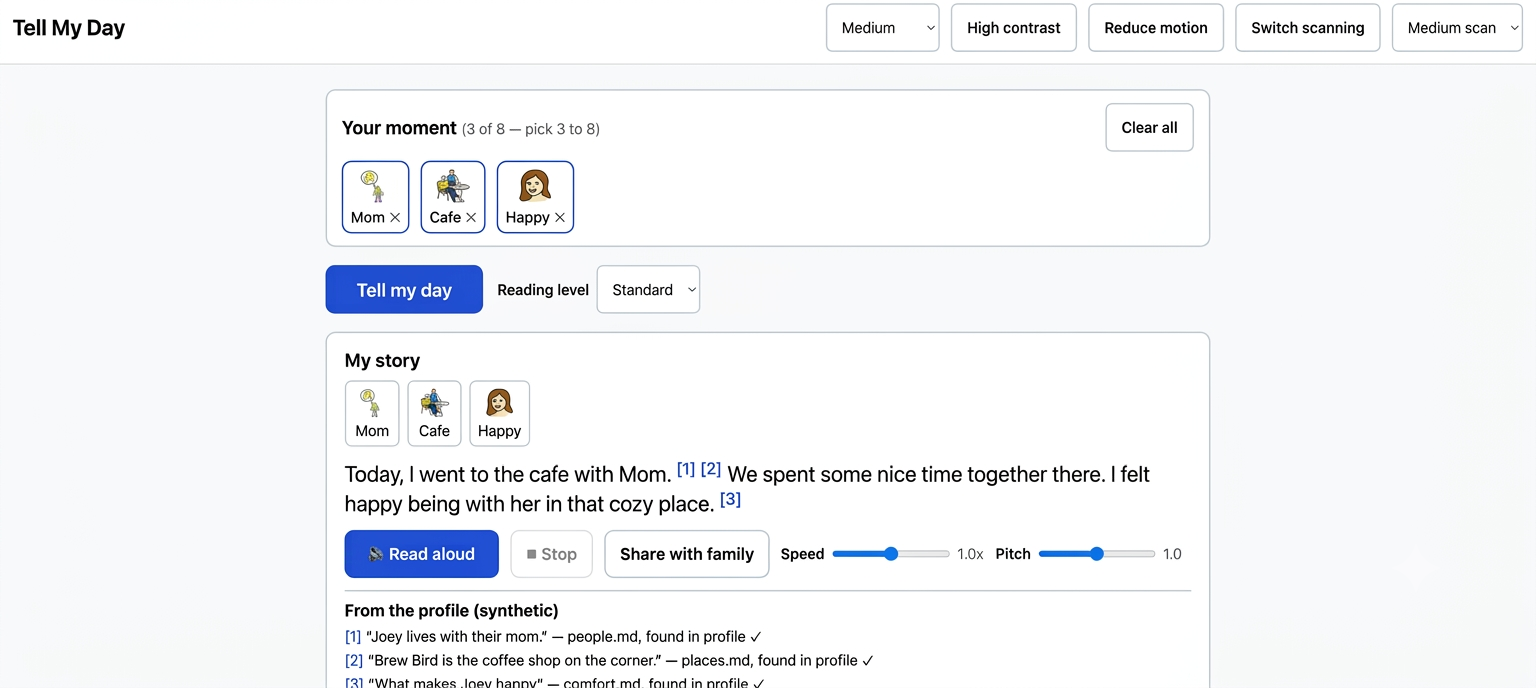
- A non-speaking adult taps 3 to 8 picture symbols (people, places, activities, feelings, food).
- The app writes 2 to 4 short, warm, first-person sentences.
- The story is grounded in the person's own "About Me" profile, so a generic "my friend" becomes "my friend Marcus" only when that fact actually exists.
- Every grounded detail shows a citation, the story reads aloud, and unmatched symbols stay general instead of getting a made-up name.
The Microsoft stack at a glance
Everything here is Azure, and the whole thing runs on free tiers.
- Azure Static Web Apps (Free plan): hosts the static React frontend and a set of managed Azure Functions together, with one GitHub Actions deploy. All secrets live in environment variables on the server side.
- Microsoft Foundry IQ: the knowledge layer. A knowledge base over an Azure AI Search knowledge source holds the profile, and a single retrieve call does agentic retrieval and returns grounded, numbered facts with their sources.
- Microsoft Foundry model deployment (gpt-4.1-mini): turns the retrieved facts plus the selected symbols into the story, called through the OpenAI-compatible endpoint.
- Web Speech API: free, offline, zero-latency read-aloud in the browser.
- GitHub Copilot: used throughout development.
Here is the request flow. The key property is that the browser never holds a secret and never talks to Azure directly.
How it works, step by step
The whole backend is one framework-agnostic pipeline behind a roughly 15-line Azure Function, so no secret ever reaches the client. Four pieces do the real work.
1. Stand up the knowledge base (one command)
Foundry IQ setup is refreshingly declarative. A single script (npm run setup:iq) creates a "file" knowledge source, uploads the five profile markdown files, and creates the knowledge base that retrieval runs against. Because the profile is small, a keyword-based file source is used, so there is no embedding model to configure at all.
// 1) A "file" knowledge source: keyword retrieval, no embedding model needed.
await put(`${searchEndpoint}/knowledgesources/tell-my-day-ks?api-version=${apiVersion}`, {
  name: "tell-my-day-ks",
  kind: "file",
  fileParameters: { ingestionParameters: { contentExtractionMode: "minimal" } },
});

// (each docs/profile/*.md is then uploaded as a file)

// 2) The knowledge base that retrieval runs against.
await put(`${searchEndpoint}/knowledgebases/tell-my-day-kb?api-version=${apiVersion}`, {
  name: "tell-my-day-kb",
  knowledgeSources: [{ name: "tell-my-day-ks" }],
  retrievalReasoningEffort: { kind: "minimal" },
});
(The put helper above is shorthand for readability. The full, idempotent script is in the repo.)
2. Retrieve grounded facts at request time
When the user submits their symbols, the Azure Function sends one semantic intent per symbol label to the knowledge base. Foundry IQ handles the retrieval and returns numbered facts, each tied back to the source file it came from.
// One semantic intent per selected symbol label ("mom", "coffee shop", "happy").
const url =`${searchEndpoint}/knowledgebases/${kbName}/retrieve?api-version=${apiVersion}`;
const res = await fetch(url, {
  method: "POST",
  headers: { "Content-Type": "application/json", "api-key": searchKey },
  body: JSON.stringify({
    intents: symbols.map((s) => ({ type: "semantic", search: s.label })),
  }),
});
// Returns numbered, grounded facts, each carrying its source document name.
3. Ground the model with a no-invention prompt
The retrieved facts and the symbols go to gpt-4.1-mini with a system prompt whose rules are the safety property, stated plainly. The model is required to return strict JSON where every sentence carries the verbatim quotes it relied on.
// The rules the model must never break (trimmed):
`- Write 2 to 4 short, warm, first-person sentences.
- Include the idea of EVERY selected symbol at least once.
- Use ONLY (a) the selected symbols and (b) the numbered profile facts.
  Never invent people, places, events, or details.
- If a symbol has no matching fact, keep it general ("my friend", "the park"), never a made-up name.
- Return strict JSON: each sentence lists the verbatim quotes it relied on.`
The call itself uses response_format: { type: "json_object" } and a low temperature, so the output is structured and predictable rather than creative.
4. Verify every quote on the server (the part that matters most)
A prompt that says "do not lie" is not a guarantee. So the server does not take the model's word for it. Every citation the model returns is checked against the actual retrieved fact. A quote that is not really there is kept but marked verified: false, which lets the interface show the user exactly which claims are grounded and which are not.
// Is this quote actually present in the fact the model cited?
function verifyQuote(quote: string, factContent: string): boolean {
  const q = normalize(quote);
  return q.length > 0 && normalize(factContent).includes(q);
}
// ...when assembling each sentence's citations:
citations.push({
  factId: fact.factId,
  docName: fact.docName,
  quote,
  verified: verifyQuote(quote, fact.content),
});
That is the whole trust story in one function. Retrieval limits what the model can know, the prompt forces it to cite, and this check confirms the citations are real before the user sees them. The pattern is not specific to AAC. It is reusable for any generative feature where a wrong answer costs something.
Deploying free on Azure Static Web Apps
The frontend and the Azure Functions ship together. You create a Static Web App on the Free plan, add the deployment token as a GitHub Actions secret, put your Foundry and Azure AI Search values into the app's environment variables, and push to main. The included workflow builds the Vite app and deploys the api/ folder as managed functions. There is no separate server to run and nothing to keep warm.
De-risking the build (a method worth teaching)
The riskiest part of this project was the integration I understood least: Foundry IQ. So it went first, behind two gates that had to pass before any UI existed.
bash

npm run setup:iq       # create the knowledge source + upload profile + create the KB

npm run test:model     # gate 1: the model answers at all

npm run test:iq        # gate 2: retrieval returns grounded, cited facts

npm run dev            # only now build the app on top

npm test               # unit tests for validation, JSON parsing, and quote verification
Standing up and proving the retrieval before building anything on top of it meant the app was never resting on an assumption that could quietly turn out to be false. The verification logic, the input validation, and the parsing all have unit tests, so the trust-critical code is covered rather than hoped for.
Accessibility is the product, not a coat of paint
Because the users are the entire point, accessibility is built into every component, not bolted on at the end.
- Two-level single-switch scanning: regions highlight in turn, and one switch (Space, or a tap anywhere) drills in and selects, with adjustable scan speed. This is what makes the app usable for someone who cannot use a touchscreen or keyboard.
- Grounding as an accessibility feature: a user who cannot easily correct the output has to be able to trust it, so the visible, verified citations are not a developer nicety. They are core to who this is for.
- Full keyboard operation, large tap targets (64px and up), an aria-live region for the story, a high-contrast theme, adjustable text size, and reduce-motion support that honors the system preference.
- Read-aloud with play and pause, adjustable speed and pitch, and word-by-word highlighting as it speaks.
There is also a caregiver profile editor, gated by a server-side PIN, that writes edits straight back to the Foundry IQ knowledge source. The knowledge base stays the single source of truth, and new facts reach stories after about a minute of re-indexing.
Results and impact
After completion of development, I was able to see Tell My Day demonstrate these outcomes:
- Every fact shown in a story is backed by a quote that was verified against its source. A model claim that cannot be verified is flagged rather than presented as trusted.
- Symbols with no matching profile fact always stay general. In the sample profile, selecting Grandma, Beach, or School produces "my friend" or "the park," never a fabricated name. That is the behavior you can test yourself in the repo.
- The app is fully operable by keyboard and by a single switch, which is the bar that decides whether an AAC tool is usable at all for many people.
The honest differentiator is not the AI model. Anyone can call a model. It is that the product decisions (stay general instead of guessing, never infantilize, write a full sentence instead of a fragment) come from someone who watches real AAC communication succeed and fail, combined with a platform that made grounding and verification straightforward to implement.
Lessons learned
The safety mechanism and the platform feature were the same thing. Going in, "use Foundry IQ" and "never fabricate" looked like two separate tasks. They turned out to be one: Foundry IQ's retrieve-and-cite pattern is the no-invention rule, and a small server-side verification step closes the gap between "the model cited something" and "the citation is real."
Put the riskiest integration first. Proving retrieval before building UI is cheap insurance against building something beautiful on a broken foundation.
Grounding plus verification is a reusable pattern. Retrieve from a trusted source, force citations, verify them server-side. That transfers to compliance summaries, customer support, internal knowledge assistants, anywhere a confident wrong answer is expensive.
See it, or build on it
If you teach or build with Azure AI, care about trustworthy generative AI, or work in accessibility, take a look.
- GitHub repo: https://github.com/stork066/TellMyDay (to try it out yourself just clone it and run it with your own Foundry and Azure AI Search keys)
- Demo video: https://www.youtube.com/watch?v=v_8WAhurzOY
Two ways to build on it. If you are learning Microsoft Foundry, this is a compact, working example of wiring a Foundry IQ knowledge base to a model and putting a verification layer around it, deployed on Azure Static Web Apps for free. And if you work anywhere that a generative feature has to be trusted, lift the grounding and verification pattern directly. The stakes in your domain may be different, but the mechanism is the same.
