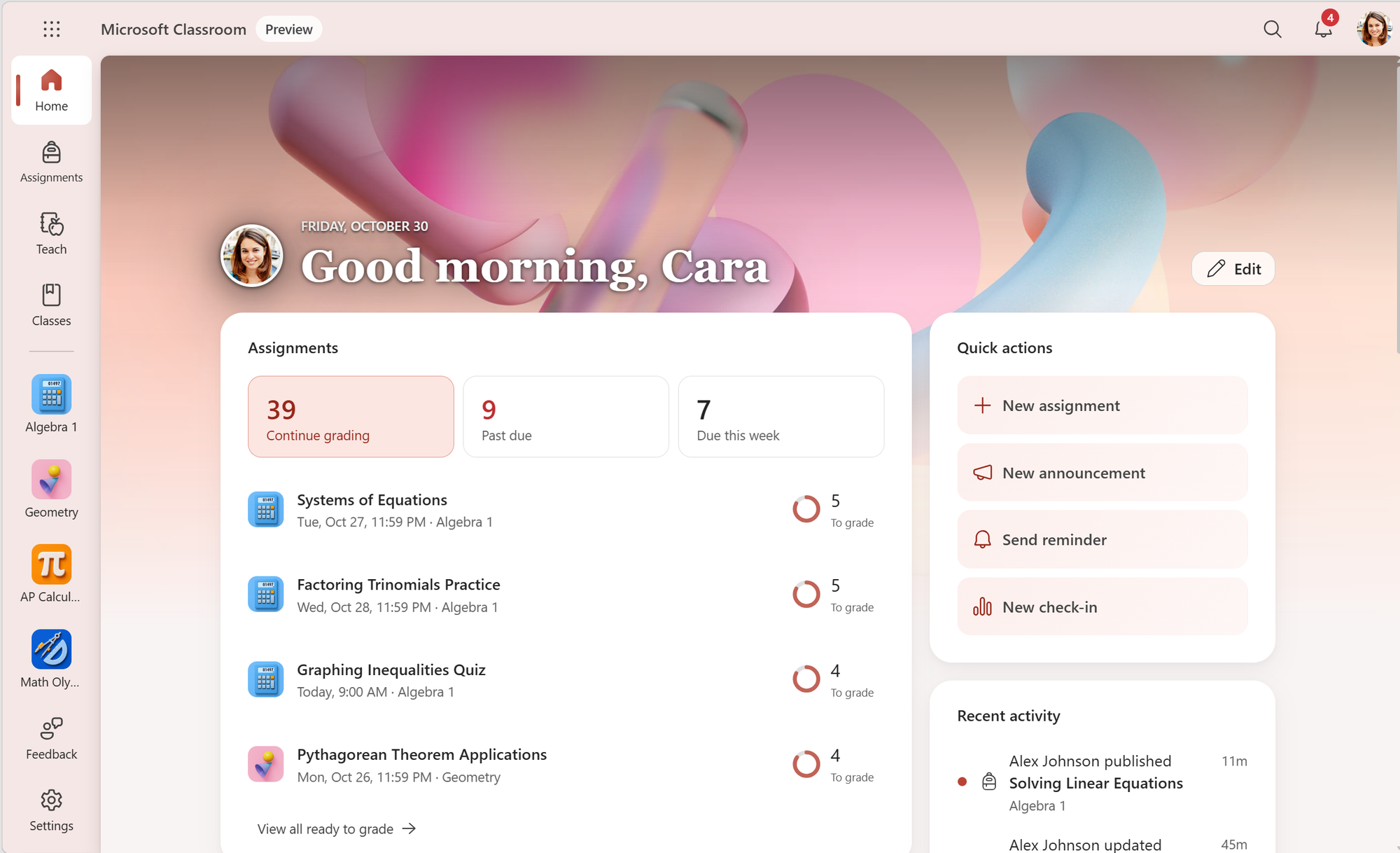
Microsoft Classroom is a new, standalone Microsoft 365 experience for teaching and learning, designed for higher education, secondary, and primary institutions that brings familiar Microsoft education tools such as Assignments, Classwork, Grades, Class Notebooks, Learning Accelerators and Insights together in one place. It will be included for all users of Microsoft 365 A2, A3, A5 and A7 at no additional cost.
Institutions take varying approaches to digital learning. Some integrate learning tools into an existing learning management system (LMS). Others use Microsoft Teams for Education as the hub for classroom communication and collaboration. Still others want a dedicated platform for managing day-to-day teaching and learning. Microsoft Classroom does not replace Microsoft Teams for Education or Microsoft 365 LTI. It is another option that serves as a front door to familiar Microsoft education tools, allowing for a streamlined experience designed with teaching and learning in mind and it brings together the best of Microsoft Education.
With tools grounded in learning science and actionable insights, Microsoft Classroom is designed to help educators personalize learning, identify student needs earlier, and improve outcomes.
Want early access? Sign up for the Microsoft Classroom preview, planned for early 2027, at https://aka.ms/classroompreview.
Built to adapt to every school and institution
One of the top requests we've heard from schools and institutions is for an experience that adapts to how they teach and learn. Microsoft Classroom is designed for every level of education:
- Higher education: one view for students balancing work across multiple courses, with deadlines and progress in one place.
- Secondary: a hub for educators managing multiple classes with Assignments, Classwork, Grades, OneNote Class Notebook, and Insights one click away.
- Primary: a welcoming, educator-curated class space where young learners can see what's next and what to bring to class, without unnecessary apps or other distractors.
The core tools and navigation stay familiar at every level.
What’s not changing
Institutions will be able to choose the Microsoft 365 Education experience that best fits their needs:
- As a standalone platform for teaching and learning with Microsoft Classroom
- Inside an existing LMS, through Microsoft 365 LTI
- Alongside chat, channels, meetings and collaboration in Microsoft Teams for Education
All three are built on the same Microsoft 365 Education foundation, so educators and students keep the tools and workflows they already know, in whichever way works best for them. For example, a school could choose to use Classroom for instructional purposes while continuing to use Teams for staff meetings and collaboration.
What Microsoft Classroom brings
Classroom will bring together Assignments, Classwork, Grades, OneNote Class Notebook, Learning Accelerators, Insights, Reflect, Teach in Copilot, and Learning Activities. Educators will be able to organize lessons and review student work, while students can organize their schoolwork, find assignments, and access feedback in all their classes. It will be available on the web and with dedicated mobile and desktop apps.
AI is part of the experience - not a separate destination. Teach, Microsoft's AI-powered planning workspace for educators, will be available inside Microsoft Classroom alongside the classroom tools educators already use. Educators can also use the Study and Learn Agent directly in Assignments, and students will have access to Learning Activities in Classroom as well.
The experience starts with a personal Home view to help educators or students focus on what needs the most attention across their classes.
For educators, their personal Home can bring together work across classes, including assignments to grade, upcoming work, and quick paths into the tools they use throughout the day. Educators can also configure a separate, shared Class Home so students have a clear, recognizable starting point for each class.
For students, their personal Home can provide one view of upcoming and past-due work, recently returned work, educator feedback, and their classes. Instead of checking each class separately, students can start with the work that needs their attention and then move into the app where that task lives.
Personalization: make it your own
Educators and students can organize their personal Home and navigation around the classes and tools they use most. Educators can shape the shared Class Home for their students, including its layout and appearance. A primary educator might create a bright, playful space for their class; a secondary geometry educator might highlight a video to watch before class; and a higher education student might organize their Home around five courses and upcoming deadlines.
Student: A personal home for every student, built around their work and progress.Class: A shared home for every class, set up and managed by the educator.
Built for how institutions operate
Microsoft Classroom is being designed for use across web and mobile experiences, so educators and students can move between desktop, tablet, and phone based on the work they need to do. It builds on familiar Microsoft 365 Education foundations for identity, class membership, storage, and administration, including class and roster provisioning through School Data Sync.
For IT administrators, Microsoft Classroom will use familiar Microsoft 365 Education administration experiences for supported availability and policy controls.
Shaping Microsoft Classroom with customers and partners
As we develop Microsoft Classroom, we continue working with customers and partners at every level of education to understand the choices that matter most. These include how schools, school systems, and higher education institutions manage availability and policies; how educators move between classes and courses; how students find their work; how existing Teams and Microsoft Classroom experiences can coexist; and how each learning space can feel useful and recognizable from the first day.
Primary, secondary, and higher education share many teaching workflows, but organize classes, schedules, and student support differently. We're working with customers and partners to make Classroom's starting layouts and settings useful in each setting.
Sign up for the Microsoft Classroom preview
Ready to get started?
- Administrators can register today at https://aka.ms/classroompreview to join the Microsoft Classroom preview, planned for early 2027. We're excited to begin this journey with education customers.
- Even before preview, educators can share early feedback by joining the EDU Insiders Program (https://akajoinEIP ), where you’ll be able to help shape the experience alongside schools, school systems, higher education institutions, educators, and students.
We look forward to sharing more details as we get closer to launch.

 Microsoft